|
Important Dates:
Aug 24: First Day of School
Sept 4: Holiday - No School
Sept 7: Holiday - No School
August:
- National Wellness Month
- Black Business Month
Let's all be kind to one another.
Campbell's Corner
Greetings, Key Families!
One of the best things about working in a school is that every year brings a fresh start. It’s a chance for our students to grow, learn, discover new interests, make new friends, and reconnect with familiar ones. We loved seeing so many students and families at Locker Night on Thursday, and their energy and excitement have us looking forward to a great year ahead.
During these first days of school, we’ll focus on getting to know our students and building a strong sense of community while helping everyone become comfortable navigating the building and our daily routines. We know the start of a new year can bring a mix of excitement and nerves, and our staff will do everything we can to make sure each student feels welcomed, supported, and ready for a successful year.
We can’t wait to see everyone and get the 2026–27 school year underway!
Sincerely,
Drew Campbell
Principal | Key Middle School
703-313-3900
Follow me on Twitter!
General Recommended School Supplies
- Key MS will provide all students with
- 3-ring binder
- Pencil pouch
- Pencil
- Highlighter
- Dividers
- Laptop
- Charging cable
- All students should have a supply of the following:
- No 2 pencils
- Erasers
- Blue and/or black pens
- Highlighters
- College ruled loose leaf paper
- Textbook covers (paper grocery bags are fine)
- Here are some additional, optional items. They are nice to have and are frequently used in classes, but are not daily requirements.
- Folders
- Glue sticks
- Scissors
- Markers and/or colored pencils
- Ruler
- Stapler
- Sticky tabs
- Post it notes
- Headphones (wired, non-bluetooth)
- Graphing or scientific calculator
Lightspeed Updates
You Can Manage Student Web Access at Home
At Key MS, we acknowledge that parents are our students' first and most important teachers. Parents now have greater control over their child’s FCPS-issued device outside of school hours through Lightspeed Parent Portal.
In addition to monitoring weekly internet activity, parents can now also customize web access at home on FCPS devices through Lightspeed using Schedules and Web Rules.
With Schedules, you can set tailored times to automatically pause or restrict internet access. This makes it easier to enforce rules around homework time, family dinners, weekends, or bedtime.
In Web Rules, you can create Custom Block Lists to block specific, individual websites they do not want your child accessing at home. This allows parents greater control over what is happening online, under their own roof.
These new custom controls take effect at home, outside of school hours, and when the device is off the FCPS network. They will not override standard district filtering policies during the instructional day.
Customize Your Lightspeed Settings
All parents should be receiving weekly Lightspeed Online Student Activity Report emails. To set up these new features, click the “Log in or Register” button at the bottom of your weekly Lightspeed Online Student Activity Report email.
Visit the FCPS Lightspeed Parent Portal Guide for more information. If you have additional questions, submit a Parent Technology Support Ticket.
Parents are encouraged to discuss internet boundaries with their children so that they can understand the reasoning behind any limits and the differences between access at home and at school. Get tips on talking to your children about technology safety.
¿Sabía que puede administrar el acceso a internet de su estudiante en casa?En Key MS sabemos que las familias tienen un papel fundamental en acompañar a sus estudiantes en el uso de la tecnología. Por eso, ahora los padres pueden tener mayor control sobre el acceso a internet desde los dispositivos de FCPS cuando sus hijos lo usan en casa, a través del Portal para padres de Lightspeed.
Además de recibir información sobre la actividad semanal en internet, ahora puede establecer límites de acuerdo con las necesidades y rutinas de su familia utilizando las funciones Schedules (Horarios) y Web Rules (Reglas web).
Con Schedules (Horarios), puede elegir en qué momentos desea pausar o restringir automáticamente el acceso a internet. Por ejemplo, puede establecer límites durante la hora de hacer tarea, las comidas en familia, los fines de semana o antes de dormir.
Con Web Rules (Reglas web), puede bloquear sitios web específicos que no desea que su estudiante visite mientras usa su dispositivo de FCPS en casa. Así, usted puede decidir qué tipo de acceso es apropiado para su familia fuera del horario escolar.
Estas opciones funcionan únicamente fuera del horario escolar y cuando el dispositivo no está conectado a la red de FCPS. Durante la jornada escolar, continuarán aplicándose las reglas y filtros de internet establecidos por FCPS.
Personalice la configuración de Lightspeed
Las familias deberían estar recibiendo cada semana por correo electrónico el Informe de Actividad en Línea del Estudiante en Lightspeed. Para configurar estas nuevas funciones, haga clic en el botón “Log in or Register” (Iniciar sesión o registrarse) que aparece al final de su informe semanal.
Visite la Guía del Portal para padres de Lightspeed de FCPS para obtener más información. Si tiene preguntas adicionales, envíe una solicitud de soporte tecnológico para padres.
También recomendamos hablar con sus hijos sobre los límites que establezca para el uso de internet. Ayudarlos a entender por qué existen estas reglas les permitirá comprender mejor las diferencias entre el acceso a internet en casa y en la escuela. Encuentre consejos para hablar con sus hijos sobre el uso seguro de la tecnología.
Schoology
💻 Catch Up on Your Child’s Classwork in Schoology
Teachers use Schoology to post their classroom materials online; to provide a secure forum for students to discuss their ideas and collaborate on projects; and to assign and collect homework electronically. It helps students stay organized, and it keeps the class connected.
A Schoology Parent Account gives you access to:
- Your child’s classes.
- Your child’s upcoming assignments.
- School, class, and group announcements.
To access Schoology, parents will need to have an active SIS/ParentVUE account. Get more information on how to login and use Schoology.
💻 esté al Tanto de las Tareas de su Niño en “Schoology”Los profesores usan Schoology para publicar en línea sus materiales del aula; ofrecer un foro seguro para que los alumnos discutan sus ideas y colaboren en los proyectos; y para asignar y recibir tareas electrónicamente. Esta plataforma ayuda a los alumnos a mantenerse organizados y mantiene a la clase conectada.Una cuenta Schoology para padres les da acceso a:
- Las clases de su hijo.
- Los deberes que su hijo debe entregar.
- Anuncios de la escuela, de la clase y de los grupos.
Para poder tener acceso a Schoology, los padres necesitan tener su cuenta SIS/ParentVUE activa. Pueden encontrar más información sobre cómo iniciar sesión y usar Schoology en internet.
Schoology (스쿨로지)란 무엇인가요?
교사는 Schoology를 사용하여 수업 자료를 온라인으로 게시하고, 학생들이 아이디어를 토론하고 프로젝트에서 공동 작업할 수 있는 안전한 포럼을 제공하며, 숙제를 온라인으로 부여하고 제출받습니다. 이를 통해 학생들은 체계적으로 공부할 수 있고 수업의 연결성을 유지할 수 있습니다.
Schoology 학부모 계정으로 다음을 이용할 수 있습니다:
- 자녀의 수업.
- 자녀의 예정된 숙제.
- 학교, 학급 및 그룹 공지 사항.
Schoology를 이용하려면 학부모는 활성된 학생정보시스템인 SIS/ParentVUE의 계정이 있어야 합니다. Schoology 로그인 및 사용 방법에 대한 자세한 내용은 온라인에서 확인할 수 있습니다.
SEL Screener
SEL Screener Parent/Guardian Notification
The Fall Social and Emotional Learning (SEL) Screener will be administered to students in grades 3 through 12 in October. Students use the SEL Screener twice a year to share their perspectives on how well their school and community help them develop skills they need to succeed. The screener works by asking questions or presenting statements that students can think about and respond to. This gives students a way to share how well their school community makes them feel valued, included, and supported.
After each screening, results are available in the Documents tab of SIS ParentVUE and mailed to families without a ParentVUE account. For more information, including SEL Screener questions and opt-out information, please visit the Social-Emotional Learning (SEL) Screener webpage.
Información para padres y tutores sobre la evaluación del aprendizaje social y emocional (SEL)
En octubre, los estudiantes de 3.º a 12.º grado realizarán la evaluación de primavera de aprendizaje social y emocional (SEL). Esta evaluación se realiza dos veces al año y les da a los estudiantes la oportunidad de compartir cómo perciben el apoyo que reciben de su escuela y su comunidad para desarrollar las habilidades que necesitan para tener éxito, sentirse valorados, incluidos y apoyados.
Los resultados estarán disponibles en la pestaña Documents (Documentos) de SIS ParentVUE. Las familias que no tengan una cuenta de ParentVUE los recibirán por correo postal.
Para conocer más, consultar las preguntas o información sobre cómo solicitar que su hijo participe, visite la página de la Evaluación de aprendizaje social y emocional (SEL).
WhatsApp
Follow FCPS on WhatsApp
Is WhatsApp one of the ways you stay connected with family, friends, and your community? Now you can use it to stay connected with FCPS, too.
Follow the new FCPS WhatsApp Channel for helpful information and reminders throughout the school year, including important announcements, upcoming dates, tips for families, and more.
¡FCPS ahora en WhatsApp!
¿Usa WhatsApp para mantenerse en contacto con su familia, amigos y comunidad? Ahora también puede usarlo para mantenerse al día con todo lo que sucede en FCPS.
Siga el nuevo canal de FCPS en WhatsApp para recibir información útil y recordatorios durante todo el año escolar, como anuncios importantes, próximas fechas, consejos para las familias ¡y mucho más!
Health Room Update - Key Middle School
Date: August 2026
Dear Parent or Guardian:
Greetings from your school Health Room! Our Health Room team is excited to partner with you in supporting the health and well-being of your student. Our goal is to help every student stay healthy, safe, and ready to learn. The Health Room team is here to provide care for illness or injury during the school day, assist in managing health conditions, administer medications as needed, screen hearing and vision as indicated, and promote healthy habits. We value strong communication with families. Please keep us informed of any health concerns or medical needs your child may have so we can support them effectively throughout the school year.
How can you help us provide the best possible care for your student?
Does your student require a special diet?
- If your student requires a modified diet and will eat school meals, please refer to the Steps to Request Dietary Accommodations. Forms are available for students who require medical dietary accommodations and those who cannot drink cow’s milk and need milk substitutes.
Has your student had a head injury at home?
- Immediately notify the school heath room and your student’s school counselor so school staff can implement appropriate accommodations if needed and follow established protocols to support a safe recovery and return to learning.
Has your student had an injury at home that may impact their physical activity at school?
Any questions about opioid awareness?
Does your student have a medical condition, require medication during the school day, or need a health care procedure?
- If your student has a seizure disorder (epilepsy), please have your student’s health care provider complete the FCPS Authorization for Seizure Action Plan (SS/SE-385) and return it to the school public health nurse (PHN). This includes authorization for seizure rescue medications and procedures that may be required during the school day.
- If medication must be administered during the school day, please follow the guidelines established in the current version of FCPS Regulation 2102.
- Have your student’s health care provider complete appropriate FCPS medication authorization forms and submit them to the school health room annually, as applicable:
- Bring your student’s medications to the health room.
- If your student must have health care procedures during the school day, please follow the guidelines established in the current version of FCPS Regulation 2104.
- Have your student’s health care provider complete an appropriate authorization form and submit them to the school health room annually, as appropriate:
- Bring your student’s health care procedure supplies to the health room.
Thank you for partnering with us to help keep all FCPS students healthy, safe and ready to learn. We look forward to working with you throughout the school year.
If you have any questions, feel free to call your school Health Room at 703-313-3910 or your school Public Health Nurse, Maureen Holt, RN, at 571-585-6629. In October, PHN will be Debbie Staron at 571-544-2982.
Sincerely,
Maureen Holt
PHN’s Full Name, PHN
New Student ID Cards
New Student ID Cards Coming This Fall
This fall, every FCPS student will receive a student identification (ID) card as part of a divisionwide effort to modernize school transportation, improve communication with families, and strengthen student safety while traveling to and from school.
Every student who rides the school bus will need to tap on and tap off the bus every day using their new student ID card. Families can help by reinforcing this new habit with their child.
All students at our school will need to wear their student ID cards throughout the school day. We will be handing out the new student ID cards the first few weeks of school. More details will be shared soon.
Learn more about the new transportation system and student ID cards.
New ParentVUE App
New ParentVUE Mobile App Launching July 28On Tuesday, July 28, a new ParentVUE mobile app will become available in the Apple and Google app stores. This new app provides parents and caregivers with a more secure sign-in. The current “classic” app will remain active for about six months. Families must download the new app by December 2026 to ensure they have continued mobile access to their child’s school data.
In the new app, families can enroll in multi-factor authentication (MFA) for FCPS Single Sign-On. While enrollment is optional, we strongly recommend that everyone enable this security feature.
Learn more about installing the new ParentVUE app. Parents needing assistance should submit a Parent Support Request.
FCPS App
Download the FCPS App Today!
The FCPS mobile app offers a customized platform to help keep you connected and informed, directly from your smartphone. Download the FCPS mobile app from the Apple App Store or Google Play Store.
With the app, you can:
-
View school calendars. See events, activities, holidays, and early dismissals.
-
Check school menus. See what’s for lunch and breakfast each school day.
-
Tap to contact. Quickly call attendance lines or email school staff.
-
Stay up to date. Get the latest news from FCPS.
-
Access key links. Jump to ParentVUE, Schoology, and the FCPS website in one tap.
No need to log in, just download and go! Learn more about the FCPS mobile app.
Immunizations
Back-to-School Immunization RequirementsMake sure your child has all of their required immunizations before the first day of school. Check their immunization records to see what they might be missing. You can:
- Request immunization records online through the Virginia Immunization Information System (a free service).
- If your child was immunized outside of Virginia, get records from those states’ systems.
- Request records from your health care provider. Some may charge for copies.
Review school-required immunizations to verify that your child is up to date.
Required Immunizations for Rising 7th and 12th GradersSeveral immunizations are required for students entering 7th and 12th grades.
- All students entering 7th grade are required to receive one dose of each of the following immunizations prior to the beginning of school: Tetanus, Diphtheria and Pertussis booster (Tdap), Meningococcal vaccine (MenACWY), and Human Papillomavirus (HPV) vaccine.
- To meet the Tdap requirement, the vaccination must be administered at age 7 or older.
- To meet the MenACWY requirement, the vaccination must be administered at age 10 or older.
- To meet the HPV requirement, the vaccination should be given between the ages of 11 and 12, but can be given as early as 9 years old.
- As a parent/guardian, you may decide that your child not receive the HPV vaccination. The school does not require documentation if a parent/guardian elects for their student not to receive the HPV vaccination.
- All students entering 12th grade are to receive two doses of Meningococcal vaccine (MenACWY) prior to the beginning of school.
- To meet the MenACWY 12th grade requirement, one dose must be administered at age 16 or older.
As long as your child meets the age requirements listed above, they can be immunized at any time.
Where to Receive Immunizations
If your child needs an immunization, make an appointment with your family’s healthcare provider or one of the following immunization events.
FCPS, in partnership with Inspire Health Alliance, will be providing school-required immunizations and optional flu shots for all FCPS students, ages 18 and under, with no out-of-pocket costs. Multiple events will take place at designated FCPS locations. Additional dates will be made available throughout the school year. Parents or guardians may view upcoming events and schedule an appointment for their student. Participation is voluntary.
If you do not have a healthcare provider, visit a Health Department clinic. Fairfax County Health Department (FCHD) clinics offer immunizations to all Fairfax County students, as well as those who are behind on their scheduled immunizations or need a booster.
Summer back-to-school immunization clinics are also available. Appointments are encouraged, but walk-ins are also welcome. FCHD offers limited walk-in hours for immunization services on a first-come, first-served basis. Immunizations are also available by appointment.
Inova Cares Back to School Pediatric Health Fairs provide children ages 5 and up with free school physicals and immunizations. Weekend clinics are available in July and August. These health fairs are for VA Medicaid or Uninsured Inova registered patients only. Appointments are required. Call 703-698-2550 to make an appointment. Bring vaccine records to the appointment.
Local immunization clinics and additional resources are available on the FCPS Immunization Resources webpage and from the FCHD.
Math Basal Resources
Provide Feedback on Secondary Mathematics Instructional Resource
FCPS will adopt new mathematics instructional resources for Math 6 (middle school only) through Algebra 2 for the 2026-27 school year. A review committee composed of community members, administrators, and teachers met to review materials submitted by vendors. The public is invited to review and provide feedback on the proposed resource.
Access the proposed resource for middle school Math 6 through Algebra 2 in person or on the Mathematics Basal Resource webpage from Saturday, June 13, to Sunday, July 12. Those reviewing instructional materials will provide feedback through a digital form. All community feedback will be shared with the review committee and the Fairfax County School Board before a board vote in July.
Hard copies of instructional materials will be available for review at Willow Oaks Welcome Center, Monday through Friday, from 7 a.m. to 4 p.m. If review hours are needed outside of these hours, please email MathBasalReview@fcps.edu.
How to pay items online via credit card
All outstanding items can be cleared through MySchoolBucks, cash, or check payable to Key Middle School.
To pay online through MySchoolBucks:
- Go to www.MySchoolBucks.com to establish an account.
- Add your child using the name of the school they are attending and either their student ID or birthdate.
- You will receive a confirmation email that your account has been established.
- Make purchases with your credit/debit card or electronic check.
- There are no convenience fees for using the online payment system.
MySchoolBucks Customer Service parentsupport@myschoolbucks.com 1-855-832-5226
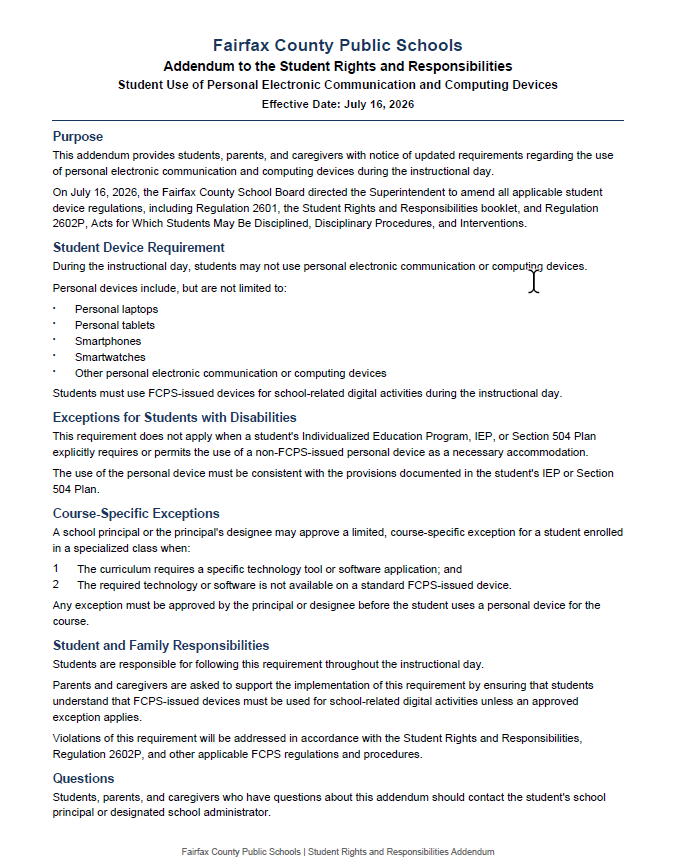
Cell Phone Policy - High School
Important Cellphone Update for Rising Ninth Graders: New Bell-to-Bell Policy Starts July 1
Under a new Virginia cellphone law (SB108) and the updated FCPS Cellphone Policy, high school students at FCPS will no longer be able to use cellphones and other smart devices during lunch time, starting July 1. This includes watches that serve a dual purpose, such as smart watches, as well as earbuds, headsets, smart glasses, and other items connected to the internet.
During the school day, including during lunch time, high school students will have to keep cellphones and other smart devices off and stored in a locker, backpack, pouch, purse, etc. This policy does not apply to school-issued devices. Visit the FCPS Cellphone Policy webpage for more information.
 |
|
Online Safety
Scroll Smart. Post Smart. Stay Safe.
The Fairfax County Police Department encourages teens and parents to stay informed, have open conversations about digital safety, and practice smart online habits throughout the summer months. Read recommendations to stay safe online this summer.
|
Family Vision Group Representative Opportunity
Key Middle School is seeking a parent or guardian representative to participate in the FCPS Family Vision Group (FVG), a district-level community engagement group that brings together families and school leaders to discuss initiatives, share feedback, and strengthen family-school partnerships across Fairfax County Public Schools.
Representatives serve as a voice for Key Middle School families and help share family perspectives in division-wide conversations. The commitment includes attending approximately six meetings per year, which are typically held in person from 6:00–7:30 p.m. on weekday evenings, location TBD.
If you would like to learn more about this opportunity or are interested in serving as a representative, please contact Deborah Vel at dsvel@fcps.edu.
We appreciate your partnership and your willingness to support the Key Middle School community.
Free Sports Physicals for the 2026-2027 School Year
Registration is now open for school athletic physical exams. All middle school students must have a completed physical on file before they can play school sports.
Who is Eligible
Rising 7th and 8th grade students for the 2026-2027 school year.
Important Details
Exams are held at FCPS high schools.
You must sign up for an appointment in advance.
Exams are only available on specific dates and times.
How to Register
Please use the appointment registration link to view available times and sign up for an appointment.
SIS ParentVUE
Support Your Child’s Success in SIS ParentVUE Signing up for a SIS ParentVUE account helps you to support your child’s academic success! Caregivers can view important information like attendance, grades, progress reports, and assessment scores through ParentVUE.
Once you have activated a ParentVUE account for an FCPS student, you will keep the same account until the student graduates. Information about students in the same family can be accessed through the same ParentVUE account. It is available online and as a mobile app for Apple and Android devices.
Need help creating a SIS ParentVue account? This video walks through the steps. Find out more about SIS ParentVUE.
If you already have an account, be sure your contact information is up to date. Parents/guardians can update their phone numbers or email addresses in the Parent/Guardian section. View additional details about ParentVUE.
Activate Your ParentVUE Account to Stay ConnectedOn Wednesday, July 29, FCPS families who haven't activated their ParentVUE account will receive an email with the subject “Fairfax County Public Schools ParentVUE Activation Letter.”
The email will include instructions to activate a ParentVUE account. If you don’t have an account and don’t receive the email, please check your spam folder or open a Parent Support Request. After July 29, families may also contact Vickie Beruete @ (703) 313-3904 or vberuete@fcps.eduto request a printed activation letter or a new activation key, if needed.
All families are encouraged to activate their accounts as soon as possible to ensure they receive immediate access to important student information and school communications.
For assistance activating your account, please contact our front office. For technical support, create a Parent Support Request.
District News/In Case You Missed It (ICYMI)
FCPS News
- In case you missed it in FCPS This Week, the school division shared updates on the following topics:
- Get Ready for Day One With the FCPS App!
- Learn About School Meals
- Managing Technology at Home
Read FCPS This Week to learn more about these topics. If you are not already receiving this weekly newsletter, please sign up today.
Novedades de FCPSEn caso de que no haya visto el boletín Esta Semana en FCPS, la división escolar compartió novedades sobre los siguientes temas:
- ¡Prepárese para el primer día de clases con la aplicación de FCPS!
- Conozca más sobre las comidas escolares.
- Cómo administrar la tecnología en casa.
Lea “Esta Semana en FCPS” para que conozca más acerca de estos temas. Si aún no recibe este boletín semanal, por favor, suscríbase hoy.
Key MS Administrative Team
Principal: Drew Campbell | amcampbell1@fcps.edu
Assistant Principal (7th Grade): Shawn D. Brown | sdbrown@fcps.edu
Assistant Principal (8th Grade): Shari Peters | sapeters@fcps.edu
Director of Student Services: Jane Flegal | jcflegal@fcps.edu
|