|
English | Español | አማርኛ | 中文 | 한국어 | Tiếng Việt | العربية | فارسی | اردو
Digital Citizenship Week
October 27th-31st
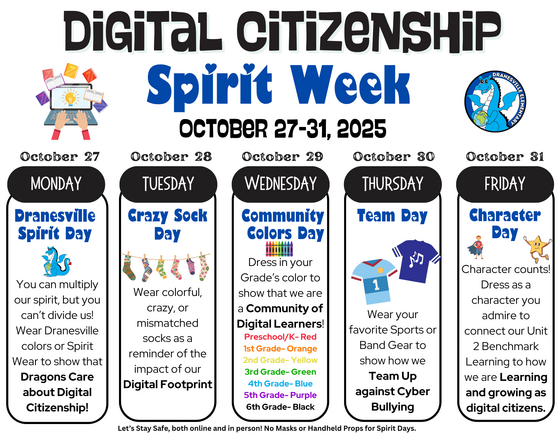
Digital Citizenship Week English | Digital Citizenship Week Spanish
October marks Cybersecurity Awareness Month and our Digital Citizenship Week Spirit Week(October 27-31)! We are committed to making digital well-being a priority and connecting families to valuable digital literacy resources. Celebrate with us during our Digital Citizenship Spirit Week!
What is Digital Citizenship?
Digital Citizenship can be described as the norms of appropriate, responsible behavior (and its positive and negative impact on self and others) with regard to technology use.
It's important for parents to help their child become safe, ethical, responsible and respectful digital citizens. To do that, you’ll use the same successful parenting strategies you’re already using. FCPS is providing these resources to support family learning and conversations.
Digital Citizenship: Establishing Expectations at Home
Choosing Digital Apps, Games, and Services Wisely
Media Balance and Well-Being Toolkit
Digital Citizenship Student Curriculum
Digital Citizenship: Videos and Tip Sheets
Digital Citizenship: Students
Online Supervision and Safety
Parents can provide the best protection for their children and help reinforce the principles learned in the classroom. Families should reach agreements about acceptable Internet activity and content.
- Parents should read about and know how to respond to Internet risks. They can stay informed by signing up for a family Internet safety newsletter and working directly with their school divisions.
- Parents should talk with their children about safe and appropriate Web sites and activities.
- Children should be encouraged to report anything they feel uneasy about. If parents overreact, children will be less likely to confide in them the next time.
- The family should create rules about what children can and cannot do while online. Posting the agreements near the computer will ensure children see them often.
Monitoring is crucial. Parents should know where their children go online, how long they stay there, and the warning signs that something is wrong.
- Parents should place computers in family areas as opposed to bedrooms; however, they need to realize that instant messaging devices, cell phones, and wireless computers may allow children to get online anywhere.
- When young children first begin going online, parents should work closely with them and talk about Internet safety at an early age.
- Parents should bookmark suitable sites and check back regularly to ensure that the content of those sites has not changed and that harmful sites have not been bookmarked.
- Filters are helpful but not fail proof. Parents need to know about circumventor sites, which allow users to get around filtering software controls.
- Parents should seek training to learn different methods of monitoring their children’s Internet use. They continually need to employ up-to-date techniques and software to track where their children go online.
- Parents should be aware that some sites have age restrictions that children may ignore or not realize.
- Parents should follow where their children go on the Internet just as they would watch them in a large public area. They need to check regularly the history and bookmarks or favorites on all computers in the house.
- Parents should recognize the warning signs of when a child might be in trouble, doing something they should not be doing, or spending too much time on the Internet. They should know how to report a problem to their Internet Service Provider and local law enforcement officials.
- Some Internet activities are not only dangerous but illegal. Parents should be aware of relevant laws.
💻 All Families Opted in to Lightspeed Student Online Activity Report
FCPS provides families with a free service that allows parents and caregivers a way to stay informed about their child's online activity on any FCPS device. Starting Sunday, October 12, all parents and guardians who have access to student records in SIS ParentVUE will be automatically enrolled to receive a weekly Lightspeed Student Online Activity Report.
This report provides a summary of the websites your child visited during the previous week and is delivered every Sunday to your email directly from Lightspeed, our internet content filter.
Visit the Lightspeed Parent Report page for more information and answers to frequently asked questions.
Technology Use
 |
|
FCPS’ Internet network and computers allow students access to vast resources and a creative outlet to pursue
writing, art, music, science, math, and many other subjects. With that opportunity comes responsibility. Students
are expected to use the technology ethically, respect the privacy and work of others, leave the workstation in good
condition and follow established rules for safety and security. The same expectations apply to the use of student
owned devices such as laptops, notebooks, and tablets.
|
SR&R English | SR&R Spanish
Thank you for your partnership in keeping our students safe in person and online.
|