|
Dear TJHSST Families,
Welcome to the 2025-26 school year! It's an exciting time to be a part of the TJ community (40th anniversary year!), and I'm thrilled to be your Director of Communications. My name is Mike Roth, and my goal is to keep you in the loop on all the great things happening at our school, share key announcements, and be a go-to resource for your questions.
If you do have a question, please reach out to me via email at mbroth@fcps.edu. Most of the time I will have an answer for you. Sometimes, I won’t but I will be able to direct you to the person you need to talk to in order to get that answer. Please note that I am not able to give specific academic advise for your child (I can give general advise), so specific academic questions regarding your child’s classes should be directed to their teacher or counselor.
This is the News You Choose newsletter. This is where I will publish the latest news, updates and accomplishments regarding TJHSST and it students, staff, and alumni. While there will be editions each Friday during these next three weeks as we prepare for the start of the school year, starting in September they will come out the first Friday of the month. If the school is closed on that Friday, it will come out the following week.
In this first issue, you'll find important information about required forms, transportation, the school calendar, free and reduced meals, and our health room.
Be sure to look for next week's edition on August 15, where we'll share details on arrival and dismissal procedures and introduce you to our new staff members.
We're so glad you're here! We have a lot of positive momentum, and we're looking forward to an incredible year. Let's make the 2025-26 school year the best one yet!
Sincerely,
Mike Roth
Director of Communications
#OneTJ
The TJ faculty and staff will be very busy next week preparing for a smooth first day of school on August 18. As a result, if you need to visit the TJ Main Office next week, please do so on Tuesday, Wednesday or Friday between the hours of 9:00 a.m. and 3:00 p.m. The TJ Main Office will be open by appointment only on Monday, August 11 and Thursday, August 14. Thank you for your understanding.
Do you want a one-stop shop for everything you need to know as we head Back-to-School for the 2025-26 school year?
Visit the TJ Back-to-School Homepage for all of the latest information!
As the new school year approaches, parents/guardians will want to check their student's emergency information online and make changes if necessary. With FCPS that is done via the Online Verification Packet (OVU).
The OVU is found in your ParentVUE account. It will allow parents/guardians to review and update phone numbers, emergency contacts and health information (such as health conditions and immunizations) for students in grades PS/HS and kindergarten through 12th grade.
Enrolling parents will be able to access OVU through their SIS ParentVUE account. If you need help with the Online Verification/Update packet or for technical support, create a Parent Support Request ticket for support with the application (select Online Registration in the Application dropdown menu) or call the Parent Technology Help Desk at 833-921-3277 (833-921-FCPS).
Visit TJ's Back-to-School Website for a link to step-by-step instructions on how to access and fill out the OVU.
IMPORTANT NOTE: Only the ENROLLING PARENT will be able to access the OVU. If you are not the enrolling parent, you will receive an error message.
Please visit FCPS' Parent Digital Consent Platform. This has nearly all of the required and optional forms that FCPS has everyone sign each you that allows you to both opt-in and opt-out of various services the school district offers. Please review the options carefully and reach out to Mike Roth at mbroth@fcps.edu if you have any questions.
One required form that we need you to fill out in this system is the Digital Consent Form. For teachers to have the resources they need to provide engaging instruction, we must have parental/guardian consent for your child to use FCPS-approved online tools listed as part of our instructional program.
You will be able click on the Digital Resource Consent 2025-26 link and approve each of the resources individually, or click on the opt-in to all resources button and opt-in to everything at once.
Schoology is the learning management system used in FCPS. Students and families can learn more about how to use Schoology here.
We’re pleased to announce that student schedules for the 2025-2026 school year will be ready to view on StudentVUE and ParentVUE starting at 6:00 a.m. on Thursday, August 14. New students can find their counselor assignments now under the "Student Information" tab.
Our counselors have worked diligently to create accurate and complete schedules based on your student's course selections. We encourage all students and parents to review the schedule carefully on August 14.
Please Note - The following message was sent to TJ Community via E-Notify on August 6 and is being repeated here for your convenience.
Dear TJHSST Families,
As part of the ongoing commitment to strengthening layered safety and security programs, Fairfax County Public Schools (FCPS) will continue to phase in a weapons detection system at all secondary schools this fall.
When students arrive at TJ each morning, they will enter through either door 1, 7, 9, or 12 where we will have our screening stations setup.
Please watch this video of the Superintendent’s conversation with students about the weapons screening system. The most important thing is to be sure that students have the right items removed from their bag before getting in line.
Items to be removed include:
- Three-ring binders
- Laptops
- Collapsible umbrellas
- Metal lunch boxes
- Metal pencil cases
- Metal glass cases
These items can remain in a student’s bags:
- Non-metal lunch boxes
- Books
- Planners
- Spiral notebooks and folders
- Cell phones
- Keys
- Non-metal pencil cases
Once the items are removed, students should walk to the shortest line and proceed. If the light turns red, they will be directed to a secondary screening to determine what may have alerted the system. Experience shows that the process becomes easier and more efficient every day. You can learn more about the system by watching this video and reading the Frequently Asked Questions on FCPS’ website. If you have additional questions, you can submit them online to the FCPS Chief of Safety and Security Office.
We appreciate everyone’s cooperation and support in our shared commitment to maintaining a safe learning environment for us all.
Sincerely,
Michael Mukai
TJHSST Principal
Once student schedules are published in StudentVUE, we encourage students and parents/guardians to review the schedule carefully for accuracy, and promptly email the school counselor if any errors occur. If a student's desired elective doesn't appear on the schedule when school begins, it means that it was not possible for the class to fit into the schedule. When this happens, your student will automatically be enrolled in an alternate choice from their list. Financial and space constraints, such as allocated staffing, limits on student-to-teacher ratios, and lab capacity, do not always allow flexibility to grant requests to change courses.
All students will receive a paper-copy of their schedule during Advisory on August 18. Students are encouraged to review all courses scheduled for the year, semester 1, and semester 2 for accuracy. Please note that the paper schedule is the only place where students will be able to see their semester 2 classes until they become available in StudentVUE in January 2026. We encourage students to share this information with their parents.
Reasons for a Schedule Change that MAY be Approved
- Student is missing a class that is required for graduation
- Student has an incomplete schedule (too few or too many credits)
- Student has been scheduled into a course previously passed (e.g. a course completed during summer school)
- Student has been scheduled into the wrong level of a course (e.g. Spanish 3 before Spanish 2)
- Student did not complete a class that was a prerequisite for another course
- Student wishes to fully withdraw from the course for an approved off-campus waiver
- Student wishes to take a higher or lower level of a course that meets the same graduation requirement
- Changes as a result of MTSS, 504, or IEP Team recommendation
Reasons for a Schedule Change that MAY NOT be Approved
- A preferred elective creates a conflict in the schedule that cannot be resolved*
- Elective course switches due to a change of mind/preference*
- Switching a course to/from in-person to Online Campus
- Teacher changes
- Counselor changes
- Preferred period/time of day of a course
*These types of changes may be requested during the second week of school only
Requesting Changes to the Schedule
We understand that sometimes schedule adjustments are necessary. There are two distinct types of changes that may be considered:
-
Level Change: A student remains enrolled in a course that meets the same graduation requirement but shifts to a higher or lower level of the course (e.g., AP to Honors).
-
Course Drop: A student fully withdraws from the course.
Our master schedule is carefully constructed based on students’ course selections. Therefore, schedule changes are limited and must adhere to the following procedures and timelines:
-
First Week of School (August 18 - August 22): During this initial week, schedule changes will be processed exclusively to correct school-generated errors or to ensure a student meets the graduation requirements for the TJHSST Diploma.
-
Second Week of School (August 25 - August 28 by 3PM): Students may request other course changes, including Level Changes or Course Drops. Any addition of a new course is strictly dependent on space availability and the student meeting all prerequisite requirements.
-
Third Week and Beyond: At this point in the academic year, schedule changes are highly restricted. Approved requests will be processed as follows:
-
Semester Course Drops: A student who withdraws from a semester course and receives administrative approval will be granted an off-campus waiver (period release).
-
Yearlong Course Drops: A student who withdraws from a yearlong course and receives administrative approval will be granted an off-campus waiver (period release) for the first semester. A new second semester course may be added based on space availability and the student meeting all prerequisite requirements.
-
Yearlong Course Level Changes: A request to change the level of a yearlong course, if approved, will result in enrollment in the new course based on space availability.
Important Note: Students who are approved to withdraw from a course will not be permitted to remain on campus for the duration of that period. The student’s schedule may need to be rearranged to accommodate the off campus period. The student is responsible for providing their own transportation to and from campus within 15 minutes of the start or end of their next class.
FCPS Regulation 2445 governs the grading and reporting procedures for withdrawing from a course during each grading period.
How to Request Changes to the Schedule
For changes requested prior to the second week of school, the student is required to initiate the schedule change by completing the schedule change request Google Form, available in the Schoology Homeroom Course. After the second week of school, the student is required to initiate the schedule change by speaking directly to their assigned school counselor. Depending on the time of the school year and type of course change requested, additional information may be required from the student, parent, and teacher of record.
As the school year commences, we are pleased to offer two Back-to-School Night options this year:
-
In-Person Session: This will be held on Tuesday, August 26, from 6:00-8:00 p.m. You will attend your child’s classes in order from periods 1-7. You will spend 10 minutes in each class to hear from the teacher, learn about their expectations, and hear a general overview about the class. Please be aware that on-site parking is limited and will be available on a first-come, first-served basis.
-
Virtual Option: New this year, this convenient option will be hosted entirely on Schoology. Each teacher will provide a video for their respective classes, introducing themselves, outlining class expectations, explaining how parents can support their child, and detailing preferred contact methods. These videos will be accessible by the beginning of the second week of school and can be viewed at your convenience.
We recommend utilizing the virtual option due to anticipated parking constraints for the in-person event.
Further details, including the complete in-person schedule and availability of virtual videos, will be communicated via email closer to the date.
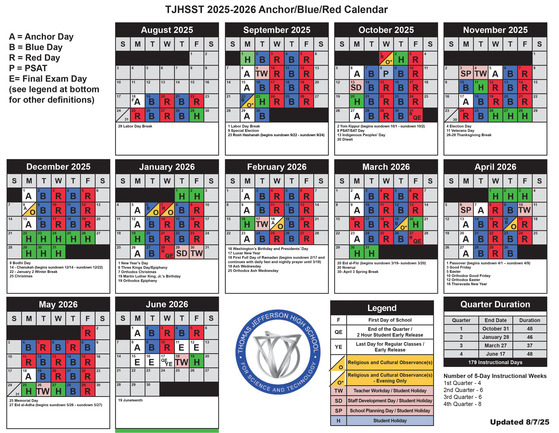
Here is an overview of the 2025-26 school year calendar (it has been updated since last published in July).
In general, Mondays are Anchor Days, where students attend all seven courses and an advisory at the beginning of the day. Tuesdays and Thursdays are Blue Days, in which students will attend periods 1-4. Wednesdays and Fridays are Red Days, in which students will attend periods 5-8. During the first two and a half weeks of school, eighth periods will be spent in the student's advisory room.
There are exceptions as Holidays and staff workdays can cause adjustments to the schedule. Pictured above is a handy calendar that tells families whether it is a Anchor/Blue/Red Day, or a holiday where school is closed. Those dates are all subject to change, but we will keep you informed when a change is going to be made.
PLEASE NOTE: One change has already been made! There will be no school on Tuesday, September 9 as most FCPS schools will be used as voting locations for the special election scheduled for that date.
If you would like a printable version of this calendar, please visit our website.
The school day at TJ begins at 8:40 a.m. and ends at 4:00 p.m. We will have the same bell schedule that we have used for the last several years.
Regular Bell Schedule
| Monday: Anchor Day |
| Period |
Start Time |
End Time |
| Advisory |
8:40 a.m. |
9:10 a.m. |
| 1st Period |
9:20 a.m. |
10:00 a.m. |
| 2nd Period |
10:10 a.m. |
10:50 a.m. |
| 3rd Period |
11:00 a.m. |
11:40 a.m. |
| Lunch |
11:40 a.m. |
12:50 p.m. |
| JLC |
12:10 p.m. |
12:50 p.m. |
| 4th Period |
12:50 p.m. |
1:30 p.m. |
| 5th Period |
1:40 p.m. |
2:20 p.m. |
| 6th Period |
2:30 p.m. |
3:10 p.m. |
| 7th Period |
3:20 p.m. |
4:00 p.m. |
| Tuesday/Thursday: Blue Day |
| Period |
Start Time |
End Time |
| 1st Period |
8:40 a.m. |
10:15 a.m. |
| 2nd Period |
10:25 a.m. |
12:00 p.m. |
| Lunch |
12:00 p.m. |
12:40 p.m. |
| 3rd Period |
12:40 p.m. |
2:15 p.m. |
| 4th Period |
2:25 p.m. |
4:00 p.m. |
| Wednesday/Friday: Red Day |
| Period |
Start Time |
End Time |
| 5th Period |
8:40 a.m. |
10:15 a.m. |
| 6th Period |
10:25 a.m. |
12:00 p.m. |
| Lunch |
12:00 p.m. |
12:40 p.m. |
| 7th Period |
12:40 p.m. |
2:15 p.m. |
| 8A Period |
2:25 p.m. |
3:05 p.m. |
| 8B Period |
3:20 p.m. |
4:00 p.m. |
Visit our website to see the two-hour and three-hour early release schedules, as well as the two-hour delayed opening schedule.
Your bus route, stop, and times are available now in your ParentVue account. Please see the following message from FCPS Transportation (remember FCPS handles transportation to TJ for our Fairfax County, city of Fairfax, and city of Falls Church students, and questions should be routed to them).
From FCPS Transportation:
If you have selected yes for transportation intent in your ParentVue account and selected your stops in the depot stop selection form, your student’s stop assignment and pick up/drop off times will have populated in your ParentVue account. Please review your student’s bus assignments if applicable. Submit any requests for changes to OTS_Team27@fcps.edu. These changes may not be in place by the first day of school.
Please remember that communications about transportation arrangements for the following school year begin to be sent in March. Please check your email settings so that e-notify or other messages originating from an @fcps.edu address are not being redirected to spam or marketing folders.
Transportation to and from TJ for our out-of-county students is taken care of by their resident school district. Families in Arlington, Loudoun, and Prince William Counties should contact those school transportation departments directly for transportation questions/concerns. Here is their contact information:
-
Device Requirement: Students must bring a fully charged device to school each day. This can be either a personally owned device or a school-issued laptop.
-
Distribution Details: Chromebooks will be distributed to students during the Advisory period in the first week of school.
-
Preassigned Devices: Chromebooks are preassigned at TJ. Students will receive an email notice to their fcpsschools.net account when their FCPSOn laptops are assigned and checked out in the system
-
Summer Retention (Returning Students): Returning students who retained their device over the summer should bring it to school on August 18, the first day of school, to ensure access to their Schoology courses. They may need to turn it in for a software refresh. Our tech team will reach out if that is the case.
-
Devices Needing Repair: Students who have a device that needs to be repaired should stop by the tech office (room 281) with their device. Any students who left their laptop with the tech team for repair at the end of the previous school year should stop by the tech office (room 281) and collect their laptop.
-
Dell Laptops: All Dell laptops checked out in a previous school year must be swapped out. After backing up your files, please stop by the tech office (room 281) to get your Dell laptop swapped out.
-
Chromebook à Dell Swaps: If you have a Chromebook and would like to swap to a Dell laptop, the tech office will begin doing swaps on Tuesday, September 2nd. You MUST have your Chromebook charger with you when you stop by the tech office to get your device swapped out.
-
Dell à Chromebook Swaps: If you have a Dell laptop and would like to swap to a Chromebook, please email TJHSSTTechTeam@fcps.edu to share your interest. Upon receiving an email saying your Chromebook is ready, please stop by the tech office (room 281) to get your laptop swapped out.
-
New Students Who Still Have Old Device: If you are new to TJ and still have your device from your previous middle/high school, please turn it in to our tech team. We will swap it out with one of our devices and return it to the school that it belongs to. The charger must also be returned along with the device.
Class of 2026, do you still need to get your Senior Portrait taken? There will be a limited number of senior portrait sittings at TJ for yearbook photos only on October 22 (No deluxe sittings, i.e. cap and gown photos or casual/personality portraits). Sign-ups for these will open at the beginning of September.
Senior families may also schedule a sitting at the Victor O’Neill studio for a full-service appointment at your convenience—as long as the sitting is completed before the end of October.
Questions? Please email Victor O'Neill's Senior Portraits Team at seniors@vosphoto.com. Please kindly include your first and last name and "Thomas Jefferson Class of 2026" when emailing, for faster assistance.
Except for FCPS or Virtual Virginia courses, parents/students must request a transcript showing completion of the summer school course. Please have your official summer school transcript sent to tjhsstdss@fcps.edu, Attn: Kirsten Frostad as soon as possible.
Screenshots/documents from parents/students are not accepted. Course updates will be made on or before October 31, 2025.
Free/Reduced Application information and forms for qualified families (Online Submission)
FCPS offers nutritious meals every school day. Your child may qualify for free meals or reduced-price meals at TJHSST. Students who qualify for reduced-price meals receive breakfast and lunch at no cost. For information on how to apply for Free and Reduced-price meals, please visit the link above. The online free and reduced-price meals application is available in 8 languages and can be completed on mobile devices. It needs to re-apply annually.
Consent to Share Form (PDF)
If you have children eligible for the Free and Reduced-price meals program, they may also be eligible to participate in other FCPS fee-based programs without paying a fee or by paying a reduced fee.
This would include things that are specified in FCPS Notice 5922. Those are:
- Musical Instrument fees
- Driver Education fees
- Student Parking fees
- Career and Technical Education Certification fees
- Fine Arts fees
- Technology and Engineering Education Material fees
- Online Campus fees
- Advanced Placement fees (after six exams)
- Returned Check fees
You are also eligible to receive information about scholarships, classes and services that are provided by agencies and organizations other than FCPS.
In order to receive the benefits, you have to fill out the Consent to Share Form (please visit the link above), a written agreement allowing FCPS staff to share information about your children's meal eligibility status.
Make sure your child has all of their required immunizations before the first day of school. Check their immunization records to see what they might be missing. You can:
- Request immunization records online through the Virginia Immunization Information System (a free service).
- Get records from other states’ systems if your child was immunized outside of Virginia.
- Request records from your health care provider. Some may charge for copies.
Review school-required immunizations to verify that your child is up to date.
Required Immunizations for Rising 12th Graders
Several immunizations are required for students entering12th grade.
- All students entering 12th grade are required to receive one dose of the MenACWY vaccine before the beginning of school.
- To meet the MenACWY 12th grade requirement, the vaccination must be administered at age 16 or older.
As long as your child meets the age requirements listed above, they can be immunized at any time.
Where to Receive Immunizations
If your child needs an immunization, make an appointment with your family’s health care provider or one of the following clinics:
FCHD offers limited walk-in hours for immunization services on a first-come first served basis. Immunizations are also available by appointment.
- Inova Cares Back to School Pediatric Health Fairs provide children ages 5 and up with free school physicals and immunizations. Weekday and weekend clinics are available in July and August. These health fairs are for VA Medicaid or Uninsured Inova registered patients only. Appointments are required. Call 703-698-2550 to make an appointment. Bring vaccine records to the appointment.
Local immunization clinics and additional resources are available on the FCPS Immunization Resources webpage and from the FCHD.
For students to self-carry or store medications in the health room, FCPS requires updated medication authorizations each school year. I am providing links to the most recent versions of the authorizations for your convenience. Please print the document(s) that are appropriate for you student and share with your health care provider.
*Please note: The appropriate authorization should be on file even if you student self-carries an inhaler or epinephrine.*
Asthma/Inhaler:
The Virginia Asthma Action Plan is required for any inhalers (even if self-carried).
Once your health care provider has completed the Virginia Asthma Action Plan, you will need to complete the FCPS Authorization for VA Asthma Action Plan (SS/SE-65) authorizing the principal designee/SHA/PHN/school staff to administer the asthma medication to your student.
Anaphylaxis/Epinephrine:
Please have your health care provider complete the FCPS Authorization for Anaphylaxis Action Plan if your student will be self-carrying or leaving epinephrine in the health room.
Other medications:
Please have your health care provider complete the Medication Authorization (SE63) for all other prescription medications (not epinephrine or inhaler) or over the counter medications like Benadryl.
Over the counter (OTC) medications must be new/unopened and in their original containers. No healthcare providers signature is needed for OTC medications used for headache, muscle aches, orthodontic pain, or menstrual cramps. If you are providing an OTC medication for any other reason or if the dosing is outside of the manufacturer’s recommendations, a healthcare providers signature is required.
Prescription medications must be in a properly labeled and the label should match the dosing and frequency information on the Medication Authorization.
Should you have any additional questions or concerns, please feel free to contact me (LWilkes@fcps.edu).
Thank you for your collaboration in keeping your student safe and healthy!
Every student can take advantage of Varsity Tutors’ services at no cost, including weekly live online classes; on-demand 24/7 chat tutoring; essay editing; and study resources such as recorded content, practice problems, and diagnostic tests.
Learn more about online tutoring with Varsity Tutors.
Need to get ahold of someone at TJ? Here is some commonly requested contact information:
Main Office - 703-750-8300
Attendance Office - thomasjeffersonhigh.attendance@fcps.edu
Student Services - 703-750-8340
Student Activities - 703-750-8333
Security - 703-750-8331
Administration Contact Information
Mr. Michael Mukai - Principal
Ms. Betsy Fawsett - Associate Principal
Ms. Yaara Crane - Subschool Principal (oversees Class of 2026 Science and Technology Division)
Mr. Shawn Frank - Subschool Principal (oversees Class of 2027 and Mathematics and Computer Science Division)
Mr. Dylan Forshay - Subschool Principal (oversees Class of 2028 and World Language, Art, Music, and Physical Education Division)
Ms. Volita Russell - Subschool Principal (oversees Class of 2029 and Humanities Division)
Ms. Sara Wright - Director of Student Services (oversees Counselors, Social Worker, School Psychologist and other staff providing student support)
Ms. Leah Conte - Director of Student Activities (oversees Activities Office, 8th Period, Athletic Office, Building Maintenance, Custodians, Food Services)
Mr. Mike Roth - Communications Specialist (oversees NewsYouChoose and eNotify, Event promotions, print/digital text, photo, video, Social Media accounts, TJHSST Webmaster and Visitors US & International (TJPF)
For another specific staff member, please use our Staff Directory to find contact information.
Be sure to visit Thomas Jefferson High School for Science and Technology On its official social media channel on Instagram @OfficialTJHSST for pictures and highlights of all the fun events and activities going on at TJ! (Please note that we have discontinued use of our X/Twitter account).
We'd love it if you give us a follow!
August 14 - New Student Orientation
August 14 - TJ Open House for Returning Families
August 18 - First day of the 2025-26 school year. It will be a Modified Anchor Day
August 22 - News You Choose: First Week Report newsletter emailed to families.
August 26 - In-person Back-to-School Night, 6:00-8:00 p.m. (Virtual option also available)
August 28 - Back to School Bash after school
August 29-September 1 - Labor Day Holiday (No school for students and staff)
September 5: - September News You Choose newsletter emailed to families.
September 9: - No school for students
September 22-27 - Homecoming Week
September 22 - Religious or Cultural Observance Day (Rosh Hashanah begins in evening) - school remains in session with normal hours, no activities in evening.
September 23 - Religious or Cultural Observance Day (Rosh Hashanah) - no school for students or staff
September 26 - Homecoming football game, 7:00 p.m. at Main Stadium
September 27 - Homecoming Dance at TJ in evening
October 1 - Religious or Cultural Observance Day (Yom Kippur begins in evening) - school remains in session with normal hours, no activities in evening.
October 2 - Religious or Cultural Observance Day (Yom Kippur) - no school for students or staff
October 3 - October News You Choose newsletter emailed to families.
October 8 - PSAT/SAT administered at TJ for 10th, 11th, and 12th graders (more information will be forthcoming on this)
October 13 - Staff Development Day - No school for students.
October 20 - Religious or Cultural Observance Day (Diwali) - no school for students or staff
October 24-25 - TJHSST 40th Anniversary Celebration
|