|
Dear Mantua Families,
Tomorrow is the big day! We are so excited to welcome your children to the 2023-24 School Year! I want to share with you key reminders for Monday. Our doors will open at 9:05 a.m. for students to make their way to breakfast and classrooms. Before you send your child to school tomorrow, please be sure to remind them of how they are getting home and that it is consistent with the dismissal plan you have entered into PickUp Patrol (PUP). Friday afternoon, messaging was sent through eNotify reminding parents/guardians to complete their PUP registration and default plan. Detailed PUP information is provided in this newsletter.
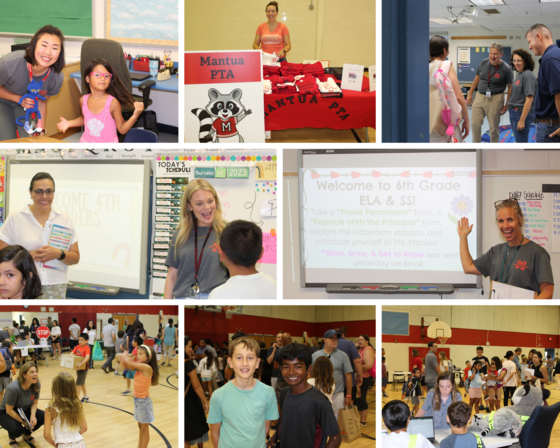
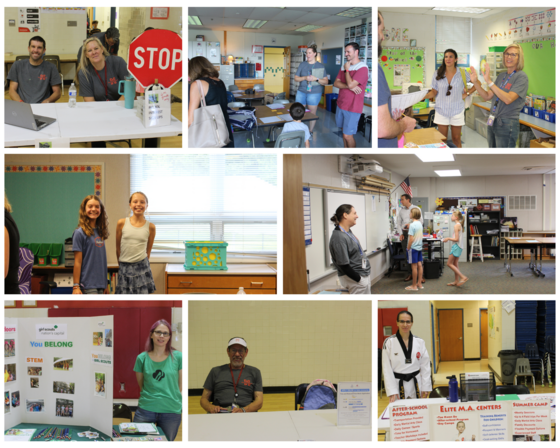
We hope everyone had a restful and enjoyable summer with family and friends. During this last week, we welcomed our team back with a Kick-off focused on beleif in our students, ourselves, and Mantua. We set our focus for this upcoming school year on our continued work around Responsive Classroom best practices, incorporating a consistent Social Emotional Learnign (SEL) curriculum schoolwide, and developing our work as a Professional Learning Community (PLC). Our Amazing PTA filled our hearts and bellies with a welcome-back breakfast. We connected with so many of you and your children on Thursday for Open House. The new design of classroom visit sessions organized by alphabet allowed families with multiple children's to visit all classes in one session and to engage in more meaningful connections with staff. We rounded out our week perfectly, meeting our new families yesterday at the PTA’s annual Popsicles with the Principal event!
Finally, we want to send a HUGE thank you to our incredible PTA for everything you do to make Mantua so special. Because of our PTA’s resources, fundraising, and personal time commitments, we have made such great additions to our school, including the new student furniture in the upper and lower pods! On a personal note, I want to thank my admin team, our custodial staff, and all of our incredible 11 and 12-month staff members for everything they did to make our opening possible! Their efforts, care, and commitment are beyond measure!
We wish each one of you an excellent first day of school tomorrow!
Take good care,
Linda Shannon, Principal
Rich Deixler, Assistant Principal
Colleen Vaughan, Assistant Principal
August 21: First Day of School
August 30: Mantua PTA Ice Cream Social, 5:30 p.m. - 7:00 p.m.
September 1-4: Labor Day Break, No School
September 8: PTA Meeting, 9:30 a.m., Mantua Cafeteria
September 20: Back to School Night, 6:00 p.m. - 8:00 p.m.
Be sure to bookmark the FCPS school year calendar to keep track of school holidays, breaks, and observances.
Bell Schedule
Mantua ES Bell Schedule for 2023-24 is 9:20 a.m. - 4:05 p.m.
- Office hours are 8:30 a.m. - 5:00 p.m.
- Kiss & Ride Drop Off - 9:05 a.m. - 9:20 a.m.
- Doors open at 9:05 a.m. for students - Please note the change from the previous school year’s 9 a.m. entry time. In order to work within teacher contract times and provide appropriate adult supervision, students will be able to enter the school building and classrooms beginning at 9:05 a.m.
Arrival & Dismissal
Your children’s safety is our priority. Please be patient as arrival and dismissal routines are established in these first weeks. We understand the hurried nature of mornings and evenings, but please drive slowly and safely through our parking lots and beyond. As you may know, we have a single entrance and exit dedicated to Kiss and Ride and buses. The following notes help us to be safe and efficient. Please review the information below and reach out if you have any questions.
Arrival
We begin welcoming students at 9:05 a.m. Please do not drop your child off early, as there is no adult supervision of students before that time. If you arrive after 9:20 a.m., please park your car and walk your student(s) to the front office through door #1.
While staff will be greeting children at Kiss & Ride until 9:20, please do all that you can to complete dropoff by 9:15 to ensure a prompt 9:20 start in the classroom. This will allow your student time to walk to class and be in place by the time class begins. We work hard to maintain a learning environment that is most beneficial to all students. One essential part of our day in classrooms is our Morning Meeting. Being on time means your child has meaningful opportunities to develop relationships with peers and staff and start their day on a positive note.
-
Walkers: Staff will greet walkers at Door #1. We ask parents to give hugs and well wishes prior to their children entering the building. We will have many staff members to help your child find their way to class during the first week of school.
-
Bus Riders: Students are dismissed from their buses at 9:05 a.m.
-
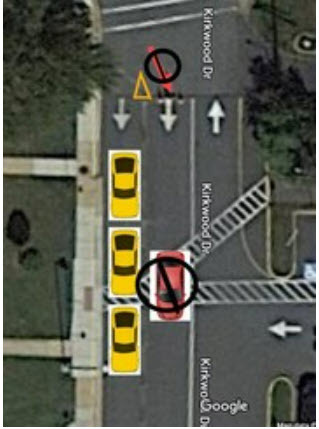
Kiss & Ride: Staff will greet Kiss & Ride students in the loop at the side entrance near door # 2. Please be sure to pull completely forward as staff directs you to do so. Whenever possible, please have students sit on the passenger side of the vehicle. For safety reasons, students are not to exit on the driver's side of the vehicle. Staff will assist your child's exit from the car as needed. Please remain in your car.
 |
|
Please note that this is a single-lane loop. Stay to the far right and remain in the line as you proceed through the loop. The included image is to assist you. No cars should drive in the middle lane, as indicated by the red car in the image. |
Dismissal
-
Walkers: Will be dismissed from their classrooms. If you are meeting your student(s), please meet them at door #2.
-
Kiss and Ride: Students waiting for Kiss & Ride will report to the Art rooms daily. If parents/guardians arrive before dismissal, students will receive notification in their classrooms through PUP and report directly to Kiss & Ride at dismissal. As you approach the Kiss & Ride loop tomorrow, you will give your name to staff on radio or display it on a piece of paper in your window. On Tuesday, all families will receive PickUp Patrol (PUP) placards in Tuesday folders to be displayed on your dashboard or passenger window. Plan to use these placards when you come through K&R. This is how we know that the person picking up is authorized by the parent/guardian. If you need additional placards throughout the year, please let us know.
-
Bus Riders: Will be dismissed from their classrooms. If you are meeting your student(s) at the bus stop, please plan on being at the bus stop at least 5 minutes early. Kindergarten students who ride the bus in the afternoon must be met at the bus door and asked for by name by a parent, parent designee, guardian, or a responsible sibling who is a 7th grader or older. Kindergarten students not met will be returned to school.
PickUp Patrol (PUP)
Registration PickUp Patrol (PUP) emails were sent to all families on Thursday and Friday. To ensure that all students take the correct mode of transportation home on Monday, it is imperative that parents and guardians complete the PUP registration and update each of your children’s dismissal plans. Please visit the PUP website if you have any questions. If you need further assistance, please email ffinaish@fcps.edu and mbkakouris@fcps.edu . If you have not yet created an account, we encourage you to contact Ms. Finaish for a one-time link to set up your account. The link expires for security purposes, so once you receive the link, you should create the account immediately.
The student default plans you enter in PUP will become visible to the main office and to the individual teacher. If a student needs to leave school during the day for a doctor's appointment, families will update their child's dismissal plan using the app. This information is then communicated to the teacher and main office staff. At the time of pick-up, the parent/guardian will come to the office to pick up the child.
Key Points to Remember
- All children must be signed out in the office (late arrivals, early dismissal, re-entry).
- A student CAN NOT be released to anyone except the parent/guardian or the emergency contact indicated on the emergency care card. Parents/Guardians can give consent to release their child to a different adult by making a change to their child's dismissal plan using the PUP app. Please know that if the person picking up a child is unknown to the staff, identification will be required.
- Changes to the default plan need to happen prior to 2 PM daily.
- Changes can be made in advance for planned changes to the student’s schedule.
- No dismissals can occur within 20 minutes of the end of the school day.
- As you use the application, if you have any questions, please check the PUP FAQ page. If you need further assistance, please reach out to Ms. Fadwa Finaish at ffinaish@fcps.edu or PickUp Patrol at support@pickuppatrol.net.
Attendance
We will also continue using PUP for absence reporting. In the event of an absence or tardy, please login to PickUp Patrol or call 703-645-6363. Please specify a physician’s diagnosis, such as strep throat or pinkeye. If your child has not seen a physician, please be specific about the symptoms your child is having, such as fever, cough sore, throat headache, diarrhea, and/or vomiting. Our Public Health Nurse tracks this information.
Medication Forms & Drop Off
The Health Room continues to be open for drop-off of emergency and daily prescription medications. Medications may be dropped off after the start of school M-F, 9 a.m.– 4 p.m. All visitors are required to check in at the Main Office. All medications are required to have a completed medication authorization.
A parent or designated adult must transport all prescription medications to school. Students are not allowed to bring in prescription medications. Prescription labels must include a description of the medication.
5th/6th Grade Band & Strings Registration
We look forward to seeing your students in our Mantua ES instrumental music teams! Students interested in band or strings who did not sign up last spring can still register! Please fill out the form at this link. Forms are due by Monday, August 28, and classes start the week of Tuesday, September 5.
Please email Mrs. Kate Easton for questions pertaining to strings: kjeaston@fcps.edu
Please email Ms. Lynette Blacksten for questions pertaining to band: lsblacksten@fcps.edu
Transportation
Families in the bus riding area should have received routes. Please ensure your child arrives at the bus stop 5 minutes early and that you allow extra time for the bus to return to the stop in the afternoon. The first week of transportation often includes adjustments; thank you in advance for your patience!
Bus information is also available on ParentVue. To view your child’s bus route information, log into the ParentVUE. Once logged in, the bus route information is in the “Student Info” tab under the heading “Transportation Information.”
- Click on the Student Info Icon
- Scroll to the Transportation Information Section
Please remember that Kindergarten students who ride the bus in the afternoon must be met at the bus door and asked for by name by a parent, parent designee, guardian, or a responsible sibling who is a 7th grader or older. Kindergarten students not met will be returned to school.
Thank you for your patience as we all get used to new routines this school year. We appreciate our families following Kiss and Ride procedures and being patient while waiting for your children’s buses.
If a student’s bus is delayed, parents may access the Bus Delay Notification System or use the Here Comes the Bus mobile app to receive the delayed bus report. Email messages will be sent to announce significant bus delays. Contact the Transportation Office at 703-446-2050 with any additional questions. For any concerns after 5:30 p.m., contact Safety and Security at 571-423-2000.
To make sure you receive email messages about bus delays, update your contact information in SIS ParentVUE.
ParentVUE Accounts
Do you have your ParentVUE account? ParentVUE is a secure solution to access your child's attendance, SOL scores, test results, class performance, and demographic data.
Certain opt-out options and paper forms are transitioning to electronic forms, which can be accessed in parentvue. Learn more about Parent SIS accounts here!
If you don't have a ParentVue account, create one today by submitting a parent support request here.
Update Contact Information to Receive Messages From FCPS
Be among the first to know about weather closings, bus delays, and other critical communications from FCPS and our school by providing your cell phone number and email in SIS ParentVUE. Make sure you complete the Emergency Care Form for your child every year and update it when necessary.
To update your contact information in ParentVUE, click the “Online Packets” tab in the upper right of the screen, then select the “Online Verification/Update” form in the drop-down menu. Click “Begin Packet.”
Parents who do not have a SIS ParentVUE account may still communicate updates via the normal paper process. They may also print and complete a blank Emergency Care Information Form with updates and submit it to the front office.
Preparing for and Paying for Meals
Parents/caregivers need to provide their students with money to purchase meals at school, send them with a packed lunch, or apply (and be approved) for free and reduced-price meals benefits. School breakfast for students costs $1.75. Lunch is $3.25 for elementary students and $3.50 for middle, secondary, and high school students.
Paying With MySchoolBucks
The best way to purchase meals (and keep food lines moving!) is to use MySchoolBucks. Set up your student’s MySchoolBucks account today. Our front office staff can help with any questions.
MySchoolBucks accounts can be set up to add money to the account automatically, as needed. Families with multiple children can use the same MySchoolBucks account. Visit FCPS’ Food and Nutrition webpage for more information.
Free and Reduced-Price Meals
The application for free and reduced-priced meals is now available for the 2023-24 school year. Interested families are encouraged to submit the Free and Reduced-Price Meal application at this link as soon as possible. Students approved for free and reduced-price lunch last year are eligible for the first 30 days of school this year (or until a new application is processed). Families should re-apply for the 2023-24 school year as soon as possible so eligible students continue to receive meals at no cost.
Students approved for Free and Reduced-Price Meals may qualify for additional benefits such as waived or reduced fees for instruments, uniforms, field trips, FCPS class fees, and Parktakes classes. Schools also benefit from funding opportunities based on Free and Reduced-Price Meal application numbers. Learn more about the Free & Reduced Price Meal program online.
What is Schoology?
Teachers use Schoology to post their classroom materials online, to provide a secure forum for students to discuss their ideas and collaborate on projects, and to assign and collect homework electronically. It helps students stay organized, and it keeps the class connected.
A Schoology Parent Account gives you access to:
- Your child’s classes.
- Your child’s upcoming assignments.
- School, class, and group announcements.
Parent accounts will be available after August 21. To access Schoology, parents will need to have an active SIS/ParentVUE account. Get more information on how to log in and use Schoology.
Annual Notice of Survey, Records, Curriculum, Privacy, and Related Rights
Fairfax County Public Schools wants all parents to understand its policies regarding surveys, records, curriculum, privacy, and related rights.
In its Annual Notice of Survey, Records, Curriculum, Privacy, and Related Rights and Opt-Out Forms (Annual Notice), FCPS provides explanations of the rights listed above and forms that may be used to exercise opt-out choices. Two versions of the Annual Notice are available — a grades K-8 version and a grades 9-12 version. Parents/caregivers with children at different grade levels should read each applicable version of the Annual Notice because the notices and opt-out rights vary depending on the student’s grade level.
Get more information and view the 2023-24 Opt-Out Booklets.
Updated FCPS Device Policy for Students
Students in grades K-6 must keep phones silenced and in backpacks for the duration of the school day unless there is a medical need or emergency, or teachers have allowed the usage of cell phones for instructional activities where they are the most appropriate tool.
Watches that serve a dual purpose (e.g., smartwatch) may be worn; however, phone features (e.g., texting, Internet, calls, etc.) are to be off when phone use is prohibited.
Parents should talk to their child(ren) before the start of the school year about these expectations for this upcoming school year. Families may also review the parental controls available for all iPhone and Android users. More information about the SR&R is available online.
Low-Cost Internet for Free and Reduced-Price Eligible Students
The Affordable Connectivity Program (ACP) is a new Federal Communications Commission (FCC) program to lower internet costs for families with children who have been eligible for free or reduced-price meals within the last 12 months. A qualifying household will receive $30 per month toward internet services and a one-time discount of up to $100 for a laptop, desktop computer, or tablet. Families can check their eligibility and register at AffordableConnectivity.gov or by calling 877-384-2575.
Quick Links
|