|

To read this newsletter in other languages, please visit our website.
Para leer este boletín en otros idiomas, visite nuestro sitio web.
 UPCOMING EVENTS
Monday, 08/21 – First Day of School
Wednesday, 08/30 – Senior Parent Night (5-6pm, Auditorium)
Wednesday, 08/30 – Back to School Night (6pm)
Friday, 09/01 - Monday, 09/04 – Labor Day Holiday
Monday, 09/25 – Yom Kippur Holiday
First Day of School is Monday, August 21st!
Essential information regarding our student return on Monday, August 21st.
- The school building opens at 7:15am, including the Main Office.
- Cafeteria opens at 7:30am for breakfast and closes when the bell for 1st / 2nd period rings.
- Classes start time is 8:10am. Our end time is 2:55pm.
School Bell Schedule
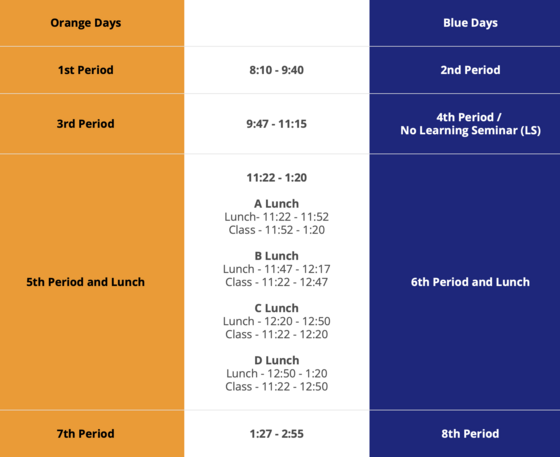 Orange and Blue days alternate throughout the year. Here is a link to our bell schedule.
-
Orange Day Periods – 1st, 3rd, 5th, 7th
-
Blue Day Periods – 2nd, 4th, 6th, 8th
- Students will learn their exact lunch period (i.e. A, B, C or D Lunch) from their 5th and 6th period teachers.
- View the Orange and Blue Day Calendar
Attendance
Find school policies and procedures regarding student attendance HERE. It is the responsibility of the parent or legal guardian to call the WSHS 24/7 Attendance Line, (703) 913-3838 to report late arrivals and absences due to illness or medical appointments.
- If your student is sick, will be late, or if they'll miss school, you should notify the school. Do the following:
-
Call the Attendance Line OR Send an E-mail
-
Email Attendance: WestSpringfieldHigh.Attendance@fcps.edu
-
WSHS Attendance Line: 703-913-3838
- Sub School 1 Last Names A - Crau press 1
- Sub School 2 Last Names Craw - Hur press 2
- Sub School 3 Last Names Hus - Miq press 3
- Sub School 4 Last Names Mir - Shao press 4
- Sub School 5 Last Names Shap - Z press 5
Learn more about FCPS attendance policies.
Still Need to Turn in Forms?
FCPS is offering a new online option where parents can easily update their child’s information. The Online Verification Update packet or OVU will allow parents to review and update phone numbers, emergency contacts and health information (such as health conditions and immunizations) for students. Enrolling parents will be able to access OVU through their SIS ParentVUE account (See SIS ParentVUE information below).
Parents must have an active SIS ParentVUE Account to access and complete the OVU packet.
Required Forms
- Update your student’s Emergency Care information in SIS ParentVue if anything has changed.
-
To update your contact information in ParentVUE, click the “Online Packets” tab in the upper right of the screen, then select the “Online Verification/Update” form in the drop down menu. Click “Begin Packet.”
-
Parents who do not have a SIS ParentVUE account continue to have the option to communicate updates via the normal paper process. You can also print and complete a blank Emergency Care Information Form needed for updates and submit it to your sub school Admin Assistant in the Main Office.
- Sign the Digital Resource Consent
- Sign the Student Rights and Responsibilities (SR&R) Document
- Parent/Guardian Signature Sheet: Please log in to your SIS ParentVue account and sign to acknowledge review of this document OR sign and return this Signature Sheet to your students Admin Assistant in the Main Office by September 29, 2023.
Optional Forms
Health Room Reminders
Medications: Parents can turn in student medications to the Health Room by appointment. Call (703) 913-3810.
Reminder: there is a NEW Epipen Authorization. We will no longer accept previous versions. Families needing to turn in medication must also submit a Medication Authorization Form. Parents should ensure expiration dates of medication(s) extend as far as possible into the school year.
Bus Schedules
Transportation assignments for eligible bus riders should be visible in the “Student Info” tab in both StudentVUE and ParentVUE.
Transportation Patience and Safety: Thank you for your patience (in advance!) as we all get used to new routines this school year. We also appreciate our kiss-n-ride families following the School Traffic Pattern (see below).
If a student’s bus is delayed, parents may access the Bus Delay Notification System or use the Here Comes the Bus mobile app to receive the delayed bus report. Email messages will be sent to announce significant bus delays. Contact the Transportation Office (Area 2 Office for WSHS, 703-446-2050) with any additional questions. For any concerns after hours (after 5:30pm), contact Safety and Security at 571-423-2000.
To make sure you receive email messages about bus delays, update your contact information in SIS ParentVUE.
School Traffic Pattern
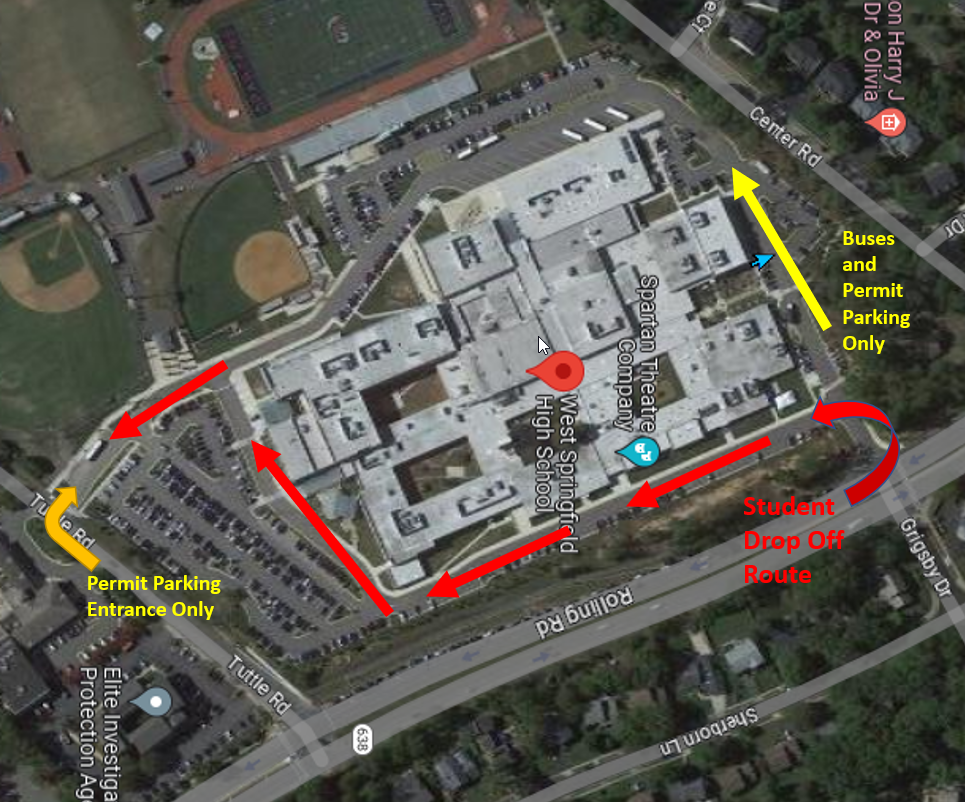 On Monday August 21st, student drivers and parents are advised to abide by our school Traffic Pattern depicted above.
- Students (seniors) with approved parking permits should entire through the Tuttle Road entrance or Grisby Drive entrance.
- Parents dropping off students in kiss-n-ride must enter through the Grigsby Drive entrance.
- NOTE: We will disallow parents to drop off students at the Tuttle Road entrance.
Lockers
Locker assignments (location and combination) should be visible in the "Student Info" tab of SIS StudentVue and SIS ParentVue. Freshmen and Sophomores are automatically assigned lockers. Juniors and Seniors can request lockers by filling out the WSHS Locker Assistance Form.
School Meals
Preparing for and Paying for Meals at School
Parents/caregivers need to provide their students with money to purchase meals at school, send them with a packed lunch, or apply (and be approved) for free and reduced-price meals benefits. School breakfast for students costs $1.75. Lunch is $3.50 for high school students.

Free and Reduced-Price Meals
The application for free and reduced-priced meals is now available for the 2023-24 school year. Students who were approved for free and reduced-price lunch last year are eligible for the first 30 days of school this year (or until a new application is processed). Families should re-apply as soon as possible for the 2023-24 school year, so eligible students continue to receive meals at no cost. Find the Free and Reduced-Price Meals Application at this link.
Paying With MySchoolBucks
The best way to purchase meals (and keep food lines moving!) is to use MySchoolBucks. Set up your student’s MySchoolBucks account today.
MySchoolBucks accounts can be set up to add money to the account automatically, as needed. Families with multiple children can use the same MySchoolBucks account. Visit FCPS’ Food and Nutrition webpage for more information.
|
Student Chromebooks
FCPS is changing its high school and secondary student devices to Chromebooks. This device will continue to enable students to use web-based tools like Schoology, Google, and online textbooks. Students that missed pick up during Spartan Spree (Open House) will receive a device within the first week of school.
If you would prefer that your student bring their own device, they need to make sure it meets FCPS’ minimum requirements. Students who use their own device will not receive an FCPS device. Our school Tech Team will make sure that students have access to an FCPS device for important tests, such as SOLs. FCPS strives to be financially and environmentally responsible. Students who do not use their FCPS device regularly will be asked to return it.
E - Hallpass
WSHS will continue to use E-Hallpass this school year. E-Hallpass is a modern and convenient tool that enhances communication and streamlines the hall pass process. E-Hallpass allows students to request and manage hall passes electronically, ensuring a smooth transition between classes while maintaining a secure and efficient environment. Rest assured, your child's safety and privacy remain our top priority, and E-Hallpass has been designed with these considerations in mind. We believe this technology will contribute to a more productive and organized school experience.
Communication and Online Resources
Registering for SIS ParentVUE / SIS StudentVue
The Student Information System (SIS) ParentVUE Account is the FCPS secure solution for accessing information about your student's attendance, class performance, demographic data, and link to Schoology. It provides an additional conduit for communication with our school.
Customized for Elementary, Middle, and High School students, your SIS ParentVUE Account login credentials can also be used to access Schoology.
Instructions for getting the ParentVue Mobile App.
To request support for ParentVue, use the Parent Support Request form.
For information about registering for an account, visit this SIS ParentVue Account Registration on the FCPS webpage. If you do not have an Activation Code, please submit a Parent Support Request ticket to receive an Activation Code via email.
What Is Schoology?
Teachers use Schoology to post their classroom materials online; to provide a secure forum for students to discuss their ideas and collaborate on projects; and to assign and collect homework electronically. It helps students stay organized and it keeps the class connected.
A Schoology Parent Account gives you access to:
- Your child’s classes.
- Your child’s upcoming assignments.
- School, class, and group announcements.
Parent accounts will be available after August 21. To access Schoology, parents will need to have an active SIS/ParentVUE account. More information on how to login and use Schoology is available online.
TalkingPoints
Many of our staff and faculty will utilize Talking Points to communicate with parents/guardians this year about your student's education and progress. TalkingPoints is an easy and safe way families can communicate in their home languages with their child’s teachers for free. This platform is being used across FCPS. Learn more about TalkingPoints and how you can download the app HERE.
SPORTS AND ACTIVITIES

Follow Spartan Sports
The best way to follow our Sports Teams is via the official site of Spartan Athletics, including:
- Scoreboard
- Seasonal sports registration information
- Upcoming events
Save the Date
HOMECOMING - October 6
- Football Game vs. Robinson, 7pm
HOMECOMING DANCE - OCTOBER 7
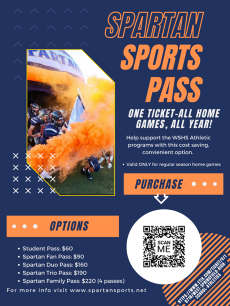
Get Your 2023-2024 SPORTS PASS
Never too early to get your Spartan Sports Pass! These are all-sport, all year passes. NOTE: WSHS home games only. Scan the QR code below or access the ETIX sports calendar link here.
|
Activities Calendar
We have ceased to use our Activities Calendar. Clubs and Activities will transition to using Schoology to publish most events. Stay tuned!
Stay in Touch with Spartan Sports!
You can follow WSHS Spartan Sports on social media:
Twittter (X): @wshssports
YouTube Channels: LINK
Sign Up For the Sports and Activities News You Choose
FCPS INFORMATION
The 2023-30 Strategic Plan — Foundation of Four Pillars
The division’s new strategic plan is built on a foundation of four pillars — what FCPS must do well to reach its goals for all students. The pillars include:
- We design innovative learning experiences that meet the needs of each and every learner, and implement professional practices that engage, empower, include, and challenge the whole learner through varied opportunities.
- We share responsibility to build trusting partnerships that sustain a safe, inclusive culture for learning and work, and we collaborate proactively with respect, honesty, and transparency.
- We recruit and retain staff who reflect the diversity of students and families; provide meaningful continuous learning, exceptional compensation, and balanced workload; and create a safe and culturally responsive environment that values staff voice.
- We nurture processes and structures that are grounded in intentional partnerships, shared responsibility for equitable resource allocation, and data-driven continuous improvement and innovation.
Stay tuned to learn more about our five goals of the new strategic plan, or visit our Strategic Plan webpage.
Quick Links
WSHS Social Media
Find WSHS Spartans on:
|
