|
In This Week's Wise Words:
🌟 Principal's Message
🌟 Transportation Patience & Safety
🌟 Kiss & Ride
🌟 SWES Tech Squad
🌟 Shrevewood PTA T-Shirt Order Form
🌟 Back-to-School Picnic | Friday, September 8th
🌟 Cell Phone and Smartwatch Usage at School
🌟 The Positivity Project
🌟 SIS ParentVUE
🌟 Update Contact Information to Receive Messages from FCPS
🌟 Annual Notice of Survey, Records, Curriculum, Privacy, and Related Rights
🌟 2023-24 Student Rights and Responsibilities
🌟 🔍 Lightspeed Parent Report on Child’s Device Activity
🌟 Parental Permission to Use Digital Resources
🌟 Free/Reduced Lunch Applications
🌟 Talking Points
🌟 FCPS News
🌟 Save the Date
Hello Shrevewood Families,
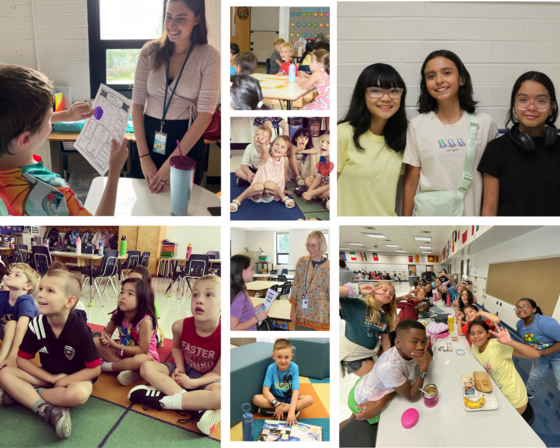
This week was wonderful as we welcomed our students back into the building for the 2023-2024 school year! The energy, smiles, and excitement radiated throughout the school.
This year, we are focusing on our three universals: be kind, be safe, and be responsible. Classes have been discussing what each of these sound and look like and practicing them throughout the day. In addition, our theme for this school year is Achieving Excellence Together. We are committed to building strong relationships, partnering with all stakeholders, and keeping open lines of communication throughout the school year to ensure the success of all of our students.
In previous years, we have sent out our Wise Words newsletters on Fridays. To align our communication with the Thursday folders, we will start sending our newsletters out on Thursdays next week. Wise Words provides you with information to stay connected with what’s happening at school and to keep you in the loop with exciting news, important dates, and deadlines.
This week was the perfect start to what we know will be a phenomenal school year!
Sincerely,
Joshua DeSmyter, Principal
Katie Vandawalker, Assistant Principal
Thank you for your patience as we all get used to new routines this school year. We appreciate our families following kiss and ride procedures and being patient as they wait for their children’s buses.
If a student’s bus is delayed, parents may access the Bus Delay Notification System or use the Here Comes the Bus mobile app to receive the delayed bus report. Email messages will be sent to announce significant bus delays. Contact the Transportation Office at 703-249-7100 with any additional questions. For any concerns after hours (after 5:30 p.m.), contact Safety and Security at 571-423-2000.
To make sure you receive email messages about bus delays, update your contact information in SIS ParentVUE.
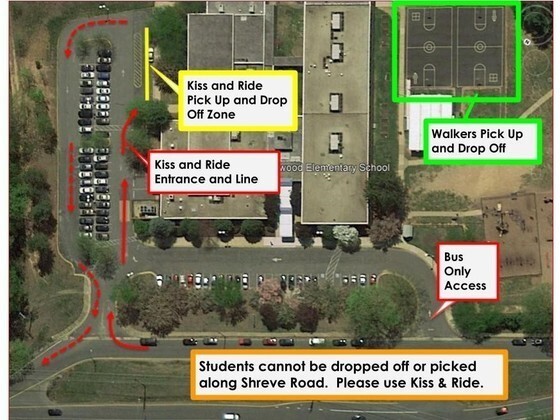
Below are our general guidelines for entering Kiss & Ride safely and respectfully:
- Students need to be able to enter and exit the vehicle from the passenger side (right) of the vehicle. It is not safe to have children walk around to the driver side.
- Parents/Guardians are requested to remain in the vehicle as school staff will open doors.
- Students cannot load or unload outside of the Kiss & Ride lane that is marked with orange cones.
- Please be patient in the first few weeks, as logistics with student numbers may lend to longer wait times.
Please refer to the visual below for drop off and pick up information for all students.

This year, the PTA will provide a free Shrevewood t-shirt for every student. If you did not sign up for a t-shirt at Open House, please use the online order form.
Save the Date for our Back-to-School Picnic on Friday, September 8th, 6-7:30 p.m. at Shrevewood (rain date: Friday, 8/15).
Come enjoy dancing to music from an awesome DJ, the Kona Ice truck, pizza, games, and more!
Pre-order pizza for your family! Pizzas will be distributed at the picnic. Order pizzas here: https://shrevewoodes.memberhub.com/store/items/898361
In accordance with the FCPS SR&R, elementary students are not allowed to use the call/text function on smartwatches during the school day. This policy does include non-instructional times including lunch and recess. If your child is not feeling well, please remind them that they need to tell their teacher, so we can support them in the clinic; they can call you from there. Please do not call, message, or reply to your child on their cell phone or smartwatch during the school day. Below is the language from the SR&R for students in elementary school:
Phones must be silenced and in backpacks for the duration of the school day. Watches that serve a dual purpose (e.g., smart watch) may be worn; however, phone features (e.g., texting, Internet, calls, etc.) are to be off when phone use is prohibited. Students are prohibited from using phones, tablets, and other mobile devices in restrooms and locker rooms, unless there is a medical necessity or emergency. Teachers may allow usage of cell phones for instructional activities where they are the most appropriate tool, however one-to-one FCPS devices should meet most needs. Cell phones may be used on campus only before and after school. The full SR&R document is linked here.
This week our school community will be focusing on the character strength of Curiosity during Morning Meeting. Curiosity means you like exploration and discovery. You ask lots of questions, because you want to learn more about anything and everything.
Curiosity is a crucial component of one’s character. Our innate urge for discovery and exploration is a key element of our human desire for wisdom and knowledge. It’s what keeps us intrigued in the plotlines of movies and books. It’s what pushes us to try new activities or travel to different places. All individuals experience curiosity but differ in their willingness to experience it -- behaviorally, intellectually, and emotionally.
Individuals with the character strength of curiosity are more likely to ask questions and try new things. Curiosity, then, is a form of courage. Asking questions exposes the fact that we don’t know, and trying a new activity means we might fail. However, it’s only through asking questions and exploring new opportunities that we learn and grow.
To practice and encourage the character strength of curiosity with your child, please visit the Positivity Project’s P2 for Families (password: P2) where together you will watch a video, read a quote, and talk about the answers to three questions.
Access your student’s attendance records, grades, and assignments at any time with SIS ParentVUE. Caregivers should receive an activation code when they register their child.
Once you have activated a ParentVUE account for an FCPS student, you will keep the same account until the student graduates. Information about students in the same family can be accessed through the same ParentVUE account. Access SIS ParentVUE by using an app on your iPhone, iPad, or Android devices.
Need help creating a SIS ParentVUE account? This video walks through the steps. Find out more about SIS ParentVUE.
Be among the first to know about weather closings, bus delays, and other critical communications from FCPS and our school by providing your cell phone number and email in SIS ParentVUE. Make sure you complete the Emergency Care Form for your child every year and update when necessary.
To update your contact information in ParentVUE, click the “Online Packets” tab in the upper right of the screen. Then select the “Online Verification/Update” form in the drop down menu. Click “Begin Packet.”
Parents who do not have a SIS ParentVUE account continue to have the option to communicate updates via the normal paper process. They can also print and complete a blank Emergency Care Information Form needed for updates and submit it to the front office.
Fairfax County Public Schools wants all parents to understand its policies regarding surveys, records, curriculum, privacy, and related rights.
In its Annual Notice of Survey, Records, Curriculum, Privacy, and Related Rights, and Opt-Out Forms (Annual Notice), FCPS provides explanations of the rights listed above as well as forms that may be used to exercise opt-out choices. Two versions of the Annual Notice are available — a grades K-8 version and a grades 9-12 version. Parents with children at different grade levels should read each applicable version of the Annual Notice, because the notices and opt-out rights vary depending on the student’s grade level.
Get more information and view the 2023-24 Opt-Out Booklets.
FCPS’ Student Rights and Responsibilities document (SR&R) explains expectations for student behavior and adult responses to enhance school safety and to create a fair, equitable, and supportive school environment. In late June, the School Board approved changes to the SR&R for the 2023-24 school year. Updates include a revision of dress code expectations, bystander expectations for students witnessing harmful or unsafe behaviors, bullying, and substance abuse responses. Read Superintendent Dr. Michelle Reid’s letter to families regarding the SR&R.
Parents/caregivers should talk to their child(ren) about expectations for this school year. Also, please log in to SIS ParentVUE and sign to acknowledge your review of the SR&R, or sign and return the signature sheet to your child’s school by Friday, September 29.
FCPS has tools to help parents know more about their child’s activity on any FCPS device. These tools are provided at no cost to families by Lightspeed, the school division’s internet content filtering service.
Parents may sign up for a weekly Parent Report, which will provide a list of the top sites your child visited. The report also offers parents the ability to sign up for free access to the Internet Use Parent Portal. Through the portal, parents may pause their child’s access to the internet on their FCPS device during non-school hours.
Learn more about Lightspeed Parent Reports.
Our teachers will use a variety of digital resources to support student learning and promote communication and collaboration with students and families. Some of the digital resources your child may use this year will require your consent before they can be used. Additionally, you can find more information about approved digital resources in FCPS here.
Included on this page is also a link to where the enrolling parent or guardian will need to indicate whether or not their student is allowed to use the list of digital resources this year. This page also provides more information about how FCPS carefully reviews digital resources for approval and why we must request your consent before using certain tools. We encourage you to complete the parental consent for digital resources form as soon as possible, as your child will not be able to use the digital resources until we have received your permission. Please reach out to Kaylin Daniels (kldaniels@fcps.edu) if you have questions or concerns about the digital resources we’ve chosen to use this year.
 |
|
Breakfast and Lunch
Breakfast will be $1.75. Lunch will be $3.25, milk $0.60. Money can be added to your child(ren)’s accounts using www.myschoolbucks.com. You can also write a check to Shrevewood Food Services and deliver it to our Food Services Manager at Open House. During the school year, you can find the menu for breakfast and lunch at https://fcps.nutrislice.com/menu/shrevewood-elementary
|
Free and Reduced-Price Status
Students eligible for free or reduced-price meals will continue to receive these benefits through the end of September. A new application must be filled out each new school year. Forms are available online now: https://www.fcps.edu/resources/student-safety-and-wellness/food-and-nutrition-programs/free-and-reduced-price-meals. Applications are accepted at any time, but we encourage you to apply or renew your application before the end of September. Call (703) 813-4800 if you need help. This must be completed for eligible students to receive free meals.
FCPS has recently adopted TalkingPoints, a two-way messaging app that allows parents and caregivers to communicate with teachers and schools. At Shrevewood, we used this app last school year. The recent changes allow us to communicate with all caregivers using the information stored in the Student Information System. Families will receive messages through the TalkingPoints Parents App or via text message. We will now be able to reach out to families with school- and grade-wide messages such as reminders about assignments and events happening at Shrevewood. For more information, visit the FCPS TalkingPoints webpage. The app translates messages, so teachers can input messages in English and parents can respond in their preferred language. TalkingPoints supports 125 languages, making it easier and faster for our FCPS families to connect with their schools. If you need to update your preferred correspondence language, contact Sebastian Brennan in our Front Office.
In case you missed it in FCPS This Week, the school division shared updates on the following topics:
- Safety and Emergency Information
- Updated Student Rights and Responsibilities - Signature Needed
- Parental Permission for Digital Resources
Read FCPS This Week to learn more about these topics. If you are not already receiving the weekly newsletter, sign up today.
⭐Labor Day Holidays⭐
Friday, September 1, and Monday, September 4
⭐PTA Back-to-School Picnic⭐
Friday, September 8, 6:00 p.m. - 7:30 p.m.
⭐Back to School Night⭐
Wednesday, September 13, 6:00 p.m.
⭐Yom Kippur Holiday⭐
Monday, September 25
|