Important Dates
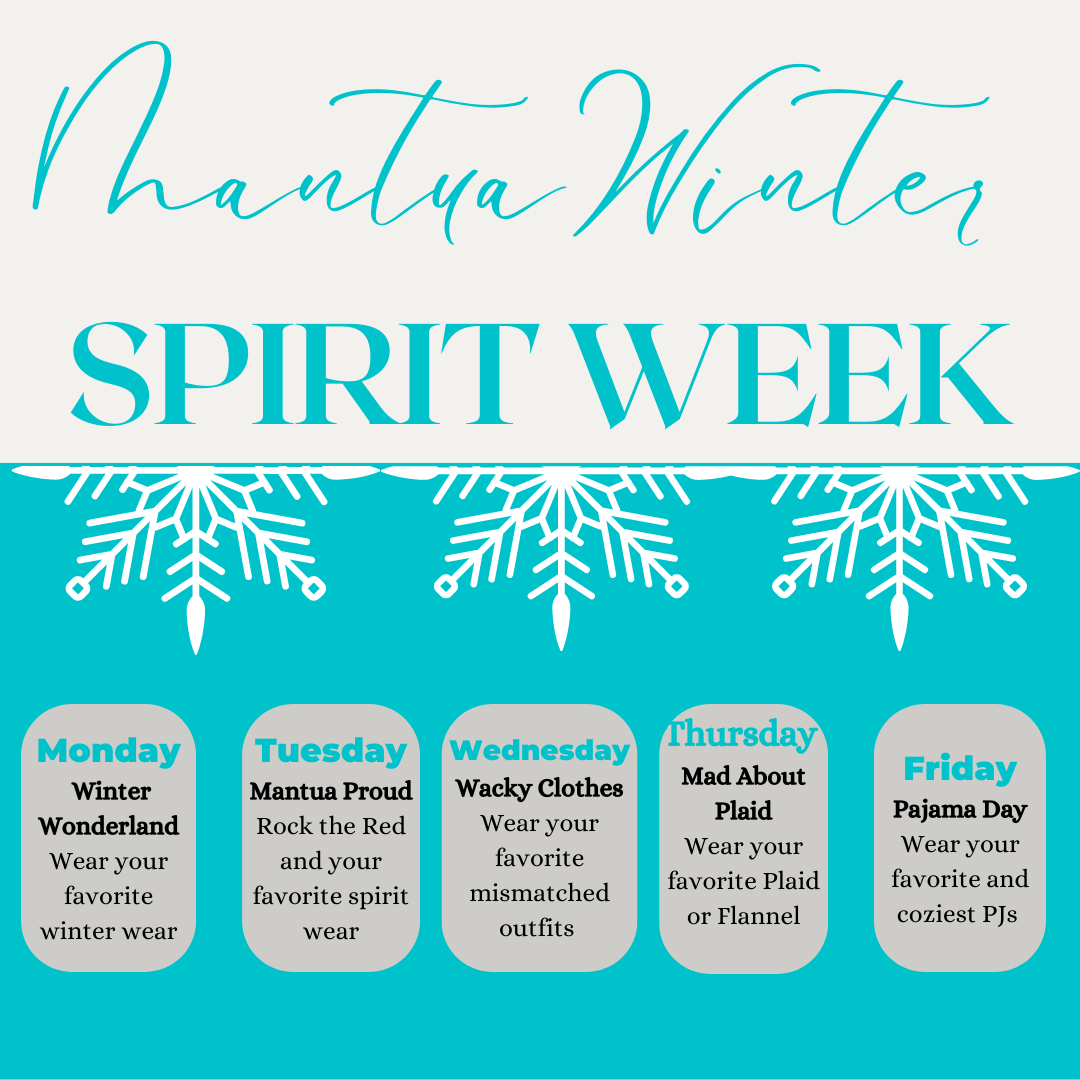
December 12-16 Mantua Spirit Week
December 14: Fall Picture Retake Day
December 15: Deadline for Parent AAP Referrals
December 18-26: Chanukah
December 25: Christmas
December 19-January 2: Winter Break, School Closed
January 3: Classes resume
See the complete 2022-23 school year calendar
Winter Spirit Week at Mantua
We’re celebrating our last week at Mantua for 2022, and everyone is joining in the fun! Here is the schedule for our winter spirit week December 12-17:
Mantua News
Picture Retake Day
We have scheduled a make-up day for pictures, for those students who were absent or who require a retake. Retake day is December 14. If your child already took their picture and would like a retake, please send the original picture back to school with your child. For new students and those who were absent on October 18, please send your child with their order envelope. These order envelopes were sent home last week. If you have any questions, please contact the main office.
Advanced Placement Programs
Parents/guardians of students in grades 2-7 who would like their student to be considered for full-time advanced academic programs (Level IV AAP services) may submit the AAP Level IV Referral Form no later than December 15. This deadline may not be extended. Referral forms may be found on the FCPS website by typing “AAP forms” into the search bar. If you need help accessing forms, you may contact our Mantua Advanced Academics Resource Teacher (AART), Kathy Van Dyke, at kkvandyke@fcps.edu. Completed forms may be dropped off at the Mantua main office, or may be emailed directly to Ms. Van Dyke.
Winter Sing-Along December 16
We are very excited to announce the return of our Winter Sing-Along this Friday afternoon, December 16. Please note that this year the sing-along will be a student-only event. Students and staff alike are looking forward to resuming our annual tradition.
Building Closed During the Break
Our main office will be undergoing a facelift over the winter break. Because of this our main office will be closed, but you will be able to contact Ms. Delvalle by email, if needed, atadelvalle@fcps.edu.
Upcoming Growth Assessments in Grades 3-6
Students in grades 3-6 will continue to participate in the Winter Virginia Growth Assessment (VGA). Please see the schedule below. It is important that your child attends school on these days. Make up sessions will be available for any absences. It is helpful to make sure your child has a good night of sleep and a healthy breakfast at home or at school.
Additional information about VGA tests is available on the VGA public webpage.
Tuesday 12/13 - 4th Grade Reading
Wednesday 12/14 - 3rd Grade Reading
Mantua / FCPS Inclement Weather Plan
As you have read from the FCPS announcements, the inclement weather procedures for FCPS will remain the same as last year. The first five inclement weather days will be traditional “snow days” with no school activities. After those five days, we will have unscheduled virtual learning days, whenever possible, to maintain the continuity of learning. Virtual learning on these days will be synchronous/live instruction.
On those days, teachers will have students access a Zoom link from their class Schoology courses. We will be starting the day at 10:30 and ending at 3:15. There will also be a 1 hour lunch and recess built in from 12:00- 1:00. All students will have had a practice with their teachers so that all students know how to access the Zoom and what behaviors are expected as to attendance and working.
Please consider bookmarking FCPS' Weather Cancellation Procedures to stay informed in case of winter weather or other emergency situations. We will send more detailed information in the coming weeks. You can read more about how to prepare for an inclement weather day here.
Laptops & iPads Coming Home Over Winter Break in All Grades
In order for students to be able to access Lexia and ST Math over the Winter Break if they choose to continue learning AND to plan ahead in case of a repeat of last year’s multi-day snow event, ALL students in grades kindergarten through 6th grade will be bringing their laptops or iPads (for kindergartners) home on Friday, December 16. If you know that your student will NOT be in school on December 16, please be sure to let their teacher know ahead of time. Please make sure that the devices, and device cases given to students at that time are returned on the first day back to school after the break. Below are come at home readiness steps to help your student be ready for virtual learning.
At Home - Technology Readiness Steps for Students
- Log onto your laptop with your student ID and password.
- Connect your laptop to your home internet connection.
- Login to Google account. In the Chrome browser, go to www.fcpsschools.net, sign in with your fcpsschools.net account.
- Log into Schoology. Make sure you can access your courses.
- If you have any issues with these steps from home, go to the Tech Support for Families page, to submit a ticket for support.
Please do not take the FCPS devices with you if you are traveling outside of Fairfax. Need tech help over the Winter Break or anytime? Use the information here.
FCPS News
Parent Advocacy Handbook
The Parent Advocacy Handbook is for parents and guardians -- a child’s first teacher and advocate. It is believed that parents and guardians should advocate and support their children’s academic, social, and emotional growth from preschool through high school, and beyond.
Information and resources within the handbook are designed to help parents and guardians:
- Learn about their rights and responsibilities as an FCPS parent or guardian.
- Learn more about what is going on in the student's school.
- Gain skills to advocate for your student at school.
- Learn more how to monitor and help your student at home.
- Find extra help and resources.
The handbook contains answers to the many questions parents may have about the school system and how they can best advocate for their student at the various stages of their school experience.
Be an advocate for your child. Know what is happening at school. Ask questions. Express your ideas, comments, and concerns. Check to see that promises made are kept.
Screen Activity Report
What is it?
Parents can submit a request for a weekly email report with a summary of their child’s FCPS device Internet activity.
How can parents get access?
Parents can simply submit a request on the Tech Support for Families page (https://www.fcps.edu/return-school/technology-support-families).
What will parents need to provide?
Before submitting a request, parents/guardians will need the enrolling parent email address on-file in our Student Information System, as well as the Student ID for their child.
How can parents learn more about what is available?
For more information about the report and additional features available to parents, please visit the Lightspeed Parent Report information page. https://www.fcps.edu/resources/technology/lightspeed-parent-reports).
FCPS Strategic Plan
The strategic planning process is a community-wide effort. There will be many opportunities to share feedback or participate in a community meeting. We want our community to stay informed and be involved. You can help!
If you are an active member of a community organization or group who people look to for information, please consider signing up to be a key communicator during the strategic planning process. FCPS key communicators should have an interest in sharing information about the school division and encouraging involvement. Key communicators will:
- Receive regular updates including news, information, future events, and engagement opportunities.
- Share the information they receive with their group in a timely manner.
- Encourage group participation in engagement and feedback opportunities where appropriate and possible.
Talking Points
FCPS has recently adopted TalkingPoints, a two-way messaging app that allows parents and caregivers to communicate with teachers. Look for messages from Mantua or your child’s teacher. Messages will come directly to the phone number that is registered in our system as a SMS text or through the TalkingPoints Parent App. Families will receive messages in the language they have listed as their correspondence language. You can reply by text or through the app. If you prefer to not receive text messages from TalkingPoints, you can reply with "GOODBYE" at any time. For more information, visit the FCPS TalkingPoints webpage.
The app translates messages, so teachers can input messages in English and parents can respond in their preferred language. TalkingPoints supports 125 languages, making it easier and faster for our Mantua families to connect with our school. If you need to update your preferred correspondence language, contact the front office at 703-465-6300 and ask for Ms. Mergie Kakouris.
Contacts
Linda Shannon, lcshannon@fcps.edu
Amy Alley, Assistant Principal, avalley@fcps.edu
Rich Deixler, Assistant Principal, radeixler@fcps.edu
AnnMarie Delvalle, Administrative Assistant, adelvalle@fcps.edu
Mergie Kakouris, Student Information Assistant, mbkakouris@fcps.edu
Fadwa Finaish, Office Assistant, ffinaish@fcps.edu
Susan Palomino, Office Assistant slpalomino@fcps.edu
Technology Support for Families/Parent Help Desk: 1-833-921-3277
Parent Information Phone Lines/Support for parents who do not speak English as their first language: Parent Information Phone Lines
Parent and Student technology support: IT Support Portal
Our Mental Health Team is available if your child needs support.
Richard Hang, Counselor, rhang@fcps.edu
Susan Song, Counselor (Returning soon!)
Austin Swift, School Psychologist, atswift@fcps.edu
David Glasser, Psychologist, dmglasser@fcps.edu
|

