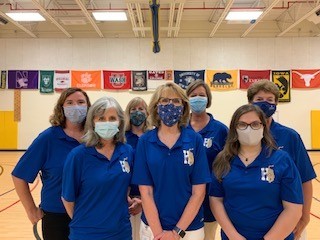
Haycock Administrators and Office Staff
Back row: Dana Chen, Debbie Felix, Heather Boyd, Mary Ann Smith
Front row: Cathie Eames, Liz Beaty, Christine LaVallee
Principal's Message
It was wonderful to see many of you at Open House yesterday.
We are so excited to welcome all our students back on Monday, August 23. We have been working hard all summer preparing for their return, and we can't wait!
Our bell schedule is 9:20-4:05. Students can enter the building beginning at 9:05.
We are looking forward to your partnership in kicking off a great 2021-22 school year.
Dr. Liz Beaty Ms. Heather Boyd Ms. Dana Chen
Principal Assistant Principal Assistant Principal
Kiss and Ride
For those parents who will be picking up their students at Kiss and Ride, please place a paper on the right side of your dashboard with your student's name and grade level in LARGE LETTERING. This will help the Kiss and Ride process move more quickly and efficiently. Thank you for your help with this.
|
|
 |
For our Walkers- Crossing Guard Guidelines
Click here for guidelines from our crossing guard.
Kindergarten walkers will be dismissed from door 11.
Grades 1-6 walkers will be dismissed from door 12.
Sharing Contact Emails with Room Parents
Please consider providing your email for room parents to contact you with updates from your child's class and the PTA. Complete this Google form if you wish to provide this information. https://forms.gle/NHVC4X2fXkb9Et3x6
Schoology Information for Parents
|
Login to Schoology with your SIS/ParentVUE account. Make sure you have registered for a SIS/ParentVUE account.
Login to Schoology at lms.fcps.edu
Wondering about the differences between a parent account and a student account in Schoology? http://bit.ly/FCPSsgydif
|
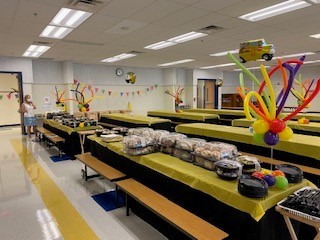
Thank you to our wonderful PTA!
The festive and delicious lunch provided for teachers during their first week back was much appreciated and thoroughly enjoyed. You all are the best!
|
|
 |
Important Upcoming Dates
Saturday, August 21st at 3:00-4:00 PM- Kindergarten Playdate-playground
Monday, August 23rd- First day of school for students
Wednesday, Sept. 1- Virtual Parent Coffee (10:00 a.m. and 6:30 p.m.)
(will be recorded and shared for those who cannot attend)
Tuesday, September 14- Virtual Back to School Night- 6:00-7:30
(will be recorded and shared for those who cannot attend)
To Do At Home for Students in Grades 3-6
Students in grades 3-6 will be issued a school computer to take back and forth from school. Please follow the following directions from home once your student receives their FCPS laptop:
At Home - Technology Readiness Steps for Students (NEW)
- Log onto your laptop with your student ID and password.
- Connect your laptop to your internet connection.
- Login to Google account. In the Chrome browser, go to www.fcpsschools.net, sign in with your fcpsschools.net account.
- Log into Schoology. Make sure you can access your courses.
- If you have any issues with these steps from home, go to the Parent and Student IT Support Portal, to submit a ticket for support.
Additional Tech Resource information:
 |
|
Student Materials for 21-22
Please see the information on our website regarding grade level materials lists School Supply Lists
|
 |
|
Shoes for PE Class
For safety purposes, it is incredibly important for students to wear tennis shoes to the gym for P.E. class. Please see this flyer from our PE teachers, Ms. Hecht and Ms. Callsen, for more information.
|
Beginning of Year Forms
All forms will remain electronic this school year. There will be no large parent packet of forms. You are welcome to bring any hard copies to open house on 8/19, drop them off at the front office or send via email to Christine LaVallee at clavallee@fcps.edu.
Digital Consent Form
At Haycock, our teachers will use a variety of digital resources to support student learning and promote communication and collaboration with students and families. Some of the digital resources your child may use this year will require your consent before they can be used. You can find our school’s list of the resources that require parental consent here: Haycock's Adopted Digital Resources. Additionally, you can find more information about the approval process in FCPS here: Digital Resources in FCPS.
Included on this page is also a link to a form where the enrolling parent or guardian will need to indicate whether or not their student is allowed to use the list of digital resources this year. Please complete the form for each student you have in FCPS. This page also provides more information about how FCPS carefully reviews digital resources for approval and why we must request your consent before using certain tools. We encourage you to complete the parental consent for digital resources form as soon as possible, as your child(ren) will not be able to use these digital resources until we have received your permission. Please reach out to your child’s teacher about the tools chosen for their grade level or Haycock’s School Based Technology Specialist (SBTS) Ben James at bbjames@fcps.edu if you have questions or concerns about the digital resources we’ve chosen to use schoolwide this year.
Emergency Care Form
Complete Emergency Care Card now Electronically in weCare
In ParentVUE, on August 19th, you can access the weCare module to update emergency care information and health information. Each school year parents need to verify the information in weCare for each student. We are required to have this completed at the start of each school year to meet regulations. Forms are due by August 23, 2021.
ParentVUE Access for New Families: This week, new families should receive a letter in the mail with an access code to activate your ParentVUE account. This FCPS video walks you through the process step-by-step: Creating a SIS ParentVUE Account. For tips on how to use your new account, FCPS has produced this short video to help you out: Navigating SIS ParentVUE. Please contact our registrar Christine LaVallee if you need assistance obtaining a ParentVUE account.
Other Beginning of the Year Forms
If completing opt out forms, you may drop them off at the school or send via email to Christine LaVallee at clavallee@fcps.edu.
See everyone on Monday!
|