For a translated version of this newsletter, please click HERE. Next click on the language icon in the upper left corner to choose your preferred language. Para obtener una versión traducida de este mensaje, haga clic AQUÍ. Luego, haga clic en el icono IDIOMA en la esquina superior izquierda para elegir su idioma preferido.

Favorite Book Character Day!
Thank you to all of our students, teachers and staff who participated on Tuesday, March 2nd for our dress as your favorite book character day!

News from Bailey's
Dear Bailey’s Families,
March is finally here! We are already beginning to experience signs of Spring with longer days, warmer weather, and birds chirping!
Thank you to the first and second grade parents who joined us for the Q&A session on Tuesday night! We hope we were able to answer any lingering questions you may have had about your child’s return to school. Here is a link to the recording of the session for parents who were not able to join us: https://youtu.be/4B_gSb1v_Kc
First and Second grade families are encouraged to check their emails as we sent information about student arrival, dismissal, and meals.
Lastly, please make sure you have completed the following FCPS forms: Emergency Care Form, Health Information Form, Student Rights and Responsibilities Form, and the Health Screening Commitment Form. It is important that we have current information for your children, so please return these forms as soon as possible. Links to each of the forms are listed below.
Enjoy the long weekend! We’ll see you on Tuesday!
Satonya, Mirna and Jillian

Calendar Reminder: Student Holiday on March 8th
As a reminder, Monday, March 8th, is a staff development day and student holiday. Teachers will participate in a variety of professional development and planning activities and will not be available for instruction or office hours . Students are not expected to complete asynchronous assignments on the March 8th student holiday. See the complete 2020-21 school year calendar.
More Important Dates
March 8th-Teacher workday; no school for students
March 9th-Grades 1 & 2 Return
March 26th- Early Release Day, dismissal for ALL students will be 1:50pm
|

Important Return to School Forms
Please make sure the following forms are complete. If you cannot access these forms on-line, please come to the school to complete them, these forms are required for every student in FCPS.
*These forms must be filled out one time per student each year.
Digital Resources Access/Consent Form * (online only)
All parents will need to access this link so your child can access FCPS digital resources (websites) listed on our Bailey's website.
Please note some of these resources will be used often and others may be used from time to time.
|

Playground Use
At this time, students are not permitted to use the playground equipment. To ensure the safety of our students who have returned to the building for in-person learning, we are asking that no children play on the playgrounds during school hours. Thank you for your cooperation and support!
|

Library Books
Hello, Families!
As students begin to return to school, please have them bring in any school library books that are in your homes. We would be happy to see them returned to the library. Thank you!
|

Attention Rising 3rd Graders
Mark your calendars! On Monday, March 8th at 2:00 pm, Bailey’s Upper will host a Virtual Rising 3rd Grade Information Session for parents and students.
Please join us at the following BBCU Link: https://us.bbcollab.com/guest/4078968c2eee430da0fdb1d17cf9fffd.
We cannot wait to see you there!
|
Cloth Masks and Face Coverings
If your child will be returning in person, please review the types of masks that are approved for student use. Students must wear a mask to school. We recommend students have an extra mask in their backpack.
The following cloth masks/face coverings are NOT supported by FCPS:
- Gaiters with a single layer - NEW
- Face masks/face coverings with exhalation valves/vents
- Cloth masks/face coverings with a single layer - NEW
The following cloth masks/face coverings are acceptable and supported by FCPS:
- Gaiters with 2 or more layers - NEW
- Cloth masks/face coverings with 2 or more layers – NEW
Please refer to the following resources for detailed information: Your Guide to Masks.
Important Medication Information
If your child will participate in in-person instruction and needs to take medication during the school day, please contact the school to set up an appointment to bring in the medication prior to your child’s first day of school. If your child needs to take prescription medication during the school day, have your doctor complete the medication authorization.
For EpiPens, your doctor must complete the epinephrine Authorization form. Please contact the office if you have questions about dropping off medication.
Parent/Guardian Health Screening Commitment Form - Now Available in PVUE
The Health Screening Commitment form is now available in PVUE for In-Person students. At least one parent/guardian must acknowledge the commitment once prior to their child coming In-Person. If a student has been In-Person and returned to virtual, their parent/guardian will not have to submit the Health Screening Commitment acknowledgment again. More information, including paper copies, are found on the FCPS Student Health and Safety page. https://www.fcps.edu/return-school/student-health-and-safety-guidance-document
Stop the Spread: Protect Yourself and Slow the Spread of COVID-19
Your actions keep all of us healthy, and we need to keep it up and continue working together to help slow the spread of COVID-19. There are some simple steps you can take to protect yourself and your family. Testing, contact tracing, and staying home and away from others when sick or after contact with someone who is sick, are also critical to help “box in” COVID-19 and prevent it from spreading further in our community.
Fairfax Water Bill Relief Program
Drinking water and wastewater utilities provide a critical service to the community, especially during a pandemic. To provide financial relief for customers in need, Fairfax Water is working to administer funds received from the Commonwealth of Virginia’s COVID-19 Municipal Utility Relief Program.
An application is available on Fairfax Water’s website at bit.ly/FWoptions. To qualify, you must meet certain eligibility requirements, attest that you are experiencing financial hardship due to the coronavirus public health emergency and submit an application to Fairfax Water. Funds are available on a first-come, first-served basis, so please apply soon.
For additional assistance, call Fairfax Water’s customer service department to discuss payment options. The call center is available weekdays, 8:00am - 6:00pm at 703.698.5800 (TTY 711).
Elementary Magnet Schools Applications Accepted March 2 - April 6
Fairfax County Public Schools will be accepting applications for its elementary magnet school programs beginning Tuesday, March 2. Bailey’s Primary School for the Arts and Sciences will accept lottery applications for students who will be in grades K-2 during the 2020-21 school year; Bailey’s Upper School for the Arts and Sciences will accept applications for students in grades 3 and 4. Hunters Woods Elementary School for the Arts and Sciences will accept lottery applications for students who will enter grades K-6 during the 2019-20 school year.
Selection for available magnet school spaces is based on a lottery. Registration for the elementary magnet school lottery closes on Tuesday, April 6, at 4 p.m.
Parents are strongly encouraged to attend virtual school-based information nights on Tuesday, February 16, for Bailey’s Elementary; Wednesday, February 17, for Bailey’s Upper; and Thursday, February 18, for Hunters Woods. These information nights will provide the opportunity to learn about individual school programs, student eligibility, the lottery process, and available transportation.
Get more information about parent information nights and the magnet school lottery.
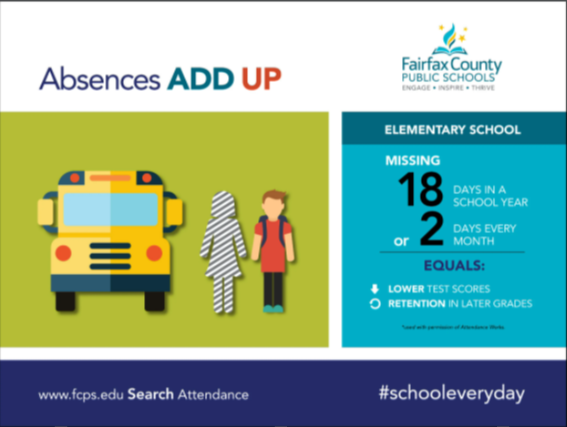
Attendance Matters!
 |

Parent/Student Tech Support!
Check out our Bailey’s Technology Support Page: The Bailey’s tech team has created videos and resources to help you with troubleshooting at home.
Proactive Troubleshooting
We’ve been working hard in our distance learning environment for over 10 months now. Very few problems are new; now it’s just a matter of diagnosing the issue and finding the last message we sent with the solution. The three most useful things that you can do to prevent or troubleshoot issues are as follows:
- Restart the computer daily.
This simple maintenance task can keep your school laptop performing throughout the school year. It ends processes running in the background and installs available updates. In regular school years, we can easily do this on a regular basis; it’s not as easy when all of our computers are being used remotely this year! Video Directions | Written Directions
- Clear your browser cache.
The majority of sites that we’re using this year perform best in Chrome. Some will work in other modern browsers like Edge or Safari, but the default on our devices is set to be Chrome. Clearing your browser cache can solve a lot of problems, especially login issues. You can see how to do it here: Clearing the Cache in Chrome.
- Sign in at school.
Some login problems simply can’t be fixed or prevented by the two steps above. Because our devices now live off of our network for months at a time, the only remedy to sync the computer is to log in at an FCPS school with the device. Bring the computer up to Bailey’s (or whichever FCPS school is closest to your house) at any time. You can stay in your car or simply stand outside the building. No need to schedule an appointment--our wifi is always on!
When you arrive, sign in on your child’s computer with your child’s credentials, wait a few minutes, and restart the computer. Repeat that cycle two or three times, and head home. If you or your child change a password at any point this year, you will also need to come up to school with the device to sign in so that all passwords sync correctly.
More help for troubleshooting other issues you may experience can be found on FCPS’s website: Tech Support for Families OR our Bailey’s Tech Help Website. Bookmark this site, as it can help solve many common problems.
If all else fails, please Call the Parent Technology Help Desk at 833-921-3277 (833-921-FCPS). This will be answered by staff members between 7 a.m. and 11 p.m., seven days a week. Please specify if you need an interpreter when you call. You can also submit a request online: IT Support Help Desk. We do our best to resolve them as quickly as possible.
Parental Consent for Digital Resources
Some digital resources like Flipgrid, Padlet & Kahoot require parental consent.
If you have not already done so, please visit this link to give your child permission to use certain tools : Application Permission Form
For directions on how to fill out this form you can reference these Directions for Filling Out Application Permission Form
Description of applications requiring consent can be found on our Bailey's Public Website
|
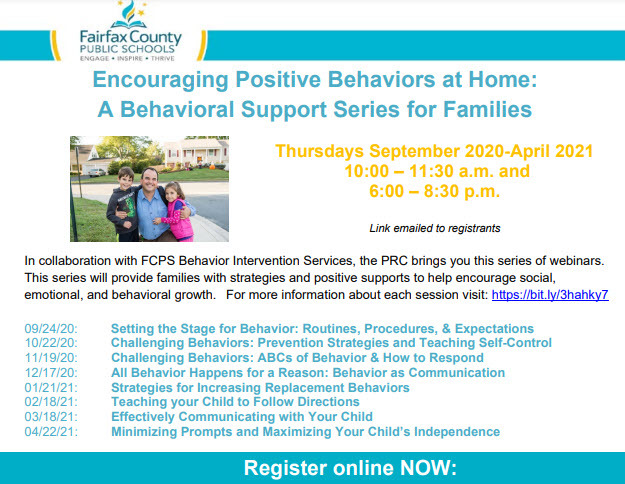 Use this link to register: https://bit.ly/3hahky7
|