Important Upcoming Dates
September 8 - First Day of School
September 10 - Virtual Back to School Night
September 23 - SAT for Seniors
October 29 - PSAT for Juniors
Important Links
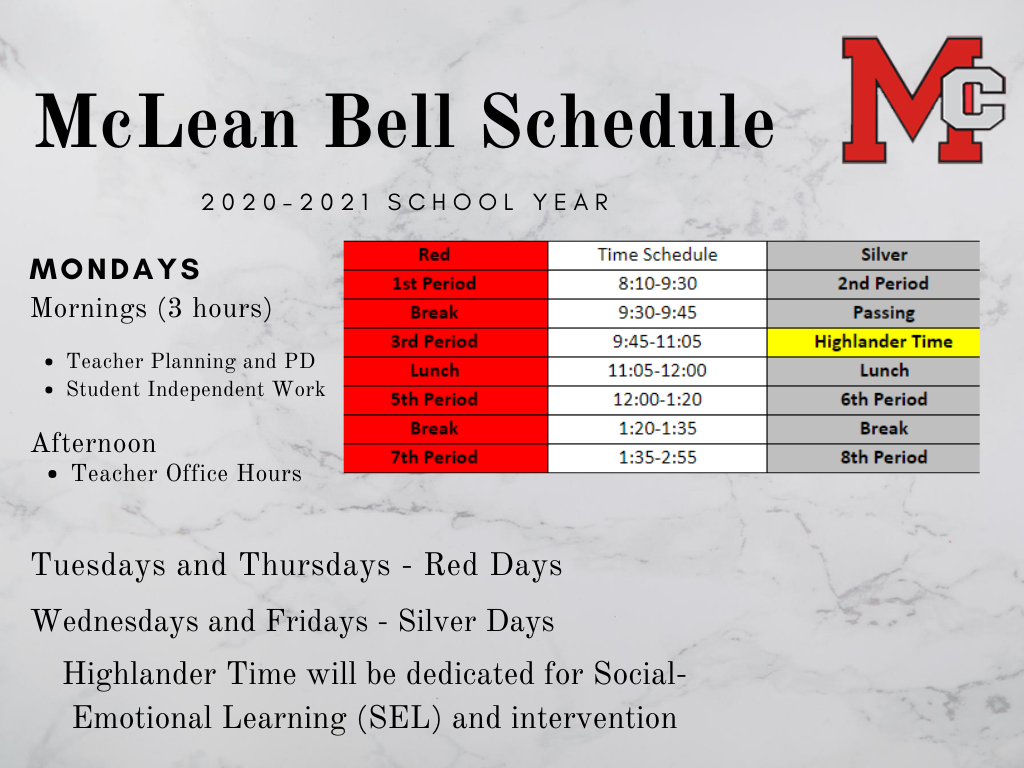
Bell Schedule
Red/Silver Calendar
Office and Support Staff
Attendance
Student Services
Student Activities
General Information
First Day of School - September 8
All classes begin on September 8, 2020. Students will find the links to their classes in their @fcpsschools.net accounts. School begins promptly at 8:10. We welcome all of our new students and the Class of 2024 and look forward to a great year at McLean High School.
Parent Required Signatures
1. Digital Tool Permission
2. Student's Rights and Responsibilities
1. Parent Digital Tool Permission Application
In an ongoing effort to protect student data, FCPS is required to secure parental permission for student use of software/applications for which FCPS does not have a confidentiality agreement. An online process has been developed to collect this information digitally and provide school-based reporting. This process has been designed to meet the legal requirements for authenticating parent identities under FERPA. The MHS Website has a list of all of the digital tools used at McLean.
2. Student's Rights and Responsibilities Signature Page
Students will review the SR&R on September 11, 2020. The SR&R booklet can be found on the FCPS website (Sept. 2). FCPS will release the link to the SR&R Signature page once the SR&R is finalized and updated on the website. Please review the SR&R with your student. The final SR&R will be available online at
https://www.fcps.edu/about-fcps/policies-regulations-and-notices/student-rights-and-responsibilities/video-and-resources
Still haven’t pick up your computer? Computer Pick-Up Information
Computer pick-up will be available curbside at Door 1 (the main entrance) on Monday, August 31st, Tuesday, September 1st, and Wednesday, September 2nd from 8:00am-Noon to issue laptops to those that missed their initial pickup window or are new students to McLean HS. I am taking up to 3 appointments per each 15 minute time slot to ensure social distancing practices are upheld. Please use the Signup Genius link below to register for a laptop pick up time slot. You and your child must wear a mask and be present in order to receive a laptop. Thank you.
https://www.signupgenius.com/go/20F054DAEAE28AAF58-fcpson
McLean HS Tech Support for Students
If you are experiencing issues with your FCPS issued laptop, please use the link below to enter your information. The tech support team will then get back to you as soon as possible.
We will continue to support students remotely as much as possible. If a computer has been identified as needing hands-on repair, we will schedule an appointment for you to come to the school to exchange it.
Description: This form should be filled out by a student if they are experiencing issues with their FCPSOn laptop.
Please click on the link below to access the Tech Support Request Form.
Parent/Student Support Portal Link:
https://itweb.fcps.edu/itsupport/
FCPS Help Desk for Tech Support for Parents and Students
To support families who are working with their children during distance learning, FCPS has launched a new Parent Technology Help Desk, effective Monday, August 24. The help desk can be reached at 833-921-3277 (833-921-FCPS) and will be answered by staff members between 7 a.m. and 11 p.m., seven days a week.
Parents or guardians can call this number for basic tech support with parent accounts, help with FCPS student devices and technical assistance with other FCPS applications. If help desk staff members are unable to solve the issue, they will enter a support ticket on behalf of the parent/guardian to escalate the issue to the appropriate FCPS team. Parents who need help in a language other than English can inform the help desk staff when they call of their preferred language, and an interpreter will join in on the call.
FCPS has also set-up Parent and Student Technology Support portal at https://itweb.fcps.edu/itsupport/ to allow older students and parents/guardians to request technology help directly. When a support request ticket is entered through the portal, it is auto-routed to the TSSpec at the appropriate site to expedite service. text.
Registering or Withdrawing from School
Registration: Parents will need to complete the registration paperwork that is available online and reach out to the registrar, Mary Bartenfeld via email. Families will be contacted via email or phone for the next steps in the registration process.
Withdrawal: If you need to withdraw your student from McLean for the 2020-21 school year, please contact McLean Registrar, Mary Bartenfeld, who will schedule a time/date to return the school issued laptop, complete a withdrawal form and other learning materials.
Records Request: If a family has a transcript or records requests, they should email the registrar throughout the summer.
Office Hours
As the state enters Phase Three, FCPS administrative and school offices will be open to the community by appointment only starting Monday, July 13, 2020.
Summer office hours for the public will be from 8:00 a.m. – 1:00 p.m. The phones will be monitored during this time.
All visitors must have a scheduled appointment with a staff member to enter the building. Visitors with appointments, must call the main office 703-714-5700 to check in and must answer a Health Questionnaire before being granted access.
If any visitor answers “YES” to any question on the health questionnaire, then he/she will not be permitted to enter the building. Visitors who answer “NO” will be instructed to access the building through Door #1 and will be greeted by a masked employee, who will direct them to their meeting. All visitors must wear a mask while inside the building.
As we continue to practice social distancing, we will limit the number of visitors to our building. If you have an appointment with a staff member, only bring others with you who are relevant to the meeting.
We encourage parents and students to email questions or concerns using the staff directory on our school website.
SAT/PSAT Information
Senior SAT Information - New Registration Due Date!!
Last week, we shared information regarding the school-day SAT administration that will take place on September 23rd at McLean HS. Please note that students must complete the SAT Intent to Participate form using their FCPS Google accounts. The registration form will not be accessible to anyone who is not an FCPS student. Students can access the registration link directly via the Seniors 20-21 Google classroom or by using the link below:
-
SAT School Day Intent to Participate form (MUST be completed by students using their FCPS Google accounts)
-
Due: Monday, August 31. The link to the registration form will no longer be active after August 31st. Students who do not register by August 31st will not be permitted to test.
If you have questions about the SAT School Day administration, please contact Sara Wheeler sewheeler@fcps.edu.
11th Graders - PSAT Information
FCPS is planning to administer the PSAT/NMSQT to students in grade 11 in October. FCPS and high schools have a responsibility to inform and support families in understanding and giving input on testing accommodations for the centrally funded PSAT/NMSQT assessment in grade 11. Schools and families share responsibility for determining what accommodations will be requested for a student.
- A parent notification with accommodations information should be sent to all parents of students in grade 11 electronically by Tuesday, August 11, 2020, or as soon as possible.
- A sample News You Choose message is available. This message links to accommodation information on the public webpage.
- This communication is necessary to facilitate the parent deadline of Tuesday, August 18 to return requests for new College Board testing accommodations to schools. Any current 11th graders who submitted requests through the College Board for accommodations for their PSAT or AP exams as 10th graders will not need to submit a request to renew their accommodations. Once instated, accommodations remain in place for all College Board testing.
- The school SSD (Services for Students with Disabilities) Coordinator has until Tuesday, August 25, 2020, to document and submit accommodation requests online to College Board.
Additional information regarding PSAT/NMSQT testing will be shared in the next few weeks.
Social-Emotional Support Information
Mental Health and Wellness Support Services and Resources
During the summer months, McLean’s Clinical Staff is available to consult with parents and students as needed. See contact information below:
Beth Werfel, School Psychologist, bawerfel@fcps.edu
Beverly Parker-Lewis, School Psychologist, baparkerlewi@fcps.edu
Marly Jerome-Featherson, School Social Worker, mjeromefeath@fcps.edu
Additionally, FCPS Mental Wellness Consultations are available. Any FCPS parent may request a 45-minute phone consultation with a school psychologist or school social worker. Parent consultations are available for all grade levels, and student consultations are available for students in middle and high school. Use this link to request a consultation:
For more Mental Health and Wellness Information, please check out FCPS’s Healthy Minds Blog and Parent Resource Center.
Emergency Resources
Crisis Link Regional Hotline 703-527-4077
Crisis Text Text NEEDHELP to 85511
Dominion Hospital Emergency 703-536-2000
INOVA Emergency 703-289-7560
Merrifield Center Emergency 703-573-5979 TTY dial 711
Life Threatening 911
FCPS Parent Sessions
Survive and Thrive with Virtual Learning: Practical Strategies to Make At-Home Learning Work for You
Are you worried about managing your child’s virtual schooling this year? Do you hate becoming the “school police” when your child won’t focus? Do you have to balance your child’s schooling with your own remote workload? We hear you, and we’re here to help.
You’ll learn how to avoid parent-child conflict around academics with practical tips for:
- Establishing routines and expectations that really work
- Creating ideal spaces for virtual learning
- Keeping kids focused while learning online
- Minimizing distractions from video games and other screens
- Getting your own work done at the same time (Yes, it’s possible!)
Don’t tackle this unusual year without a plan. Instead, join us and feel more prepared and confident for the year ahead, with a toolbox full of practical strategies that actually work. We can’t wait to see you there!
Presented by Ann Dolin, M.Ed., educational consultant and award-winning author. Ann is the President and Director of Educational Connections, Inc.
Friday September 1, 2020, 6:30-8:00 p.m.
Friday September 11, 2020, 10-11:30 a.m.
Register for Survive and Thrive with Virtual Learning: Practical Strategies to Make At-Home Learning Work for You
10 Ways to Stop Power Struggles & Start Motivating Your Kids
Do you need help calming your explosive household? Tired of yelling at, negotiating with and bribing your child? Do you want your child to take responsibility for their schoolwork, chores and attitude? How can you prevent kids who need consistency from falling behind with distance learning models? How are teachers/parents going to keep kids on task without shutting down?
It’s time to stop the yelling, arguing and power struggles with toddlers and teens.
Celebrate Calm Founder, Kirk Martin, will show you how to create stress-free mornings, school, dinner and bedtime. We promise you will laugh and leave with a dozen practical strategies that really work.
Webinar Highlights:
- Stop Defiance, Disrespect, & Meltdowns
- Get Your Kids to Listen the First Time
- Create Stress-Free Mornings, Homework, & Bedtime
- Get Kids Off Screens Without a Fight
- Motivate Strong-Willed Kids without Crushing Their Spirits
- Prevent kids who need consistency from falling behind with distance learning models.
Friday September 18, 2020, 10 - 11:30 a.m. and 6:30-8:00 p.m.
Register for 10 Ways to Stop Power Struggles & Start Motivating Your Kids
Encouraging Positive Behaviors at Home Series
9/24 Setting the Stage for Good Behavior: Routines, Procedures & Expectations
- Overview on establishing and maintaining routines, procedures, and expectations.
-
Strategies to teach and reinforce routines, procedures, & expectations
10/22 Challenging Behaviors: Prevention Strategies and Teaching Self-Control
11/19 Challenging Behaviors: ABCs of Behavior & How to Respond
12/17 All Behavior Happens for a Reason: Behavior as Communication
01/21 Strategies for Increasing Replacement Behaviors
02/18 Teaching your Children to Follow Directions
03/18 Effectively Communicating with Your Child
04/22 Minimizing Prompts and Maximizing Your Child’s Independence
Thursday September 24, 2020, 10 a.m. and 4 p.m.
Register for Setting the Stage for Good Behavior: Routines, Procedures, & Expectations
FCPS Cares
 |
|
Do you know a McLean High School or FCPS employee who does ordinary things in an extraordinary way or goes beyond what is expected? If so, then click here to share with everyone. |
My School Bucks
Learn more about this online payment portal for many school fees. Parents can set up an account which they link their student(s) to so there is one account per family. Course fees, lunch funds, some ticket events can be taken care of online. MySchoolBucks eliminates the need for students to carry cash to school and for multiple checks to be written. Learn more and sign up at https://www.myschoolbucks.com/ver2/login/getmain?requestAction=home
|