PARENT COFFEE TONIGHT @ 7:30 PM
Please join us for a meet & greet/parent coffee tonight at 7:30 PM.
Here is the link to the meet & greet:
https://us.bbcollab.com/guest/659d4f7fcc354651994bd66718149e1a
LIVE ORIENTATION- Thursday, September 3 from 9:00am - 11:00am
We are excited to see our students for Orientation tomorrow. This an opportunity for students to practice logging into all of their classes and to meet their teachers and peers. To prepare for Orientation, please have your student log into their @fcpsschools.net account and complete this Orientation Schedule Template. Be sure to save the template as a ‘Bookmark’ or ‘Favorite’ in your web browser.
Students should have received their class links directly in the BBCU Links folder in their @fcpsschools.net Gmail. All class links are sent directly from ‘Blackboard Collaborate’. Each link is formatted the same way in order to indicate the class period, subject, and teacher. For example, if the link is named: ‘1-English-Smith’, this student would have 1st period English with Ms. Smith. Do not worry if the time listed in the session matches the bell schedule- only go by the period that is indicated in the name of the link.
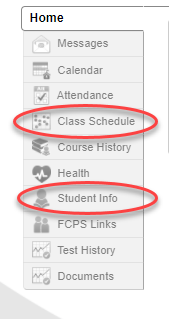
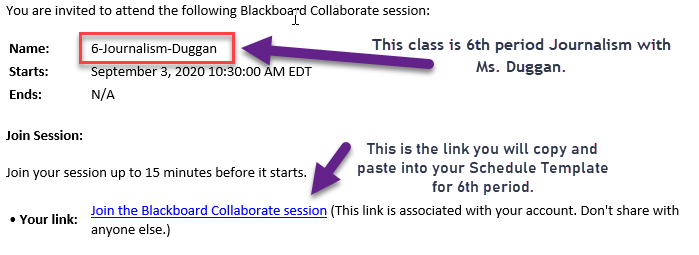 If your student has not received links to their classes, please reach out to your child’s counselor. You can find your child’s counselor using either SIS Parentvue or SIS Studentvue and clicking the “Student Info” tab.
BBCU Links
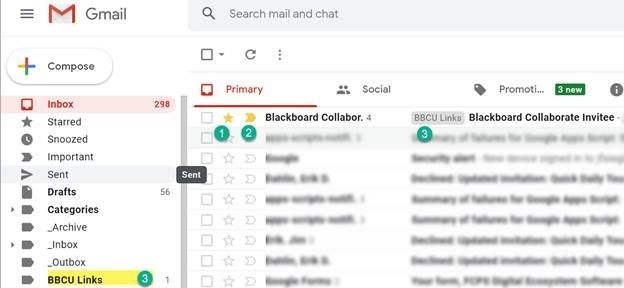
An automated process has been created to make it easier for students to locate the links to their Collaborate sessions. Students will see a label in their Gmail titled BBCU Links and this label will be applied to emails with Blackboard Collaborate links. A script will run automatically that will create an email filter for all users and that script will do four things:
1. Star messages coming from Scheduler (See #1 in the image below)
2. Mark the message as “Important” (See #2 in the image below)
3. Apply the label “BBCU links” to emails coming from Scheduler (See both #3’s in the image below)
4. Prevent the message from going to the Spam folder.
This will enable students to find their Collaborate session links in one convenient location without having to sift through their email. To locate their sessions, users have two options:
1. Click the BBCU Links label as pictured below (highlighted #3). If students do not see the BBCU Link label, they can click More to expand the view.
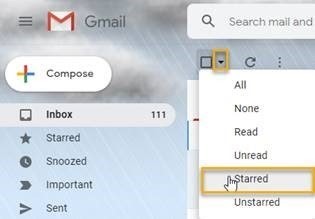
Click the down arrow to pull all Starred Messages as pictured below.
|