|
While providing our students with the resources for a successful virtual school start, we understand the critical need to ensure the safety of our students, families and staff during the distribution process.
Following are the general procedures for the distribution and safety guidelines that will be followed.
PLEASE READ CAREFULLY.
Schedule
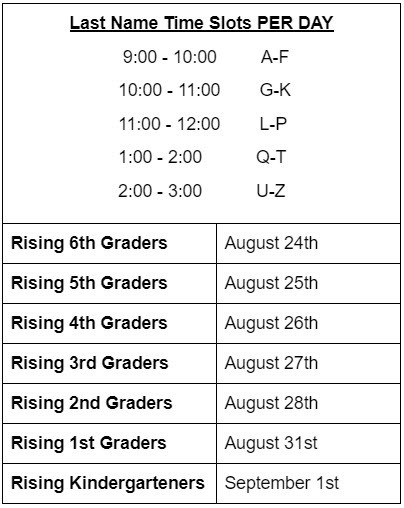
Laptops will be distributed by grade level and last name. Please see the chart below for the date of your child's grade level and the time slot for the first letter of your child's last name.
Distribution Day
What to Do
- Please note: If you or your child are not feeling well the day of distribution, please contact the school office at 703-561-2900 for instructions.
- One parent and the student must attend on Distribution Day.
- When entering school property, please enter the side parking lot (next to the fire station) and follow the kiss and ride loop to Door #1 (front office), where the laptop pickup will take place.
- Please stay in your car. A staff member will approach you to get your information and provide the laptop.
- Once students receive the laptop, staff will instruct them to log on.
What to Bring
- On a sheet of paper, please bring with you the following:
- Student First and Last Name
- Student ID #
- Password
Mandatory Safety Guidelines
- Masks are required throughout the distribution process.
- Additional staff will be on hand to ensure safety measures are followed.
- All staff members involved with distributing student items will be wearing gloves.
Student Passwords
Rising 1st - 6th grade student passwords will not expire this year! Your student can continue to login to their FCPS computer, Google Apps, FCPS 24/7 Blackboard, Wixie and other FCPS applications that require their username and password.
For rising kindergarten and new to FCPS students, we will set up your password the day of distribution.
Password Recovery: (Rising 1st-6th only) We encourage parents to setup password recovery information for their student using the FCPS Account Manager system located here https://itweb.fcps.edu/AccountManager/
Tech Tips and Information
Reference this Distribution Guide for any other information in setting up your student laptop.
See these additional tech tips from FCPS or our Floris Return to School Information Page.
|