Important Upcoming Dates
August 17-18 Freshman/Transfer Student Laptop Pick-up
August 19 - Parent Q&A session - 7:00pm
August 25 - Make the Most of Virtual Learning: Back-to-School Tips for Parents - 7:00pm
August 27 - Senior Parent Night - 6:30pm
September 2 - Freshman/Transfer Parent Session - 7:00pm
September 2 - Parent and Student Vue open for schedules
September 3 - Orientation
September 8 - First Day of School
September 10 - Virtual Back to School Night
General Information
Senior Parent Night - August 27- 6:30pm
Attention Parents of Seniors! Please join us for our annual Senior Parent Night, where we will go over post secondary options, Student Services, and the college process. Counselors will be meeting with all seniors over the next several weeks, but we encourage seniors to join this session with their families as well.
Thursday, August 27 at 6:30pm
The link for accessing the virtual session will be shared using the email we have for parents on Blackboard/Naviance. Be sure to check your Blackboard/Naviance account here: https://www.fcps.edu/resources/technology/fcps-24-7-learning/parent-help
Parent Session – Make the Most of Virtual Learning: Back-to-School Tips for Parents
Are you interested in learning how you can help your child(ren) transition back to school in this new virtual learning world? If so, this parent session is for you. Hear thoughts and ideas from elementary, middle, and high school staff on how to support students as they transition from summer break back to school. We’re all in this together and can support and learn from one another as we navigate this change.
Presented by McLean Pyramid school counseling and clinical staff.
We will send the link to the session, one hour before it begins, and the session will be recorded and available for viewing for those who are unable to attend.
Date: Tuesday, August 25 7:00-8:00pm.
11th Graders - PSAT Information
FCPS is planning to administer the PSAT/NMSQT to students in grade 11 in October. FCPS and high schools have a responsibility to inform and support families in understanding and giving input on testing accommodations for the centrally funded PSAT/NMSQT assessment in grade 11. Schools and families share responsibility for determining what accommodations will be requested for a student.
- A parent notification with accommodations information should be sent to all parents of students in grade 11 electronically by Tuesday, August 11, 2020, or as soon as possible.
- A sample News You Choose message is available. This message links to accommodation information on the public webpage.
- This communication is necessary to facilitate the parent deadline of Tuesday, August 18 to return requests for new College Board testing accommodations to schools. Any current 11th graders who submitted requests through the College Board for accommodations for their PSAT or AP exams as 10th graders will not need to submit a request to renew their accommodations. Once instated, accommodations remain in place for all College Board testing.
- The school SSD (Services for Students with Disabilities) Coordinator has until Tuesday, August 25, 2020, to document and submit accommodation requests online to College Board.
Additional information regarding PSAT/NMSQT testing will be shared in the next few weeks.
As we prepare for the upcoming virtual school year, it is important to follow these best practices. To assist with preparing FCPSOn devices remotely, students who have a laptop at home should do the following once per week beginning in August:
- Plug the device into an outlet.
- Turn the device on and let it boot up.
- Ensure that the laptop is connected to the internet.
- Let the device sit for 30 minutes. No additional action is required.
- Do this once per week to ensure the laptop has the latest updates.
Please continue these practices throughout the entire school year:
- Turn your laptop on for a minimum of 30 minutes every week(you don’t need to be signed in).
- Restart your laptop from the Start Menu (click on the Window Logo, then the power icon, then restart) once a week to ensure that you are receiving the latest updates.
If you cannot remember last year’s password, it can be recovered, managed and changed by clicking on this link: https://itweb.fcps.edu/accountrecovery/index.cfm
- Go to the Account Manager Website
- Enter your Username & Password
- Click Click to Display your Recovery Options
- Add a personal cell phone number or email address.
- Go to the FCPS Account Recovery Website
- Enter your Student ID
- Select your Recovery Option
- Click Get Code
-
Click the reset password link that was sent to your phone or email
- Follow the on screen directions to complete the recovery of your password
*For additional student resources, please visit the McLean HS Student Resources Site.
Welcome Letter from our PTSA President
You are invited to connect, support, and engage with our McLean community! The McLean PTSA is working on your behalf with the school administration and staff to support the curriculum and provide programs that positively impact the educational and emotional growth of students at MHS. The letter includes links to: join the PTSA, upcoming meetings, volunteer opportunities, and a short survey so you can provide feedback to help guide our efforts to support students and their families. Read the welcome letter here. For updates, follow us on Twitter @PTSAMcLean
 Red/Silver Schedule
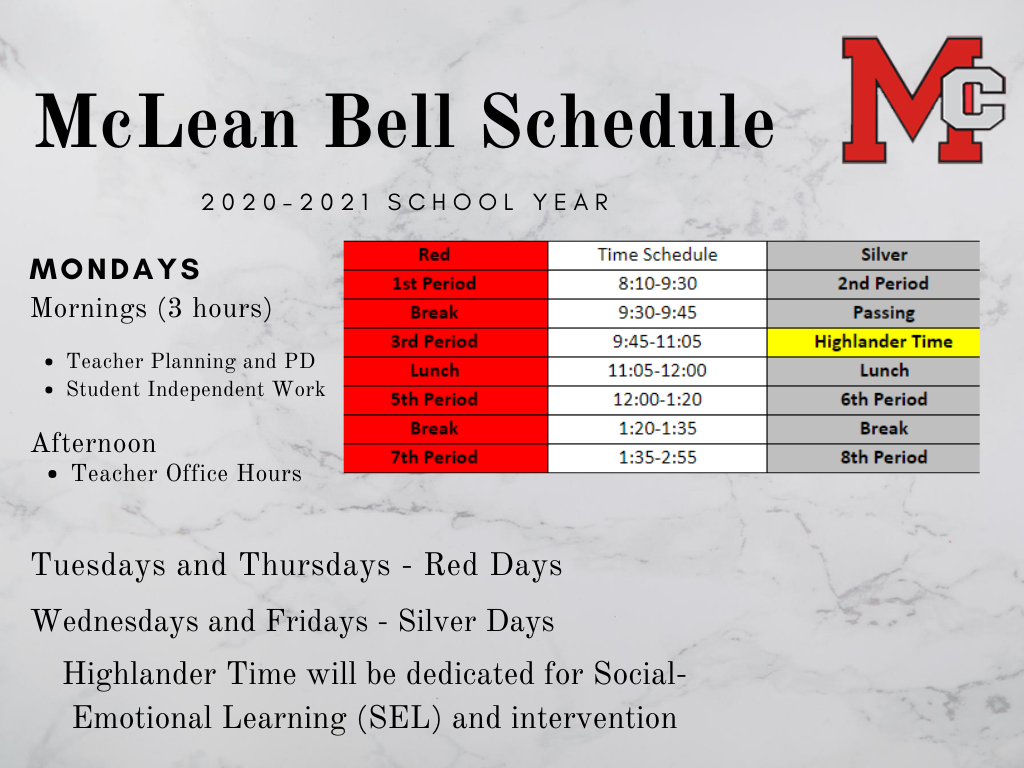
Every Monday is designated as a Teacher Planning Day. The Teacher Planning Day will provide teachers time to collaborate and plan for the week and support students who may need additional assistance/enrichment opportunities. Students will be expected to complete asynchronous work for their classes on Mondays. Office hours will be provided once school starts for students to meet with teachers.
Every Tuesday and Thursday will be a Red Day and every Wednesday and Friday will be a Silver Day. Red Days will be Periods 1, 3, 5, and 7. Silver Days will look a little different this year. Silver Days will be 2, Highlander Time, 6, and 8. Highlander Time will show up as a Learning Seminar on your schedule. Highlander Time is technically 4th period under the 8 period rotation, which is why there is no 4th period this year.
First Day of School - September 8
At their July 9 business meeting, the Fairfax County School Board approved delaying the start of the 2020-21 school year to provide staff members additional time to plan instruction and schedules, provide professional staff development, and finalize transportation and other operational details.
The revised calendar delays the first instructional day for students by two weeks, from Tuesday, August 25, to Tuesday, September 8. Other employee work schedules will remain unchanged and the revised calendar provides adjustments for additional staff development and planning time between Tuesday, August 25, and Thursday, September 3.
View the revised 2020-21 school year calendar.
Registering or Withdrawing from School
Registration: Parents will need to complete the registration paperwork that is available online and reach out to the registrar, Mary Bartenfeld via email. Families will be contacted via email or phone for the next steps in the registration process.
Withdrawal: If you need to withdraw your student from McLean for the 2020-21 school year, please contact McLean Registrar, Mary Bartenfeld, who will schedule a time/date to return the school issued laptop, complete a withdrawal form and other learning materials.
Records Request: If a family has a transcript or records requests, they should email the registrar throughout the summer.
Office Hours
As the state enters Phase Three, FCPS administrative and school offices will be open to the community by appointment only starting Monday, July 13, 2020.
Summer office hours for the public will be from 9:00 a.m. – 12:00 p.m. The phones will be monitored during this time.
All visitors must have a scheduled appointment with a staff member to enter the building. Visitors with appointments, must call the main office 703-714-5700 to check in and must answer a Health Questionnaire before being granted access.
If any visitor answers “YES” to any question on the health questionnaire, then he/she will not be permitted to enter the building. Visitors who answer “NO” will be instructed to access the building through Door #1 and will be greeted by a masked employee, who will direct them to their meeting. All visitors must wear a mask while inside the building.
As we continue to practice social distancing, we will limit the number of visitors to our building. If you have an appointment with a staff member, only bring others with you who are relevant to the meeting.
We encourage parents and students to email questions or concerns using the staff directory on our school website.
McLean Learning Modules
McLean teachers have developed asynchronous learning modules for students to access to review past course material and prepare for future courses. These resources are ready and can now be found on the McLean Continuity of Learning Google Site!
Summer Reading Assignments
Students and parents can access summer reading assignments on the McLean website using the following link: https://mcleanhs.fcps.edu/academics/summer-assignments
Mental Health and Wellness Support Services and Resources
During the summer months, McLean’s Clinical Staff is available to consult with parents and students as needed. See contact information below:
Beth Werfel, School Psychologist, bawerfel@fcps.edu
Beverly Parker-Lewis, School Psychologist, baparkerlewi@fcps.edu
Marly Jerome-Featherson, School Social Worker, mjeromefeath@fcps.edu
Additionally, FCPS Mental Wellness Consultations are available. Any FCPS parent may request a 45-minute phone consultation with a school psychologist or school social worker. Parent consultations are available for all grade levels, and student consultations are available for students in middle and high school. Use this link to request a consultation:
For more Mental Health and Wellness Information, please check out FCPS’s Healthy Minds Blog and Parent Resource Center.
Emergency Resources
Crisis Link Regional Hotline 703-527-4077
Crisis Text Text NEEDHELP to 85511
Dominion Hospital Emergency 703-536-2000
INOVA Emergency 703-289-7560
Merrifield Center Emergency 703-573-5979 TTY dial 711
Life Threatening 911
Tech Support for Students
If you are experiencing issues with your FCPS issued laptop, please use the link below to enter your information. The tech support team will then get back to you as soon as possible.
We will continue to support students remotely as much as possible. If a computer has been identified as needing hands-on repair, we will schedule an appointment for you to come to the school to exchange it.
Description: This form should be filled out by a student if they are experiencing issues with their FCPSOn laptop.
Please click on the link below to access the Tech Support Request Form.
McLean HS - Tech Support Request Form
FCPS Cares
 |
|
Do you know a McLean High School or FCPS employee who does ordinary things in an extraordinary way or goes beyond what is expected? If so, then click here to share with everyone. |
My School Bucks
Learn more about this online payment portal for many school fees. Parents can set up an account which they link their student(s) to so there is one account per family. Course fees, lunch funds, some ticket events can be taken care of online. MySchoolBucks eliminates the need for students to carry cash to school and for multiple checks to be written. Learn more and sign up at https://www.myschoolbucks.com/ver2/login/getmain?requestAction=home
|