|
Good evening Mighty Red Birds,
We hope each of you enjoyed the beautiful weekend. Seeing the sunshine was amazing. Our staff is ready for a fresh new week of learning. As Mr. Hirsch and I stated in the previous News You Choose we understand that the technical difficulties with Blackboard have caused many disappointments, but are hopeful Monday will run smoothly. The updates that were put in place last week should allow enhanced security and less lag.
If we experience problems with Blackboard, please direct your child to the recorded sessions, learning packets, Channel 21, CFES website, and Google classroom. Please also access our social media sites.
Accessing BBCU Links in Blackboard (Student Directions)
1. Open Chrome
2. In the address bar (where websites go) type in fcps.edu
3. You can click on one of two buttons to go to blackboard
4. Students can log into Blackboard 24/7 using their FCPS Username and Password
5. After you login, click on the word ‘Courses’.
6. Click on the name of the Blackboard Course you need to access.
7. When the course opens, click on the tab entitled COLLABORATE ULTRA
After you click on the tab, you will see a list of sessions. Select the BBCU session with your teacher’s name
FCPS YouTube Channel- Additional Learning Activities
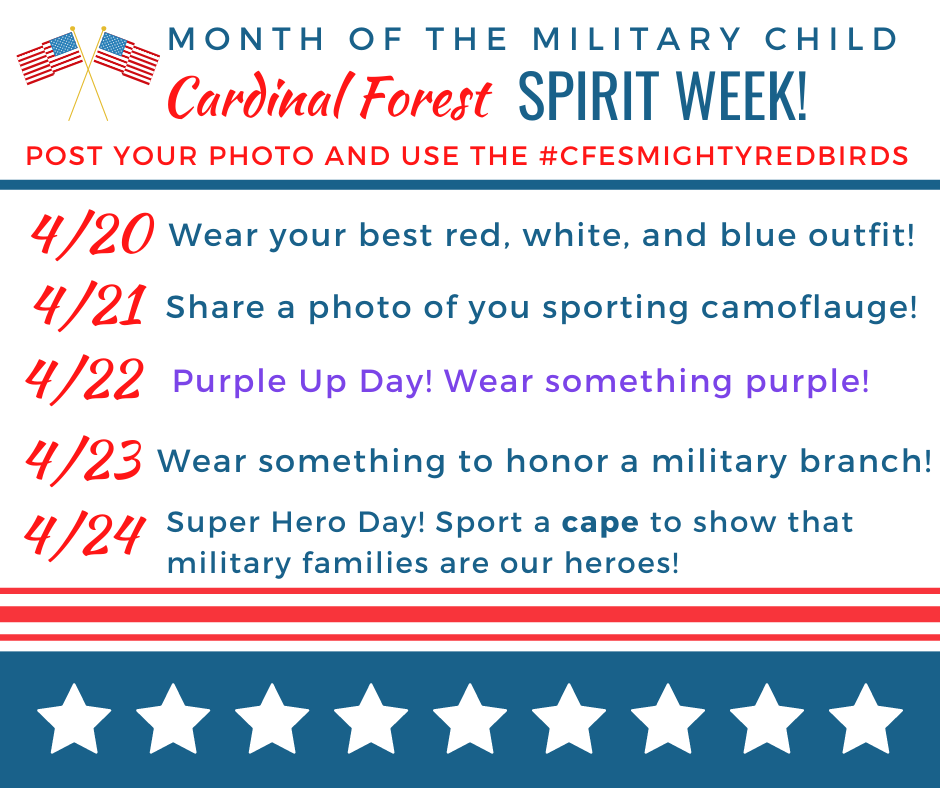
April is Month of the Military Child. At Cardinal Forest ES, we want to celebrate our students whose parents serve in branches of the Military. This week help us celebrate virtually via Twitter and Facebook. Post pictures of your family celebrating along with us.
 Information from FCPS
- FCPS Distance Learning
- Frequently Asked Questions - Read updated FAQs
Attention Parents of Rising Kindergarteners: Registration is being conducted virtually and by phone. All forms may be downloaded at: https://www.fcps.edu/registration/kindergarten-registration. Once completed, please email them our registrar, Karla Macoto at kmmacoto@fcps.edu. Please include a contact phone number so Karla can help with any questions.
|