|
04/15/2020
Good afternoon families,
Thanks for your patience and flexibility as we continue to grow in our new distance learning environment. We were incredibly excited to see our students yesterday and are looking forward to continuing our journey together! Today, our staff has been working hard to prepare for the new safety requirements for logging into our live virtual learning sessions on FCPS 24-Blackboard.
Directions for the new login procedure, including a “how to” video, are embedded in this message below. We are looking forward to resuming our regular schedules tomorrow morning!
Thank you again for your patience and flexibility!
Jamey Chianetta
Principal
Blackboard Log-In Directions
1. Students will log on to FCPS 24-7 Blackboard using their school credentials.
2. Within the “Courses” tab at the top, select your student’s grade level distance learning site.
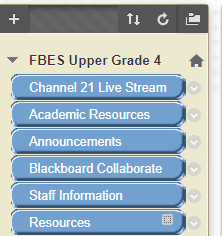
3. Within the grade level site, choose the “Blackboard Collaborate” link on the left menu bar.
4. Find the desired teacher’s name, and current date. Select their session. This will take you into the live teacher’s class. The most current sessions will be listed at the top and are bolded. Future sessions will be grayed out and are unable to be clicked.
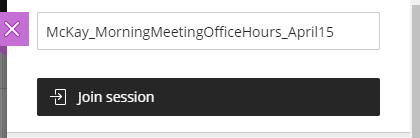
5. Select “Join Session” to be added to the class. You will not need to type your name as you are already logged in to FCPS 24-7.
6. Everything else about the live sessions remains the same. The only thing that has changed is how to log on.
Blackboard Log-in Directions (YouTube Video)
Our thanks to Ms. Tamala Thompson-Griffin, who has also created a video to walk families through this process!
https://youtu.be/Wri__cDbVWQ
|