|
Dear Clermont Families,
As always, a top priority of Clermont ES and of FCPS is to ensure that our students are safe when they are under our care. Yesterday many aspects of our Distance Learning Plan were positive and well-executed, including how quickly our students adapted to the digital learning environment. While there is still room for growth, the biggest area of concern that emerged across the Division was the ability to keep each virtual classroom independently secure. Today staff and admin worked with FCPS Central Office IT staff to add additional layers of security for the safety of our children, teachers, and school community.
All previous links to Class Sessions and Office Hours can be deleted or discarded. In addition to an email sent out on Monday, April 6, you may have received a paper copy in the mail of the schedule and links. Please be advised that while the links are no longer active, our schedule will remain the same. The primary difference will be that students will now have to first log into Blackboard 24/7 to join a Blackboard Collaborate Ultra session, which is the platform that allows your child to meet virtually with their teacher(s).
On a personal note, I am deeply sorry for this disruption in your child’s schedule, and I share your frustration. I wish I could promise you that tomorrow morning Blackboard 24/7 will be fully functional, however as we have seen yesterday and today, that may not be the case. As an FCPS community, we are bound to using FCPS approved products so I will guide you, the students, and the staff as quickly and gracefully as possible tomorrow if Blackboard 24/7 fails us. As a Clermont community of problem solvers, I know we all try to quickly devise ways to fix the issues that arise with Distance Learning. I feel the best way to solve any issues related to Distance Learning right now begins with patience, as we are only in the second day of our plan.
Our intended school schedule for Thursday is as previously advertised. No changes to the schedule have been made.
I have attached the following visuals and directions for your child to access his or her learning opportunities tomorrow.
The Clermont Staff and I thank you for your support.
Sincerely,
Ms. Salata, Principal
Step 1: Have the student log on to FCPS Blackboard 24/7: https://fcps.blackboard.com/webapps/login/
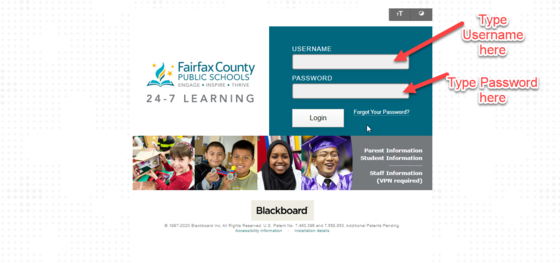
Step 2: Select the “Courses” tab

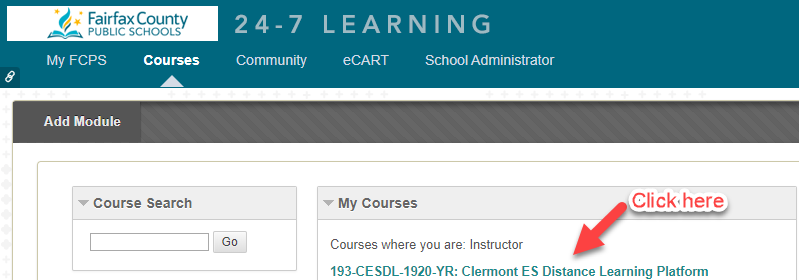
Step 3: Under "My Courses" click on "Clermont ES Distance Learning Platform"
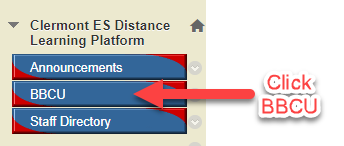
Step 4: Select “BBCU” from the menu on the left side.
Step 5: Click on the magnifying glass on the right hand side to search.

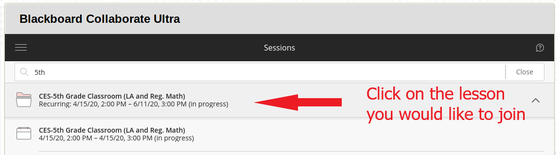
Step 6: To join a live session, search for grade level (example: "5th"). To join a teacher's office hours session, search for that teacher's last name.

Step 7: When you find the appropriate grade level and subject, click the down arrow to show occurrences.

Step 8: Click on the lesson in progress that you would like to join.
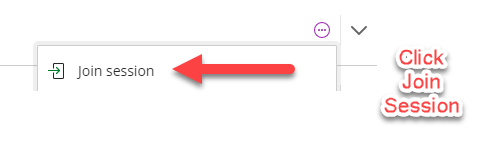
Step 9: Click "Join session"
To View Recorded Lessons
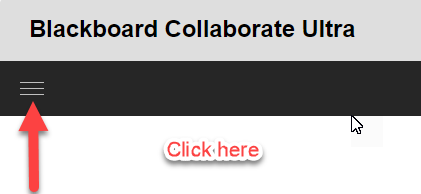
Following the steps above to access BBCU within Blackboard 24/7, click on the three line menu icon near the top of the screen.
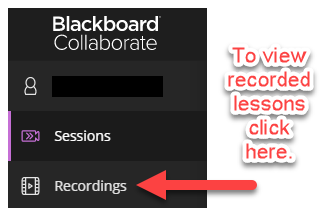
Next, Click on "Recordings" to access available recorded lessons.
|