 We’ve made updates to the medications tool on My HealtheVet so it’s easier for you to manage and track your VA prescription refills. The medications tool is now organized into 4 main pages:
-
Medication Refills: Request refills your VA prescriptions
-
Refill Status: Review the status of your refill requests
-
Medications List: Review your past and current VA prescriptions
-
Prescription Details: Review information about individual VA prescriptions
These changes include a new Refill Status page. Here you can review where each of your VA Prescriptions are in the refill process. Once you have submitted a refill request, it will process through one of the following statuses until it is eventually shipped to the address we have on file for you.
- Request(s) submitted
- Fill(s) in progress
- Prescription(s) filled
You can also view expected fill dates and shipment tracking information when available to ensure you know when to expect your VA Prescription refill(s).
Other changes include a new way to filter the list of medications on the Medication Refills page. For example you can filter the list to review only your medications that need a renewal. This makes it easy to keep track of when a medication has no refills left (or if your VA Prescription has expired) and it’s time to request a renewal.
How to get started
If you’re new to managing your medications on My HealtheVet, it’s easy to get started. Simply sign in to VA.gov using your modern sign-in credential. Learn how to sign in to VA.gov
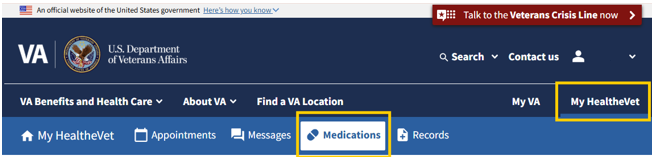
Once you are signed in, select My HealtheVet in the primary navigation, then select Medications from the secondary navigation.
|