 |
|---|
|
 Articles in this issue highlight a variety of human factors methods and how they have been applied within the Department of Veterans Affairs. The first article is “Part 2” of a series and outlines how physicians navigate the electronic health record during primary care appointments. The second article describes the Veteran-Centered Design Lab and the methods this group utilizes to promote human-centered design. This effort was launched by VA in 2013 with the mission to positively transform the delivery and experience of Veteran’s health care. The third article presents an interview with physician Kevin Galpin, MD, where he discusses his recent experience working on an interdisciplinary project alongside human factors engineers. The fourth article describes a rapid heuristic evaluation approach, which was developed to accelerate the design process for VA’s Enterprise Health Management Platform (eHMP). This issue concludes with a second set of highlights from the 2016 International Symposium on Human Factors & Ergonomics in Health Care. We welcome your questions, feedback, and ideas for new articles via e-mail to VHA10P2HFQ@va.gov. Articles in this issue highlight a variety of human factors methods and how they have been applied within the Department of Veterans Affairs. The first article is “Part 2” of a series and outlines how physicians navigate the electronic health record during primary care appointments. The second article describes the Veteran-Centered Design Lab and the methods this group utilizes to promote human-centered design. This effort was launched by VA in 2013 with the mission to positively transform the delivery and experience of Veteran’s health care. The third article presents an interview with physician Kevin Galpin, MD, where he discusses his recent experience working on an interdisciplinary project alongside human factors engineers. The fourth article describes a rapid heuristic evaluation approach, which was developed to accelerate the design process for VA’s Enterprise Health Management Platform (eHMP). This issue concludes with a second set of highlights from the 2016 International Symposium on Human Factors & Ergonomics in Health Care. We welcome your questions, feedback, and ideas for new articles via e-mail to VHA10P2HFQ@va.gov.
From The Editor-in-Chief, Alissa Russ, PhD
|
|
| |
 |
 |
Human Factors at the Front Lines: CPRS Use and Clinical Workflow Efficiency – Report 2 of 4
Alan Calvitti, PhD, Veterans Medical Research Foundation
This is the second report in a series that tells the story of how VA’s Computerized Patient Record System (CPRS) impacts primary care provider workflows from the Patient Centered Electronic Health Record (PACE) observational time and motion study of primary care encounters at four VA San Diego area primary care clinics...
Read More >
|
Upcoming Events:
HFES International Annual Meeting, Washington, DC, September 19-23, 2016
AMIA 2016 Annual Symposium, Chicago, IL, November 12-16, 2016
Informational Links:
- Human Factors Engineering (HFE) within the Veterans Health Administration (VHA) Office of Informatics and Analytics, Health Informatics Division seeks to increase awareness of human factors products and services among clinical end-users and other stakeholder groups. This quarterly newsletter serves to engage these communities in shared communication and collaboration around human factors-related issues.
- Access and review previous issues of this newsletter
- Editor-in-Chief:
- Alissa Russ, PhD, VHA/Health Services Research and Development
- Managing Editor:
- Christopher Petteys, MBA, Human Factors Engineering, Office of Informatics and Analytics
- Editorial Board Members:
- Ross Speir, Human Factors Engineering, Office of Informatics and Analytics
-
- Rachel Wiebe, RD, CPHS, Health Solutions Management, Office of Technology and Information Strategy
-
- Linda C Williams, RN, MSI, VA National Center for Patient Safety
-
- Shilo Anders, PhD, Center for Research & Innovation in Systems Safety, Vanderbilt University
-
- Scott D. Wood, PhD, Informatics Patient Safety, Office of Informatics and Analytics
-
|
 |
 |
Veteran Centered Design Lab: Creative and Interactive Tools to Aid Human-Centered Design
Stephanie Adams, MFA, Applied Creativity and Design Research, VHA Engineering Technical Assistance Program (VE-TAP), Veteran-Centered Design Lab, VHA
The Veteran-Centered Design Lab (VCD Lab) was founded in the spring of 2013. The mission: positively transform the delivery and experience of Veteran’s health care by utilizing Human-Centered Design and Design Thinking concepts and tools. VCD Lab is comprised of a multi-disciplinary team consisting of expertise in...
Read More >
|
|
|
 |
A Customer’s Perspective: An Interview with Kevin Galpin, MD
Christopher Petteys, MBA, Human Factors Engineering, Office of Informatics and Information Governance
Dr. Kevin Galpin is a board certified physician in internal medicine and clinical informatics. He serves as the Chief of Health Informatics for VISN 7 and as the Interim Director of VA’s National Telemedicine Program. He recently undertook a project to develop Colorectal Screening Templates and engaged the Human Factors Engineering office for usability feedback. This interview with Dr. Galpin provides a different perspective on the human factors process: the customer’s.
Read More >
|
|
|
 |
Rapid Heuristic Evaluations to inform design of Enterprise Health Management Platform (eHMP)
Jennifer Herout, PhD, MA, Human Factors Engineering (HFE), Office of Informatics and Information Governance (OIIG); Jolie Dobre, MS, HFE, OIIG; Craig Harrington, MS, MSW, VA Digital Services, VA Office of Informatics and Technology; Charlene R. Weir, PhD, IDEAS Center of Innovation, Salt Lake City VA; Donna Baggetta, BA, HFE, OIIG; Tippy Carter, HFE, OIIG; Ashley Cook, HFE, OIIG
The Department of Veterans Affairs (VA) has recently experienced several very well-publicized events resulting in outcries to improve the delivery of health care to Veteran patients. A major initiative toward this improvement is the design and development of a next generation of VA’s Electronic Health Record (EHR), known as the Enterprise Health Management Platform (eHMP). Although based on Agile development principles, the design reviews were marked by inefficient practices...
Read More >
|
|
|
 |
More Highlights from the 2016 International Symposium on Human Factors & Ergonomics in Health Care
Linda Williams, RN, MSI, CHSE
The HFES Healthcare Symposium, Shaping the Future, was in the Spotlight in the spring issue of this newsletter. Attending both HFES and the smaller healthcare symposium has always felt to me like being among so many like-minded individuals - like being among my people.
Read More >
|
| |
Back to top of article summary | Back to top of newsletter |
|
|
Human Factors at the Front Lines: CPRS Use and Clinical Workflow Efficiency – Report 2 of 4
Alan Calvitti PhD, Veterans Medical Research Foundation
This is the second report in a series that tells the story of how VA’s Computerized Patient Record System (CPRS) impacts primary care provider workflows from the Patient Centered Electronic Health Record (PACE) observational time and motion study of primary care encounters at four VA San Diego area primary care clinics. To view the first report in the series, please visit Human Factors Quarterly Newsletter Spring 2016.
Report #2 - Temporally Resolved Activity and CPRS Navigation
In the previous report, we provided summary statistics of activity during visits, specifically: length of visit, timing of clinicians’ gaze to CPRS, gaze to patient, physical exam, and which CPRS functions clinicians used most frequently (e.g. Notes, Orders, Labs, Meds) based on the number of mouse clicks. In this report, we analyzed the time spent on each activity that is tracked throughout the visit, to extract common CPRS navigation patterns, based on the same underlying data.
Figure 1 is a visualization of data depicting clinicians’ gazes and CPRS activity for approximately 110 visits grouped by 21 clinicians. The number of patients per clinician varies between two and six patients, as PACE is an observational study and the data collection strategy was opportunistic. These visualizations, called chromograms, use color to distinguish activities. The time axis runs along the horizontal and shows a 60-minute time frame (a few visits exceeded this mark).
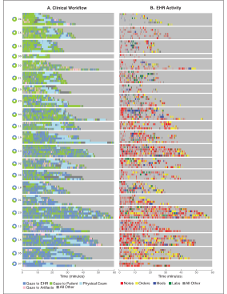
Figure 1. Chromogram of Clinician Gazes and CPRS Activity by Clinician. (click to expand)
Clinicians are rank ordered top to bottom by “gaze dominance”: the ratio of total time during the visit looking at the computer to time looking at their patients. The left column "Clinical Workflow" is based on video analysis and represents "interval events" that have a definite duration. Human coders used a joystick or keypresses to mark the beginning and end of each event while reviewing videos. A second human coder was used to assess interrater reliability. For simplicity, we grouped ancillary activities like handling pager and phone calls or clinicians leaving the exam room, as "other." Pie charts along the far left reflect gaze dominance aggregated at the level of clinicians. Clinicians at the top, like 04 and 16, look green overall, indicating that they spend most of the visit looking at the patient, while clinicians at the bottom like 05 and 07 look mostly blue: they look at the computer much more. Note that visits also tend to get longer for more computer-intensive visits near the bottom. The length of physical exam does not appear to vary much.
The right-hand column in Figure 1, shows individual mouse clicks as vertical lines (each click is a single timestamp or “point event” without duration). These have been human coded to major CPRS functions, which take up the full Electronic Health Record (EHR) screen (unlike, say, in Epic, where clinicians can work on notes while doing order entry). We grouped multiple CPRS functions at the tail of the distributions as “other.” Attention switch is evident here in the transition across functions during the course of a visit. Note that clinicians at the top of the figure tend to use EHR less than those towards the bottom.
A pattern that emerges from these time-resolved traces is that all clinicians in this study switched their attention back and forth between different tasks. That is, in any span of time, they will go back and forth between looking at the patient and the computer. Figure 2 shows histograms of the dwell times for each event before switching. Although there are outlier stretches of attention that last up to several minutes, the median dwell time for gaze to computer is ~5 seconds and for gaze to patient it is only ~3 seconds, so that in a median ~20-minute visit, there is a lot of switching back and forth. We remark that clinicians frequently carry on conversations with the patient while the clinician is working on CPRS. These histograms show one clinician’s gaze aggregated over their study visits.
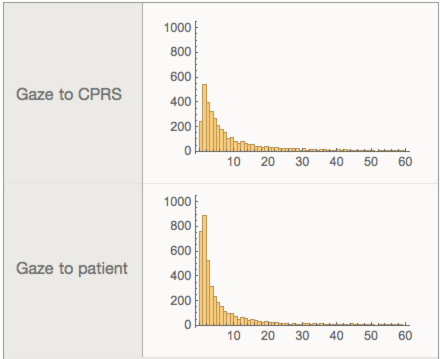
Figure 2: Attention Switch Histograms of dwell times (in seconds) based on Clinical Workflow patterns. Clinicians frequently and rapidly switch their attention between patient and EHR.
Another obvious finding is that clinicians’ cluster their behavior across patients. Using gaze-dominance as a metric (ratio of total time looking at the patient to time looking at computer), clinicians tend to be either computer-centric (gaze dominance less than 1) in most or all of their visits, or patient-centric, (gaze dominance greater than 1). We again point out the key limitation of this study is that we only observe patterns during visits, whereas from interviews, we know that some clinicians prefer to do some work on CPRS before or after the visit (we do not have data on which strategy is more efficient).
Next, we will ignore the precise time-durations of events to focus on the sequential patterns of EHR activity. Figure 3 shows CPRS navigation patterns in the form of Activity Transition Graphs (ATG). Each label in the graph corresponds to a tab along the bottom of CPRS screen. The nodes represent individual CPRS functions, and links between them represent transitions between consecutively accessed function. For example, following the link from Notes to Orders shows about 10% of all clicks are transitions from Notes to Orders. The inset at top right (3A) shows the raw distribution obtained by summing all transitions between CPRS functions observed in the study. The abundance of links shows that clinicians can jump from most CPRS screens to most others overall. To aid in interpretation, data is filtered to highlight the most frequently observed transitions. In the filtered ATG (large graph 3B) still accounts for about ~80% of the transition clicks, yet reveals clearly that some transitions, like Notes to Orders and Orders to Notes occur more frequently than others, so switching between these two functions is a nexus of activity. Note➞Orders➞Notes transitions occur typically because clinicians document the order entry activity in their notes, and use progress notes to organize much of the patient data (including medications and labs).
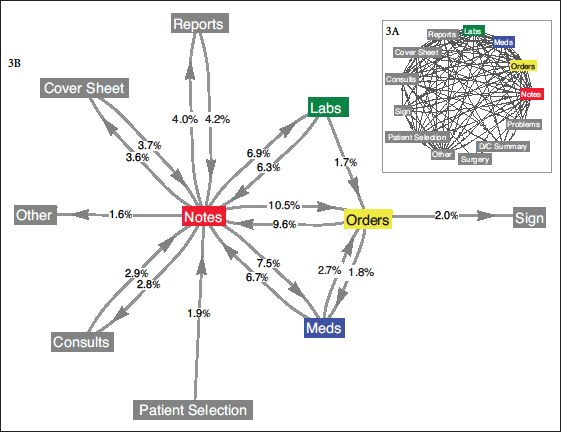
Figure 3. Summary of EHR navigation patterns across screens
Beyond the limitations described in the previous report for PACE study, here we add that mouse activity primarily tracks navigation across the EHR interface, selection from menus and positioning of cursor to either text or input fields, but does not directly reveal activity such as typing or reading. Also, timing of these activities would give a more universally comparable measure of activity across EHRs, and especially as computers move to the post-WIMP (“windows, icons, menus, pointer”) user interfaces that could involve voice and gesture and possibly eye-tracking.
Measuring provider-patient interaction and providers’ EHR use during office visits with realistic case load variability versus lab tests using standardized test patients can provide objective baselines for clinical practice. We found clinicians tend to have consistent style of work. For example, some defer EHR use pre/post visit to focus on patients, while others have longer visits with more EHR activity and less (relative) eye-to-eye connection with patients. Further evaluation of EHR activity can also suggest interface improvements, based on actual use patterns, such as the need to merge order entry and documentation within a single computational interface.
Join us again in the Fall Issue of the VHA Human Factors Quarterly for Report #3 in this series, which will focus on Order Entry.
Funding Acknowledgment: The PACE study work described in this series of reports was supported by VA Health Services Research & Development grant number IIR 07-196.
Special Update to Report #1
In response to a congressional inquiry on documentation burden in VA, a time-at-task analysis was conducted to complement the estimates of CPRS use based on mouse click tallies that was reported in the first article of the series. Click here to see the results of the time-at-task analysis.
|
|
Back to top of article | Back to article summary | Back to top of newsletter
|
|
|
|
Veteran Centered Design Lab: Creative and Interactive Tools to Aid Human-Centered Design
Stephanie Adams, MFA, Applied Creativity and Design Research, VHA Engineering Technical Assistance Program (VE-TAP), Veteran-Centered Design Lab, VHA
The Veteran-Centered Design Lab (VCD Lab) was founded in the spring of 2013. The mission: positively transform the delivery and experience of Veteran’s health care by utilizing Human-Centered Design and Design Thinking concepts and tools. VCD Lab is comprised of a multi-disciplinary team consisting of expertise in Design Strategy, Human Factors, Analytics, and Engineering. The goal of this article is to share a deeper insight into the approach and methodology of the VCD Lab by sharing specific tools that have proven successful in prior projects.
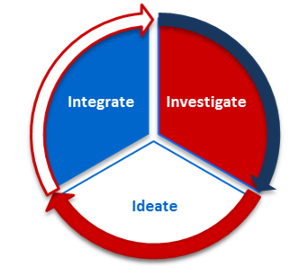
The VCD Lab utilizes a three-phase creative problem solving process (I3) in concurrence with Lean process improvement methodology. This powerful combination provides stakeholders a unique experience in brainstorming, innovation, and problem solving.
I3: Investigate - Ideate - Integrate:
- Investigate involves framing the problem and interacting with stakeholders to identify the right problem to solve.
- Ideate is an opportunity to think divergently about solutions to the problem, co-create with stakeholders, and then evaluate and converge ideas into solutions.
- Integrate moves the solution from theory to application, working with stakeholders to prototype and implement solutions.
|
|
Within each of the I3 process stages, the VCD Lab leverages creative methods to gain insight and context from our participants. Humans have a difficult time articulating their needs, desires, and providing genuine feedback. Design Thinking is an approach that asks designers and strategists to slow down and give the user an opportunity to represent their experience from their perspective. Interactive materials that utilize visuals as a communication tool promotes individual expression and can provide a holistic understanding of a participant’s experiences, digging deeper than top of mind feedback. Many of these tools are artistic, visual, and less formal in nature. This allows participants to relax, and thus may encourage more involvement in workshop activities. This is especially relevant in VHA, as it is a complex health organization with a variety of unique user needs.
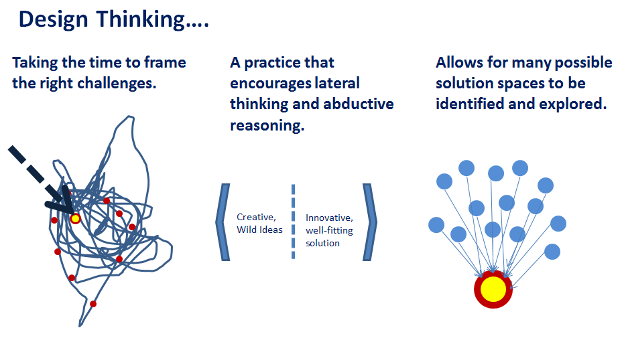
Figure 1. Design Thinking Diagram
Users are often so tied to their own reality that thinking of solutions to ambiguous problems is overwhelming and discouraging. As designers, we leverage tools to help users side step the complexities of the problem to focus on the opportunities within the problem space. Below are a few activities that provide high impact value and help uncover potential new insights.
I. Personas
Personas are highly diversified tools that can be applied within many genres of design and creativity. Personas may help develop empathy for Veterans, staff, and their experiences, while discouraging assumption about experiences. Regardless of the context, personas are a representation of key end users - capturing the distinctions of that group and their needs. Personas are a source of inspiration and way for each team to look at a problem from someone else’s perspective, increasing the ability to empathize with end users.
Personas can be used within I3 steps:
-
Investigation
- To allow stakeholders to build a current state from a different perspective (i.e. What does this process look like for Jackie, our front line staff persona?)
-
Investigation
- Supports internalization of possible solutions from a different perspective
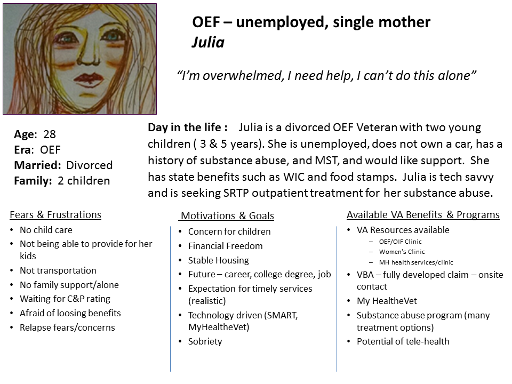
Figure 2. Example of a digitized, fictional persona from the Access to Care workshops facilitated by the VCD Lab.
Example project: The VCD Lab utilized personas as an empathic tool during the redesign of the Cancer-Care Center at the Roudebush VAMC in Indianapolis, Indiana. Stakeholders created two fictional personas, one of a Veteran receiving cancer treatment, and the other of a Veteran Caregiver. The creation of the Veteran patient Persona led to the design insight of providing a group infusion bay, where Veterans can socialize with their peers while receiving their chemotherapy. The Caregiver Persona was especially enlightening in regards to widening the design perspective and considerations. It was discovered that providing enough space in infusion bays for a Caregiver to accompany their loved one during long infusion times was meaningful to both the Veteran and their Caregiver
II. Journey Mapping
Journey maps are a qualitative graph that charts a user’s experience through process steps and interaction touchpoints. A journey map can provide a comprehensive view of a user’s experience and a holistic view of their journey through a service, program, or product.
Journey Maps can be used within these I3 steps:
-
Investigate
- The process that the audience or end-user currently uses or would like to use in the future
- To understand the interactions that may occur at each of these steps
- The positive or negative experiences within each step
- The challenges that impact each step
- To identify best practices in each step that need to be preserved or recognized
- To visualize how one part of a service may impact the service as a whole
- To understand how the before and after user interactions can impact how a user may perceive a service
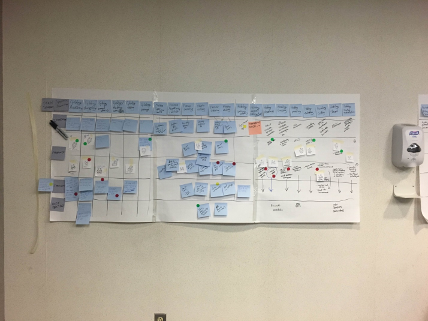
Figure 3. Example of an analog journey map from a VCD Lab Workshop.
Example Project: During the Access to Care workshops, the VCD Lab utilized journey maps to understand the holistic journey of Veterans as they attempted to get into an appointment at their local VA Medical Center. This holistic approach can provide insights which may not be uncovered in a traditional process improvement methodology. This process can include the challenge of a single parent Veteran arranging child care, or the transportation issues faced by an elderly Veteran who can no longer drive.
III. Stickers
Not only are stickers lots of fun, they are portable images, colorful post-its and labels that can allow participants to identify what is working or not working within a specific space, equipment, or experience. Digital stickers could allow participants to mark areas of difficulty within an interface during usability testing, using simple shapes depending on your prototype program. Stickers are interactive tools that are incredibly versatile and allow participants to express and articulate through a flexible medium
Stickers can be used in a variety of ways, for example:
- To gather nuanced information during an interview or fact finding session (e.g. place a smiling face to anything you enjoy in this space.)
- Identify positive or negative clustering in a space in order to prioritize design efforts (e.g. this area of the clinic has several negative comments compared to other spaces.)
- To provide insight about how the participant experience during each step in a Process/Journey map.
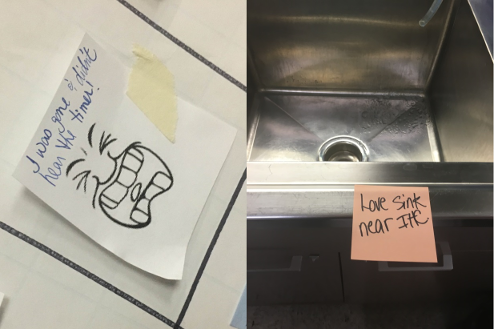
Figure 4. Examples of participants using stickers or post-it notes to tangibly mark and express what they like, dislike, or feel about their space and processes.
Example project: Recently, the VCD Lab used different color post-it notes to label areas of satisfaction or dissatisfaction within a Pathology Lab. The VCD team then photographically documented this visual feedback and the resulting insights influenced eventual design decisions.
These tools are just a few examples from the field of Human-Centered Design (HCD). Using a HCD approach, participants should feel like they are enjoying themselves and become more involved in the process. The goal is to understand a holistic perspective of people’s experiences while meeting their needs as end-users of products and services.
Learn more about the VCD Lab.
Special acknowledgements to the following individuals who reviewed and helped edit this article: Jessica Pierce, Chris Hughes, Kyle Maddox, and Andrew Carlstrom
|
|
Back to top of article | Back to article summary | Back to top of newsletter
|
|
|
|
A Customer’s Perspective: An Interview with Kevin Galpin, MD
Christopher Petteys, MBA, Human Factors Engineering, Office of Informatics and Information Governance
Dr. Kevin Galpin is a board certified physician in internal medicine and clinical informatics. He serves as the Chief of Health Informatics for VISN 7 and as the Interim Director of VA’s National Telemedicine Program. He recently undertook a project to develop Colorectal Screening Templates and engaged the Human Factors Engineering office for usability feedback. This interview with Dr. Galpin provides a different perspective on the human factors process: the customer’s.
Chris: What are the Colorectal Cancer Screening Templates?
Dr. Galpin: The colorectal screening templates are a system of clinical reminders that will be used in the primary care and Gastro-Intestinal (GI) setting to help track patients’ needs for colon cancer screening and follow up, with the goal of preventing late stage colorectal cancer. Like other progress note templates or reminder dialogues, these are to function within VA’s Electronic Health Record (EHR). The dialogues are important for reasons beyond being a note in the patient record. They impact future care by reminding clinicians of needed interventions for their patients. The Colorectal Cancer Screening process is complex as it involves multiple users, including nurses, PCPs (both inside and outside VA), GI physicians, and case managers. It can also involve multiple functions, including not only reminders, but also lab orders and follow-up recommendations. For this reason, a clinical decision support tool is valuable but it needs to be simple and intuitive to ensure it is functional and usable for all end-users.
C: Describe some of the risks of poor usability with these templates. What would be some of the impacts to the field if usability problems had not been uncovered and resolved?
DG: Usability issues may prevent people from using it or prevent people from using it correctly. If providers don’t know how to use these templates correctly, they may not be getting the appropriate prompts when their patients’ screenings are due. Issues may cause providers to lose the redundant process that ensures patients are getting standardized and quality care. It is important clinicians understand how to use this product and that it’s intuitive to them because of its implications on delivering safe and quality care.
C: Describe the work that was done in this project or the sequence of activities?
DG: In the beginning, our team obtained input from clinical technical experts and developed the concept and goals for the system to determine what was important and what safety gaps existed. Once outlined, we developed wireframe diagrams of the user interfaces, which are essentially pictures, along with swim lane diagrams, to define how the system would work within the PCP and GI environment. The Human Factors Engineering office then tested the wireframe diagrams employing the cognitive walkthrough technique. This method presented clinicians with clinical scenarios and gave them options to choose in the template to achieve certain, defined goals. During these sessions, providers discussed their thought processes and commented on and rated the dialogues on several measures of usability. This resulted in a lot of good feedback and insight into what providers were thinking when presented with different information and situations. The feedback drove product design and alterations to the language of the template to make it more intuitive and easier to use. The product was then developed to operate within the EHR (the first phase was only wireframes) and the process was repeated. Testing in this environment gave us an opportunity to test the product before field testing, and gave us additional items to consider as things look differently in the real EHR
C: Describe the relationship between the roles involved in this project (such as developers, clinical lead, and HF engineers)?
DG: Our team chose to leverage a multidisciplinary approach early in the process. We engaged clinicians, informaticists, reminder builders, implementations scientists, and the VHA Human Factors Engineering team. The human factors engineers joined us at a very early stage in our workgroup process, which helped us identify problems early on in the design and development phase and prevented a lot of rework. It kept us on a narrower path than if we had brought people on at a later time after drafts were already developed in the EHR.
C: What was the outcome of this collaboration? Were you successful meeting the objectives?
DG: Our objective is to take great care of patients. In the way we worked, we put ourselves in the best position to meet that objective. The product is not released yet, but the multidisciplinary approach and engaging the Human Factors Engineering team early in development, helped it move through the process faster, and resulted in a better product in the end.
C: If you are involved with another project in the future, is there something you will do differently to improve usability?
DG: Our goal from the beginning was to get this product released for clinical use. When undertaking a project of this nature, you need to expect revisions and several rounds of testing. It’s important to put effort in getting the right people on board and scheduling the time for usability testing. Having reasonable expectations and knowing that the process will not be done in one day is critical to obtaining the needed feedback for releasing a usable product.
C: What advice do you have for development teams concerned about usability?
DG: When working through a process like this, it’s healthy to have a multidisciplinary group and involve people on your team that have many different perspectives. Unless you are making something for yourself, do not surround yourself with only people that think just like you. It’s remarkable when you have other people with different perspectives and they look at the same work and have a completely different interpretation of what it means. You need that because when releasing something to a large audience, there are going to be people that think differently and have different experiences or perspectives. When working through this type of process, you need that feedback to know if something that makes sense to you also makes sense to others.
|
|
Back to top of article | Back to article summary | Back to top of newsletter
|
|
|
|
Rapid Heuristic Evaluations to inform design of Enterprise Health Management Platform (eHMP)
Jennifer Herout, PhD, MA, Human Factors Engineering (HFE), Office of Informatics and Information Governance (OIIG); Jolie Dobre, MS, HFE, OIIG; Craig Harrington, MS, MSW, VA Digital Services, VA Office of Informatics and Technology; Charlene R. Weir, PhD, IDEAS Center of Innovation, Salt Lake City VA; Donna Baggetta, BA, HFE, OIIG; Tippy Carter, HFE, OIIG; Ashley Cook, HFE, OIIG
Introduction
The Department of Veterans Affairs (VA) has recently experienced several very well-publicized events resulting in outcries to improve the delivery of health care to Veteran patients. A major initiative toward this improvement is the design and development of a next generation of VA’s Electronic Health Record (EHR), known as the Enterprise Health Management Platform (eHMP). Although based on Agile development principles, the design reviews were marked by inefficient practices that resulted in numerous design iterations as VA stakeholders (clinician informaticists, Subject Matter Experts [SMEs], and eHMP leadership) struggled to reach an agreement on design. This resulted in lost opportunities for VA to evaluate and modify designs prior to hard coding of the software. The subsequent delays led to shrinking timelines for future designs and development. To remedy the problem, VA established a formal review process, wherein a clinical informaticist (Charlene Weir) and a usability specialist (Craig Harrington) were jointly designated as official decision makers. As such, their role was to help ensure that design approvals included both perspectives by explicitly approving them before they entered the development phase. The volume of software interface wireframes posed a significant challenge to the two decision makers who had to analyze, review, and approved the material in a few months.
Innovation
We developed a process solution to support the decision makers: A rapid heuristic evaluation (HE) of early wireframes and system design documentation. This process leveraged established EHR heuristics or design guidelines (Armijo, McDonnell, & Werner, 2009) to accelerate wireframe’s transition from design to development. The rapid HE merged a traditional HE with an expert review by two subject matter experts (SMEs). In addition to “signing off” on the wireframes, the decision-makers served as the SMEs: the clinical informaticist (Charlene Weir) is a nurse and the usability specialist (Craig Harrington) has a background in social work and software development.
A usability specialist from the Human Factors Engineering (HFE) office reviewed the wireframes using the EHR-specific heuristics (Armijo, McDonnell, and Werner, 2009) that are supportive of VA’s mission1 in combination with previously developed clinician personas (Cook, Robbins, Brown, and Wilck, 2015) to help identify potential usability issues, such as unclear language or inconsistent data presentation. An example wireframe from one of the applets is presented in Figure 1 below. For each wireframe set, the HFE usability specialist captured screen shots of issues, annotated, and catalogued them. Each finding was scored using a published ranking system (Cook and Herout, 2015) and at least one recommendation for improvement was made for each finding. Positive findings were also included to communicate successful aspects of the design. All of this was captured in a novel instrument created using Microsoft Excel.
1As an example, the selected set included an item: “displays should support collaborative work processes,” which is a useful heuristic for VA since team communication is crucial to the success of the Patient Aligned Care Team (PACT) initiative.
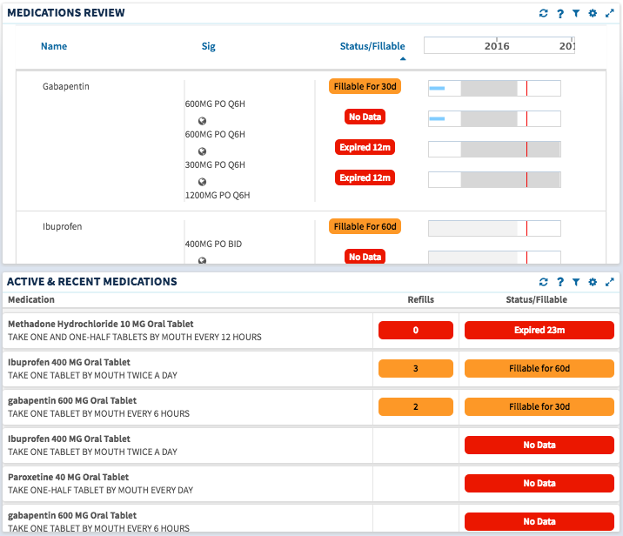
Figure 1. Screen capture of a couple of related applets that show how similar information can be displayed in different ways to fit the needs of the users.
The HFE usability specialist presented the data from the initial HE review to the two decision-makers for review. This group discussed the findings and made additions or edits based on the professional perspectives offered. The team came to consensus on a decision to either approve the wireframes or communicate necessary changes back to the development team. The entire Excel workbook, typically containing 12-25 findings from the heuristic evaluation, was then delivered to the feature team with an offer to discuss the findings. Our goal was to complete the process for each set of wireframes within one week.
Impact
The nature of health care work makes it difficult for clinicians to participate in daily or weekly design sessions. The rapid HE process meant usability feedback from multiple perspectives on wireframes was considered before software programming and coding began. It allowed software developers to incorporate structured usability input from two usability specialists and a clinician informaticist. Our input affected the designs of 21 features that otherwise would have been moved to development without such feedback. The size of wireframe packages also made the turnaround time difficult to achieve. A typical request for HE included two to four workflows represented in wireframes and resulted in a Rapid HE workbook containing 12-25 findings along with recommendations for remediation. The process ensured that designs accurately represented the stated design requirements. Inconsistencies introduced during the iterative design process could be identified and corrected prior to coding, reducing corrections later on. Changes that were not incorporated into current versions were added to the development backlog and prioritized according to the potential value to end-users.
Discussion
Rapid HEs provided a mechanism to quickly identify and prioritize potential design issues for the decision- makers. This process was important because clinical and usability expertise had been lacking in early development of the eHMP. The use of the rapid HEs allowed us to make maximum use of our resources (both dedicated HFE and decision-maker/SMEs) and minimize the amount of time necessary for providing feedback, a constraint imposed by the Agile development rhythm. The evaluation process complemented the iterative nature of Agile by analyzing not only the current wireframe iteration, but all functional specifications documented for that capability set via a thorough review of existing documentation. The HEs provided decision-makers with substantial data on current design problems as well as recommendations to improve the usability of the design. A key secondary benefit was that development teams were able to rank and prioritize backlog items easily. Stakeholders, from both VA and the development team, seeking to ensure that approval was clear both to VA and the developers before wireframes were released from design to development, were enthusiastic supporters of this “agile” heuristic evaluation process
There were several challenges faced in setting up this process. First, while the accepted gold standard for conducting HEs is to include 3-5 usability reviewers, our organization was not staffed at a level to allow for that. Therefore, we arrived at this solution, which allowed for two usability reviewers and a knowledgeable clinical informaticist to review wireframes and contribute to the findings with the expectation that any serious issues with the design would be uncovered.
It was also challenging to schedule time for the usability specialists and informaticist to meet for discussion of the wireframes. This was exacerbated by variations in timing in submission of wireframe sets for review. To avoid delays due to scheduling, time was set aside each day for potential review discussions.
Lastly, the process is limited by the limitations inherent in a typical HE. HEs are not expected to identify 100% of usability issues, although with three reviewers contributing, we anticipate that serious issues would be raised for remediation. In addition, there are plans to supplement with other usability evaluations (such as participatory reviews with clinicians and formative usability testing) in the near future.
Also, in the future, the documentation of structured information, including which heuristics were violated and the associated severity ratings can be analyzed and used by HFE to provide targeted design guidance such as design guidelines or specific design patterns for future feature development. This will save time and effort in all future eHMP designs.
References
Armijo D., McDonnell C., & Werner K. (2009). Electronic Health Record Usability: Evaluation and Use Case Framework. AHRQ Publication No. 09(10)-0091-1-EF. Rockville, MD: Agency for Healthcare Research and Quality. October 2009.
Cook, A. & Herout, J. (2015). Developing a Usability Ranking System for Findings in Health Information Technology Products. Proceedings of the International Symposium on Human Factors and Ergonomics in Health Care, June 2015. 4: 23-28.
Cook, A., Robbins, J., Brown, J.W., and Wilck, N.R. (2015). Introducing VHA HFE Personas: Who Are They and How Can You Use Them? The Human Factors Quarterly. Issue 10: Spring 2015. http://www.ehealth.va.gov/Newsroom.asp
|
|
Back to top of article | Back to article summary | Back to top of newsletter
|
|
|
|
 More Highlights from the 2016 International Symposium on Human Factors & Ergonomics in Health Care More Highlights from the 2016 International Symposium on Human Factors & Ergonomics in Health Care
Linda Williams, RN, MSI, CHSE
The HFES Healthcare Symposium, Shaping the Future, was in the Spotlight in the spring issue of this newsletter. Attending both HFES and the smaller healthcare symposium has always felt to me like being among so many like-minded individuals - like being among my people. A recent article, Human factors in healthcare: welcome progress, but still scratching the surface, describes three concepts that are key to full integration of HFE into health care. The three concepts describe well what you find in the air at the symposium: bridging, collaboration, and mutual adjustment. HFE professions are derived from various fields of study – and they may be applied in sufficiently diverse ways to provoke disagreement. Diverse professions here include a variety of clinical backgrounds as well. However, meeting at the symposium finds most of us willing to bridge, collaborate, and adjust.
Understanding, designing, and evaluating real-world clinical health IT solutions was presented by Alex Vu, PhD from Ohio State U. Alex and his group studied temporal patterns in the telemetry unit finding low informativeness in a sea of background noise that makes what is urgent very difficult to detect. Bridging across the worlds of biomedical engineering and intensive healthcare, Dr. Vu says that instead of focusing our concern on false alarms, we need to differentiate those that are actionable. 65-99% of all alarms are false alarms, and less than 39% of true alarms indicate that action is urgently needed.
Cognitive Challenges, Technological Factors, and Communication of Medical Referrals and Consultations - work from various MD and PhD researchers at VA health care systems in Indianapolis (HCI lab), Phoenix, and Palo Alto. Collaboration involving HCI researchers and physicians across three big VAMCs separated by many miles attacked an issue that has made newspaper headlines recently. Their study reveals a very different picture of the problem of delayed or lost appointments after referral for a consult. There are 695 unique consult types from which to select in CPRS. If duplicates are included in the count, the possible choices are >800! And about one third of patients are referred each year. Part of the solution is to create a streamlined, understandable, and efficient template in CPRS; and to add agile, automated tracking tools to assure that the consult occurs and information follows.
Understanding Complex Clinical Decision Tasks for Better health Information Technology System Design presented by Roosan Islam, PharmD, PhD from Baylor and the Michael E. DeBakey VAMC. With the goal of providing a better EHR clinical decision support system, Roosan holds the ability to inspire mutual adjustment in his own self. He is both a PharmD and a PhD, and the work involved 10 infectious disease physicians. The research problem is increasing diagnostic uncertainty, perceived difficulty, treatment unpredictability – and decreased case similarity. Recommendations for design were derived using task complexity models from outside of healthcare in which a large number of components feed into decisions, adding considerations for patient complexity (co-morbidities and polypharmacy), and refining with the methods of information search and retrieval required for evidence-based practice in healthcare.
The HFES Healthcare Symposium is comprised of three tracks. Each of the sessions is small and informal enough to allow for true conferring. The work presented is often work-in-progress, so the discussions that follow presentations may improve the work or provide refinement. Next year: New Orleans, March 5-8.
|
Back to top of article | Back to article summary | Back to top of newsletter
|
|
|
 |
|