|
Dear School Certifying Official (SCO),
We have received numerous inquiries on how to correct a monthly certification of hours for On-the-Job Training (OJT) or Apprenticeship (APP) programs. Below you will find detailed instructions on how to correct monthly certifications in Enrollment Manager.
In order to correct information on a monthly certification in Enrollment Manager, you must add a custom remark on the monthly certification for a subsequent month, as soon as possible. The ability to replace a specific month is expected in a future release. If this was the trainee’s last month, please submit the corrected information through AskVA.
Follow the steps below to correct a monthly certification in Enrollment Manager:
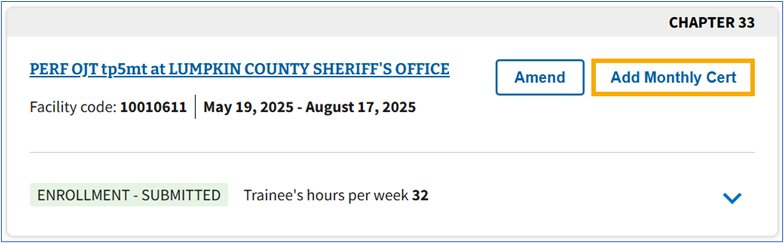
1. Select the Add Monthly Cert button on the Enrollment card.
Note: While the Amend button is selectable, it is only to amend the enrollment certification. It should not be used if the trainee has already had monthly certifications submitted. Functionality to prevent you from selecting this button is expected in a future release.
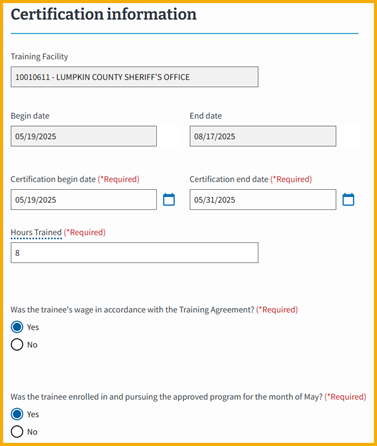
 2. Enter required enrollment certification information.
Notes:
- You should not add the corrected enrolled hours to the enrolled hours being certified in a subsequent month.
- For more information on adding Monthly Certifications information in Enrollment Manager, see the Enrollment Manager SCO User Guide.
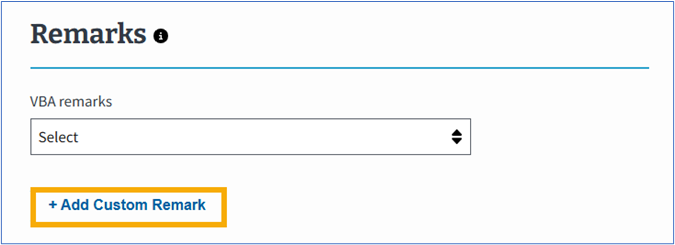
 3. Select the + Add Custom Remark button.
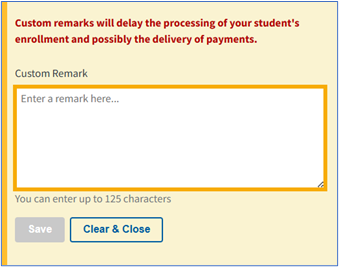
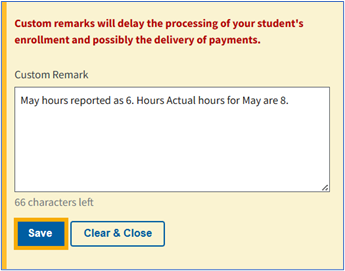
 4. Enter the corrected information within the Custom Remark reason field. This should be done on the next certification submitted after the error is identified, ideally the following month.
Example: 6 hours were erroneously submitted for the month of May 2025. When submitting the next enrollment certification, you will add a custom remark for June 2025 which reads “May hours reported as 6. Actual hours are 8."
 5. Select the Save button.
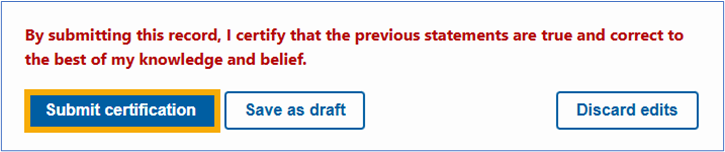
 6. Select the Submit certification button.
 For more information, see the Employer’s Certification Handbook On-The-Job Training & Apprenticeship Programs.
Respectfully,
Education Service
|