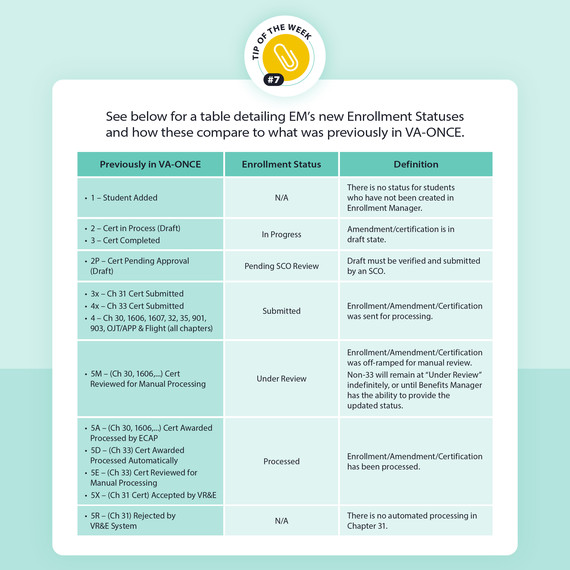
We're excited to share a new tip with you this week as you continue to become familiar with Enrollment Manager. Each tip was designed to help you navigate Enrollment Manager and support your GI Bill® students with their varying needs. This week we’re sharing tips on enrollment statuses.
Additional Information:
You can find more information about Enrollment Manager functions on the Resources for Schools webpage by reviewing the Quick Starts Guides listed in the “Enrollment Manager information” dropdown menu.
Quick Tips
In addition to searching for a student by name or student ID, you can also search for a student by filtering the enrollment status.
Our Customer Experience Group (CEG) is available for one-on-one technical support with Enrollment Manager throughout the month of April. Please contact the CEG toll-free at 1-888-442-4551, Monday – Friday, 8 a.m. - 5 p.m. ET.If you’re located outside of the United States, please call 001-918-781-5678.
New Video: Watch the “Built for SCOs, with SCOs” video to hear how your feedback helped develop Enrollment Manager.
We hope you learned something new from this week's tip. Have suggestions on helpful content you’d like to see? Let us know in the feedback form.
Thanks,
Education Service
US Department of Veterans Affairs
Veterans Benefits Administration
1-888-442-4551, TDD: 711
Do you have a question or concern about your benefits? Contact us safely and securely with AskVA!