|
School Certifying Officials -
Thank you for joining our January Office Hours where we reviewed DGIB Updates: Enrollment Manager, Federal Register Notice, Standard vs. Non-Standard Remarks and School Certifying Officials (SCO) Annual Training Requirements. We’ll cover some very important Enrollment Manager items below.
During the series, we referenced numerous resources to support your understanding of the changes and communicate information to beneficiaries. Below, you will find a summary of hyperlinked resources outlined during the sessions as well as reminders:
GovDelivery registration
All announcements for Office Hours are sent from the GovDelivery system. If this document was forwarded to you, please use the hyperlink to create your own account immediately so you don’t miss out on them.
If you have technical issues in GovDelivery, here is the link to their Support site.
The Adobe Connect platform and access

Each time a person registers for a Connect event, Adobe sends an automated confirmation email that comes from a “Do Not Reply” source. Schools with strong firewalls and anti-virus protection prevent these emails from getting through to you. Please check junk/spam hourly!
Use the Connect Desktop Apps to access all our trainings!
After you register, you should receive that confirmation email within one day. If not, please contact your school’s IT Office and have them remove the Adobe restriction.
If you need assistance contacting your ELR, or do not know your facility code, email the National Training Team – Schools for assistance. EDUTRAINING.VBACO@va.gov.
|
January 2023 Office Hours

To review the January Office Hours content, please go here.
Enrollment Manager questions and answers:
All EM questions submitted to us during Office Hours are answered on the Enrollment Manager FAQ Page. You can use “Control F” to search keywords too.
Office Hours questions and answers:
Topics outside of EM are answered on the Office Hours FAQ page which is also key word searchable, using "Control F".
Please bookmark both webpages.
Did you miss the January Office Hours?
You can view the video recording here.
To review the topics and information from the January Office Hours, please visit the Education & Training Page.
|
DGIB updates: Enrollment Manager

EM 100, 101 and 102 are now located in the SCO Portal.
During December Office Hours we played a demo video on “Multifactor Authentication.” That video can be viewed in this Facebook location. Be sure to save this one as well.
What is the Transition Period?
Leading up to the launch of Enrollment Manager, there will be a Transition Period to migrate the data, during which access to VA-ONCE will not be available.
The Enrollment Manager system will be live on Monday March 6, 2023. You will have full use of VA-ONCE until Friday February 24, 2023 at 8:00pm Eastern Time.
Continue to submit all enrollments in VA-ONCE until then.
Enrollment Manager Access
VA strongly encourages you to create an ID.me or Login.gov account as soon as possible to gain access to Enrollment Manager. The EM site is NOT live at this time.
All SCOs need to create an ID.me or Login.gov account to access Enrollment Manager.
Step 1
Sign up for a new account
Step 2
Confirming your email address
Step 3
Securing your account
Step 4
Verifying your identity
Visit the ID.me help center for questions about ID.me accounts.
Visit the Login.gov help center for questions about login.gov accounts.
For more information about ID.me, please view this video.
Please note:
To gain access to EM, ensure that you still have access to VA-ONCE.
- An SCO must either already be in WEAMS or have recently provided VA Form 22-8794
- To gain access to EM, a Read-Only SCO must either already be in WEAMS or have recently provided VA Form 22-8794
- No paperwork is ever needed to gain EM access for an Asst SCO/Work Study.
|
Federal Register Notice on Educational Assistance Funds, otherwise known as the 90/10 Rule
The 90/10 rule is specific to for-profit institutions. VA identifies all approved schools by its assigned eight-digit facility code. If you’re a school with a facility code, which begins with the number “2” for example 29000013 (also known as a for-profit institution) it’s applicable to your school.
The law now requires the 90% federal revenue cap include all Federal education assistance funds as Federal revenue at for-profit institutions. VA Education benefits must be counted as Federal funds in the 90/10 calculation for fiscal years beginning on or after January 1, 2023, not only Title IV student aid.
Chapter 31 Inquiries - Please contact Veterans Readiness and Employment (VR&E).
Send all completed 90/10 calculations to the Department of Education.
Standard vs. Non-Standard Remarks in VA-ONCE
VBA Standard Remarks are predetermined choices that can be selected from a drop-down list. If "Other" is selected from the drop-down, the user can then enter a non-standard remark.
Non-Standard Remarks include "School Standard Remarks" which can be saved for repeated use. "Other” Remarks are used one-time only. Both types are entered as free text. These remarks will not migrate to Enrollment Manager.
The use of Non-Standard Remarks prevents automated claims from being processed and should be limited. See the School Certifying Official Handbook for scenarios that require use of a Non-Standard Remark.
The following link is the Online School Certifying Official (SCO) Handbook: School Certifying Official Handbook.
SCO annual training requirements
 |
|
For more information about SCO training requirements, please visit this webpage.
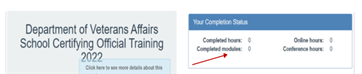
Note: You can view the number of modules completed in the SCO Training Portal in the Your Completion Status table.
|
Annual training requirements for FY2023
These Facility types require 4 modules of training
- Institutions of Higher Learning (IHL)
- Non-College Degree Programs – Only (NCD)
- IHLs with NCDs
- IHL with Flight Programs
These Facility types require 1 module of training
- On-The-Job & Apprenticeship Training (OJT & APP)
- Vocational Flight Programs
- High School Programs
- Residency Programs
New Certifying Official training requirements
- Institutions of Higher Learning = 10 Modules
- Non-College Degree Facilities = 10 Modules
- OJT & App Facilities = 1 Module
- Vocational Flight Facilities = 1 Module
- High School & Residency Facilities = 1 Module
Self-Certification steps
- Login to the SCO Annual Training Portal
- Select Office Hours, Conference Sessions, or Supplemental Training
- Locate the applicable Session and Click “Begin”
- Verify you selected the correct Training Session, then click “continue”
- Click “Yes” you completed 100%, then click “Submit”
- Enter the Date of Training, then click “Submit”
- Download your results and retain the Certificate
Additional SCO resources
For additional information about SCO requirements, navigate to the updated School Certifying Officials Handbook, the School Certifying Officials Resource Page and the School Certifying Official Training.
For more information or questions about this event, please contact the Training Corporate Mailbox. For specific information about GI Bill benefits, please visit the GI Bill website.
Upcoming training
To view the dates for the upcoming webinars please visit this website for the National Training Team - Schools Training Calendar.
The Enrollment Manager Experience will be six sessions dedicated to the EM platform
Note: Both IHL and NCD sessions will present the exact same material, so please only register for one to save space for other SCOs. Only one session is needed for credit.
There will not be a February Office Hours Series
March Office Hours – 22 and 23
One last time: You must be enrolled in GovDelivery to receive all Office Hours announcements and communications from Education Service.
The Enrollment Manager Experience
Tuesday, February 28 - IHLs
Wednesday, March 1 - NCDs
Thursday, March 2 - OJT/App
All sessions are Eastern Time
We realize SCOs are concerned about the Transition Period when you will not have access to either VA-ONCE or Enrollment Manager. You will be receiving multiple emails from us before, during and after the Transition Period to keep you abreast of the migration of info.
We are all in this together and will be here for you!
National Training Team – Schools
|