|
|
Welcome to the September edition of the SLFRF Newsletter, meant to inform and empower SLFRF recipients. In this issue, you’ll find our recently updated guidance for reporting, a checklist to prepare for closeout, additional recipient resources, and other important information related to the program. Plus, we have answers to some of SLFRF recipients’ most frequently asked questions and guidance to avoid common reporting errors.
We encourage you to forward this newsletter to someone you know who would benefit from receiving this information and let them know to subscribe here.
Please note: This newsletter has been edited to align with formatting requirements of GovDelivery. For the full newsletter, please see the following link: SLFRF September 2026 Newsletter Collection
|
|
SLFRF EXPENDITURE DEADLINES – THEY ARE COMING UP!
The deadline to obligate all SLFRF funds was December 31, 2024. The deadline to expend all SLFRF funds is December 31, 2026, with the exception of Surface Transportation and Title I eligible use category projects for which recipients must expend funds by September 30, 2026.
Recipients are required to return to Treasury any SLFRF funds that have not been expended by the expenditure deadline. Please see the SLFRF Frequently Asked Questions (FAQs) for additional information about the expenditure requirement and in particular note the FAQs indicated below.
Questions regarding the use of SLFRF funds for Closeout Costs
FAQ 17.5 addresses the use of SLFRF funds for closeout costs after December 31, 2026. Treasury also recently posted FAQs #17.25 – #17.28 to provide additional information about the treatment of expenditures as the period of performance ends.
Examples of issues addressed in these new FAQs include:
- Application of the expenditure deadlines to subrecipients and the use of SLFRF funds for processing or correcting final subrecipient invoices through April 30, 2027 (FAQ #17.26);
- The permissibility of reissuing uncashed checks through April 30, 2027 (FAQ #17.27); and
- The treatment of uncashed or cancelled (voided) checks after April 30, 2027 (FAQ #17.28).
Concerned About Timing? Underspent on projects?
See how the reclassification how to guide for the SLFRF program might be useful.
You may be interested in learning more about Reclassification.
If a recipient has funds that were obligated as of the December 31, 2024 deadline but ultimately not expended on an eligible activity, the recipient may reclassify the SLFRF funds from the original activity to another project that is eligible under the SLFRF program, including the requirement that the recipient incurred an obligation by December 31, 2024, as described in FAQ 17.19.
Reclassification can be a useful tool when an SLFRF-funded project has experienced delays and will not be completed by the applicable expenditure deadline. In that case, you may use non-SLFRF funds to complete the project and reclassify the SLFRF-funds to another project that is eligible under the SLFRF program.
It can also be useful if you complete a project and have excess SLFRF funds that could be used for other expenditures that meet the eligibility requirements—including the December 31, 2024 obligation deadline.
Example Scenario from the “How To” Guide: Reclassifying funds from one project to another project
- A recipient initially obligated $1M for a community center renovation under EC 2.31 Rehabilitation of Commercial Properties (Project A).
-
After final design changes, $100,000 is reclassified to create a new project under EC 5.15 Drinking Water: Other Water Although this is a new project in the Treasury Portal, this is not a “new project” for the recipient. This project existed and incurred an obligation prior to the obligation deadline of December 31, 2024; the recipient previously covered the costs of this project with local funds and is now using SLFRF funds to cover the costs.
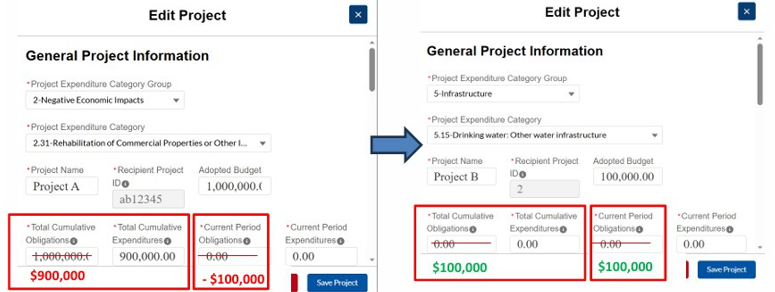
For more information on the timeline for obligation and use of funds, step-by-step guidance for reclassifying funds in the Treasury Portal, common reclassification scenarios, and related resources, please see the Reclassification “How To” Guide for the SLFRF Program.
|
|
|
|
Recipients that have reported fully expending their SLFRF allocation may be invited to close out their SLFRF award before the end of the period of performance. Treasury is inviting recipients via email to close out their SLFRF award on a rolling basis, as applicable. If the point(s) of contact associated with your community have not received communication from Treasury with an invitation to close out, the option is not yet available for your community. In the meantime, please review the SLFRF award closeout preparation checklist and ensure your point(s) of contact are up to date in the Treasury Portal.
Recipients who have not yet initiated closeout of their SLFRF award must continue to submit reports to Treasury, as outlined in the SLFRF Compliance and Reporting Guidance. Quarterly reporters will submit their Q3 2026 Project and Expenditure Report by October 31, 2026 and their final Project and Expenditure Report by April 30, 2027. Annual reporters will submit one final Project and Expenditure Report by April 30, 2027.
Do you think you have completed your reporting requirements? Maybe you haven’t! HOW TO CHECK YOUR CLOSEOUT STATUS AND WHAT TO KNOW
One of the most common misunderstandings occurs when a recipient thinks it closed its SLFRF award because it finished expending the funds. However, “closeout” is a two-step process that involves (1) submitting your most recent compliance report and (2) completing the Closeout Report section when it becomes available to you.
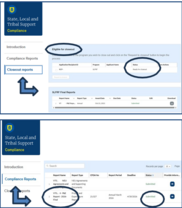
- “How do I check if I closed out?”
If your community has submitted a Closeout Report, in the “Closeout Reports” section of the Treasury Portal you will see a blue box titled “Eligible for Closeout” and the status will be “Closeout Complete.” If instead you see no document displayed in that section or you see a document with the status “Ready for Closeout” or “Closeout in Progress,” your community has not initiated or completed closeout of your SLFRF award.
- “Have I submitted my most recent compliance report?”
You will also want to check to see when your most recent compliance report was submitted. Click on the Compliance Reports tab and look for the 2026 Annual Project and Expenditure (P&E) Report (for annual reporters). For quarterly reporters, the information will also be available in the same location as it is for annual reporters.
If you do not see “Submitted” as the status for your 2026 Annual P&E Report, you should complete and submit that report as soon as possible; closeout will then become available only once Treasury extends a closeout invitation to you via email.
If you have not yet submitted your 2026 Annual or latest Quarterly Project & Expenditure (P&E) Report, we encourage you to review the SLFRF 2025 Annual/Q1 2025 Reporting Demonstration which provides a step-by-step walkthrough of the Treasury Portal, explains reporting requirements and recipient responsibilities, and offers guidance on the noncompliance process, debt management, and additional Treasury resources to help you successfully complete and submit your report. Of note, this recorded demonstration presents the 2025 report, which is very similar to the 2026 report with two changes. The changes are noted below:
1. The deadline to obligate all SLFRF funds was December 31, 2024, and so recipients may not report projects exceeding the amount obligated in the report covering the obligation deadline (for annual reporters, this would be the total obligations reported by the 2025 Annual P&E Report).
2. The revenue loss determinations were required to be reported by the April 2025 reporting period, and so recipients cannot edit the fields related to their revenue loss determination on the Recipient Specific screen. Cumulative obligations and expenditures reported under EC 6 projects may not exceed the total amount of revenue loss that was previously reported.
Contact slfrf@treasury.gov with reporting questions.
SLFRF TREASURY PORTAL ACCOUNT ACCESS HELP
“I want to check my status, but I can’t log into the Treasury Portal”
If you have difficulty accessing your community’s SLFRF report, Treasury can help:
For step-by-step instructions and troubleshooting tips, including best practices for setting up Login.gov, please visit SLFRF Treasury Portal Account Access Help.
If you are still having difficulty, please email SLFRF@treasury.gov with the following information:
- Your community’s name and address,
- The email address you are using to log into the Treasury Portal,
- Whether you are signing into the Treasury Portal via: gov or ID.me,
- A brief description of the issue, and
- A screenshot of the error/message (if applicable)
CLOSEOUT OFFICE HOURS!
Recipients who received an invitation from Treasury to initiate close out of the SLFRF program are encouraged to join office hours if they need assistance in successfully initiating closeout or have questions about the process. Below, please see the schedule of upcoming office hours:
(Meeting ID: 165 722 8604): https://ustreasury.zoomgov.com/j/1657228604
- Wednesday, September 30, 2026 at 1PM ET
- Wednesday, October 14 and October 28, 2026 at 1PM ET
- Wednesday, November 11 and November 25, 2026 at 1PM ET
- Wednesday, December 9 and December 23, 2026 at 1PM ET
Who should attend? Staff responsible for submitting the Closeout Report through the Treasury Portal.
Additionally, staff who administer their recipient government’s SLFRF award funds, including staff with new administrative responsibilities, are encouraged to attend. In particular, staf directly administering budget, finance, policy, grants, housing programs, Capital Improvement Plan (CIP) programs, emergency management programs, or other functions of the SLFRF program may find the webinar helpful.
Prior to attending, please verify your Treasury Portal access so you can follow along during the webinar. For information about accessing the Treasury Portal, see the information below and in this resource: SLFRF Treasury Portal Account Access Help.
|
|
|
|
In this section, we’ll “get into the weeds” on common reporting questions.
EXPERIENCING UNEXPECTED BEHAVIOR IN THE TREASURY PORTAL? CHECK THE KNOWN ISSUES PAGE!
Experiencing unexpected behavior in the Treasury Portal? Before troubleshooting or submitting a support request, check the “Known Issues” section on the introduction page of the Treasury Portal. This section is regularly updated with issues that Treasury has identified as affecting multiple recipients, including resolution status and, if resolved, the date of resolution.
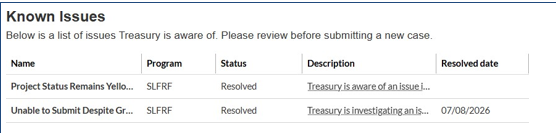
If the issue you’re experiencing is not listed, it is likely not a widespread Treasury Portal issue. In many cases, the issue may be related to your individual report, user error, cached data, or report-specific validations. If you’ve confirmed the issue persists after basic troubleshooting, contact the SLFRF@ Treasury.gov and include: 1) screenshots, 2) the email you are using to log in, and 3) the steps you took before the issue occurred.
CAN’T LOCK YOUR PROJECT?
Locking a project can be very useful to simplify SLFRF reporting. However, occasionally a project cannot be locked even after all required information has been entered. For many cases, this resource can help you troubleshoot these issues: Troubleshooting When Unable to Lock Projects.
However, in some cases, there is a “known issue” that will not allow some recipients to lock certain projects. This issue was caused by previous report entries in the current obligations and current expenditure fields that were incorrect. We have implemented a fix in validations going forward that requires that the current period amounts be checked against the supporting entries. However, this update will only fix projects going forward.
Projects containing previously entered incorrect amounts will not have access to the lock feature.
Due to the cumulative nature of that section, totals that have this issue will not align, and the system will not allow you to lock the project. Locking the project is not a requirement, so you can still submit your report. Since this is a known issue, Treasury uses this section for general historical reference but relies on other fields to calculate the project’s total obligations and expenditures.
|
PROJECT STATUS INDICATORS: HOW DO YOU FIX A YELLOW OR RED BOX?
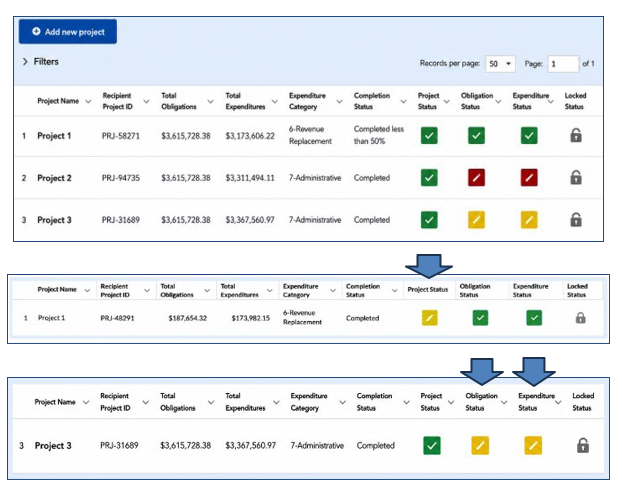
The Project Overview page has a table that lists each of the recipient’s projects and includes status indicators that help identify whether a project section is complete. These indicators appear as green, yellow, or red boxes.
- Green indicates the section is complete.
- Yellow indicates the section may be incomplete or requires attention.
- Red indicates required information is missing and must be addressed before the project can be finalized.
There are two areas where the yellow or red indicator boxes commonly generate questions:
1. “Project Status” Column with a Yellow Box:
This means that there is missing information about that project and the user must click the yellow box to provide the required information.
For example, many recipients who have previously reported completing obligations and expenditures for a project still experience a yellow project status indicator for said project. In this instance, the user may click the yellow indicator box to access the “Edit Project” pop-up box, and enter $0 in current period obligations and expenditures. The user should also ensure the start date of the project is filled in.
2. “Obligation Status” or “Expenditure Status” Columns with Yellow Boxes:
For all projects except Expenditure Category 6 (Revenue Replacement), recipients are required to report obligations and expenditures in a different section of the report.
This information is reported in the Subawards and/or Expenditures section of the Treasury Portal—not within the “Edit Project Details” pop-up page itself. If the Obligation/Expenditure Status box is yellow or red, verify that:
- Required obligation and expenditure information has been entered in the Subawards and/or Expenditures
- Any required subaward records have been reported
- The reported obligations and expenditures are also entered in the current period obligations or expenditures fields within the “Edit Project” pop-up box, which can be accessed by clicking the box in the Project Status column for the applicable project
If all required information has been entered and the status indicator does not update to green, review the videos SLFRF Explainer: How to Fix Obligations - YouTube, SLFRF Explainer: How to Fix Expenditures, the current P&E User Guide and the “Known Issues” section of the Treasury Portal’s introduction page before contacting SLFRF@Treasury.gov.
|
|
Here are the SLFRF questions we’ve received most frequently in our SLFRF@Treasury.gov inbox this year. We hope the Q&A below helps clarify any common points of confusion.
COMMON QUESTIONS – ASK THE ANSWER TEAM AND SLFRF UPDATES
“We reported that we fully expended our SLFRF award. Why am I still receiving emails from Treasury?”
Reporting that your award is fully expended in a required Project and Expenditure Report does not automatically close out your award. Until your government initiates the award closeout process, it remains an active recipient and may continue to receive communications, including reporting reminders, Information Document Requests (IDRs), Compliance Correspondence Notices (CCNs), and closeout-related notifications.
In sum, If you’re ever unsure whether a Treasury notification requires action, read the message carefully. In general:
• Information Document Requests (IDRs): Action required.
• Closeout Invitations: Action required.
• Notifications: Notices may be informational or may require action. When action is required, the notice will provide specific instructions and an applicable timeframe for completing the required action, including any steps that must be taken elsewhere in the Treasury Portal.
• Award Closeout Notices: No action required.
Below are more detailed descriptions of the types of notices you may receive:
• Information Document Requests (IDRs) – Action Required
An Information Document Request (IDR) is issued when Treasury needs additional information or clarification regarding your report. An IDR requires a response.
To view and respond to an IDR:
1. Log in to the Treasury
2. Navigate to Compliance
3. Scroll down to Information and/or Document
4. Open the request, carefully read what is being requested, and submit the requested information by the due date.
Need help responding? Watch Treasury’s Information Document Request Explainer Video, which walks through the process step-by-step.
• Closeout Invitations – Action Required
If Treasury determines your award is eligible for closeout, you may receive a Closeout Invitation. Unlike an Award Closeout Notice, a Closeout Invitation does require action.
Recipients must follow the steps below (also as outlined in this video):
1. Log into the Treasury
2. Navigate to the “Closeout Reports” section of the Treasury Portal
3. Click the box next to the program you are closing out and select “Request to Closeout”
4. Complete the required closeout questions, review SF-425 Federal Financial Report, and certify.
5. Submit the closeout package for Treasury’s review.
Your award is not officially closed until Treasury reviews your submission and issues an Award Closeout Notice through the Compliance Correspondence section of the Treasury Portal.
• Notifications – Official Notices – May Require Action
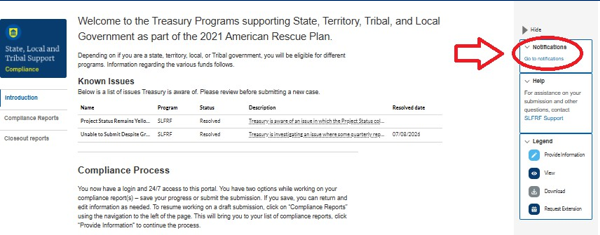
Notifications are official communications from Treasury that provide recipients with important program information, updates, and required actions. Some notifications are informational, while others require action within a specified timeframe. When action is required, the notification will provide instructions, including any steps that must be completed elsewhere in the Treasury Portal. Unlike IDRs, Notifications do not always require a response, but do often indicate required action within the Treasury Portal (e.g. submission of a required report, clarification needed via an IDR, information related to compliance with program, or action needed for closeout). They can also alert you to important official documentation, such as the Award Closeout Notice (see below), which confirms Treasury has completed closeout of your award.
It’s important to read Notifications upon issuance, as they notify recipients of important information regarding their award or reporting status. To ensure you are reading the most up-to-date information, please also note the date when reviewing your Notification history.
|
|
 |
|
To view your Notifications:
- Log into the Treasury
- Navigate to Notifications on the right side of the screen
- Click on the Notifications
|
|
|
• Award Closeout Notice – No Action Required
After Treasury reviews and approves your closeout submission, you will receive an Award Closeout Notice through the Compliance Correspondence section of the Treasury Portal. This notice confirms that Treasury has officially closed your SLFRF award.
Because the subject line includes the word “Notice,” some recipients mistakenly believe they must respond or complete another step. No further action is required in response to an Award Closeout Notice. It serves as your official confirmation that Treasury has completed the closeout process for your award.
Keep in mind that award closeout does not eliminate your record retention or other post-award responsibilities. Recipients must continue to comply with applicable federal requirements after closeout, including maintaining required records and supporting documentation for the applicable retention period and cooperating with any audits or other authorized reviews of the award, if requested.
If you have not yet received an Award Closeout Notice, your award has not officially closed, even if you previously reported that your funds were fully expended or have initiated the closeout process by submitting your SF-425.
Question: What is a Notice of Recoupment, and why did I receive it?
An Initial Notice of Recoupment is part of the compliance review process. This notice explains why Treasury has determined that funds may need to be returned and identifies the amount subject to recoupment. Recipients with unresolved compliance violations are considered noncompliant and may be subject to recoupment of SLFRF funds in accordance with 31 CFR 35.10.
If you receive an Initial Notice of Recoupment, you will have an opportunity to submit a request for reconsideration within the timeframe specified in the notice. You may also have the opportunity to address the compliance issue, if applicable.
If Treasury does not receive a request for reconsideration or the compliance issue is not resolved within the specified timeframe, Treasury will issue a Final Notice of Recoupment. The Final Notice will identify the final amount that must be returned to Treasury.
The Initial and Final Notices of Recoupment will be sent by postal mail and will also be available in the Treasury Portal. You will receive an email notifying you that an important message is available in the Treasury Portal’s Notifications section, where you can view and download the notice.
PUBLIC DATA UPDATES
Treasury regularly releases the reporting data submitted by state, local, and territorial governments. This public data provides transparency and accountability for communities, local leaders, and the public about how SLFRF resources are being used by recipient governments.
REPORTING FRAUD, WASTE AND ABUSE
Recipients play an important role in protecting the integrity of the State and Local Fiscal Recovery Funds (SLFRF) program. If you become aware of potential fraud, waste, abuse, or other misuse of SLFRF funds, you should report your concerns to the U.S. Department of the Treasury’s Ofice of Inspector General (OIG). Information on how to report suspected fraud, waste, and abuse is available on the Treasury OIG website: Report Fraud, Waste, and Abuse | Ofice of Inspector General (treasury.gov).
Cases involving potential fraud, waste, and abuse must also be reported to the SLFRF program by emailing SLFRF@treasury.gov.
Prompt reporting helps Treasury safeguard federal funds and ensure they are used in accordance with program requirements.
|
|
CONNECT WITH US
Please share SLFRF news by forwarding this newsletter to others!
Subscribe to the State and Local Fiscal Recovery Funds Newsletter by signing up here.
If you require additional assistance, please reach out to us by email:
For questions about the Treasury Portal or for technical support, please email SLFRF@Treasury.gov
For general questions about the Coronavirus State and Local Fiscal Recovery Funds, please email
SLFRF@treasury.gov.
|
|
|
|
|