|
|
Welcome to the April edition of the SLFRF Newsletter, meant to inform and empower SLFRF recipients. In this issue, you’ll find our recently updated guidance for reporting, a checklist to prepare for closeout when it is made available to you, additional recipient resources, and other important information related to the program. Plus, we have answers to some of SLFRF recipients’ most frequently asked questions and guidance to avoid common reporting errors.
We encourage you to forward this newsletter to someone you know who would benefit from receiving this newsletter, and let them know to subscribe here.
|
|
The U.S. Department of the Treasury (Treasury) will host a webinar series for all recipients of the SLFRF program to assist with successful submission of their 2026 Annual or Q1 Project and Expenditure (P&E) Reports, which are due on April 30, 2026. The purpose of the webinar series is to provide recipients with key resources to submit the P&E Reports.
Listed below are the four key areas that will be covered during each webinar:
- General Program Information & SLFRF Program Background
- Common Reporting Errors/Questions
- Demonstration of Reporting in the Treasury Portal
- Brief Update on Closeout
Join us for a webinars, offered on separate dates to give you more flexibility and the chance to participate early. Don’t wait—sign up below and secure your spot! Webinar details and the registration links are listed below.
- Webinar Session 1 (2026 Annual and Q1 Reports Focus): Tuesday, April 21, 2026
- Webinar Session 2 (2026 Annual Report Focus): Thursday, April 23, 2026
- Webinar Session 3 (2026 Q1 Report Focus): Tuesday, April 28, 2026
- Webinar Session 4 (2026 Annual and Q1 Reports Focus): Thursday, April 30, 2026
Who should attend? Staff responsible for submitting the 2026 Annual or Q1 P&E Reports through the Treasury Portal. Additionally, staff who administer their recipient government’s SLFRF award funds, including staff with new administrative responsibilities, are encouraged to attend. In particular, staff directly administering budget, finance, policy, grants, housing programs, Capital Improvement Plan (CIP) programs, emergency management programs, or other functions of the SLFRF program may find the webinar helpful.
Prior to attendance, please verify your Treasury Portal access so you can follow along during the webinar. For information about accessing the Treasury Portal, see the information below and in this new resource SLFRF Treasury Portal Account Access Help.
- To access the Treasury Portal, if you haven’t already, you’ll need to register and set up an account with one of two Treasury’s sign-in services, Login.gov or ID.me. We strongly suggest NEUs and new users who have not previously registered to register using the Login.gov process at https://portal.treasury.gov/compliance: For more information visit: SLFRF Self-Service Resources | S. Department of the Treasury
- Users who have previously registered through me and submitted a compliance report may continue to access the Treasury Portal through that method, although creating a new Login.gov account will not cause any issues. Users can login using either ID.me and Login.gov, provided the accounts use the same email address.
|
|
Treasury has released the new and updated April 2026 Project and Expenditure Report User Guide to assist recipients in a successful submission of the 2026 Annual and Q1 P&E Reports.
Treasury’s Portal opened for quarterly and annual reporters to submit P&E Reports on April 1, 2026. The recipient must submit their report by April 30, 2026.
|
|
|
|
The deadline to obligate all SLFRF funds was December 31, 2024. The deadline to expend all SLFRF funds is December 31, 2026, with the exception of projects within the Surface Transportation projects and Title I projects eligible use categories for which recipients must expend funds by September 30, 2026.
Recipients are required to return to Treasury any SLFRF funds that have not been expended by the expenditure deadline. Please see the SLFRF Frequently Asked Questions (FAQs) for additional information about the expenditure requirement.
|
|
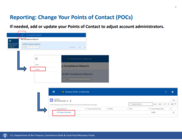
Treasury has released a SLFRF Reporting How To Guide, to walk recipients step-by-step from the user perspective through the account access and reporting process in the portal.
This resource highlights common errors and provides guidance on how to avoid or correct them. It also addresses frequently asked questions. Please visit SLFRF Reporting How To Guide to help navigate the issues outlined here:
- Account Access
- Establishing gov credentials • Logging in • Entering the Portal
- Reporting
- Access and View Reports Creating a New Project • Review Data
- Reporting: Revenue Replacement EC6
- Certification
- Federal Audit Clearinghouse (FAC) & Alternative Compliance Examination Engagement (ACEE) • Submission
- Common Errors
- Account Access Reporting • Program Income
|
|
|
NEWLY RELEASED REPORTING RESOURCES – EXPLAINER VIDEOS
We want to re-acquaint you with our series of explainer videos designed to assist you with the reporting requirements for SLFRF. We understand navigating the reporting process can sometimes be challenging, and these step-by-step videos aim to provide clear, visual guidance to help resolve common issues and ensure smooth, accurate submissions. Whether you’re facing technical difficulties or simply need a refresher on best practices, these videos will help you troubleshoot efficiently and stay on track with your reporting requirements.
KEY UPDATES
For other explainer videos, webinars, and demonstrations, please visit Additional Reporting Resources | U.S. Department of the Treasury. We also encourage you to explore self service resources on Treasury’s website, particularly System Support Login.gov, ID.me and SAM.gov FAQs and System Support–Treasury Submission Portal FAQs.
|
RECLASSIFICATION HOW TO GUIDE FOR THE SLFRF PROGRAM
If a recipient has funds that were obligated as of the December 31, 2024 deadline but ultimately not expended on an eligible activity, the recipient may reclassify the SLFRF funds from the original activity to another project that is eligible under the SLFRF program rules, including the requirement that the recipient incurred an obligation by December 31, 2024, as described in FAQ 17.19.
For more information on the timeline for obligation and use of funds, step-by-step guidance for reclassifying funds in the Treasury Portal, common reclassification scenarios, and related resources, please visit Reclassification How To Guide for the SLFRF Program.
|
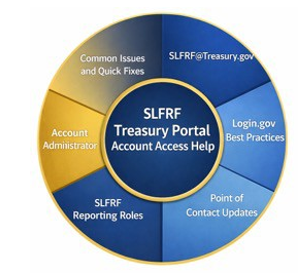
SLFRF TREASURY PORTAL ACCOUNT ACCESS HELP — BEST PRACTICES + COMMON FIXES
In preparation for the April 2026 reporting period, we’ve received many questions at SLFRF@Treasury.gov about accessing Treasury’s Portal—particularly around updating points of contact, understanding roles, and navigating account access when no administrator is assigned due to staff turnover.
Accurate account information is essential for timely reporting and compliance. For step-by-step instructions and troubleshooting tips, including best practices for setting up Login.gov. please visit SLFRF Treasury Portal Account Access Help.
ACCOUNT CREATION AND NEW USER ROLE REQUESTS TEMPLATE
To facilitate account creation and new user role requests for the Treasury portal, please email SLFRF@treasury.gov utilizing the template below:
Subject: [Community Name] Account Access Body:
City EIN #:
[City Name]
To Whom it May Concern:
I am the [Job Title] for the [Recipient Name], [State] and am requesting to be linked to my community’s SLFRF account. I have already created a contact account through login.gov utilizing the information listed below. I understand that I cannot utilize an email address that was previously registered to a different contact and therefore am using the same email I am sending this request from, acknowledging that all future communications will flow through this email.
I am requesting to have my contact account linked to my community account in order to stay in compliance with the program requirements. When adding my contact to our account, please ensure I have the roles of Account Administrator, Point of Contact, and Authorized Representative for Reporting assigned.
Here is our contact information to update the recipient’s record:
Name:
Title:
Email:
Phone Number:
Recipient Address with zip code:
I also understand that if I have not already created my account, the process may be delayed.
Additional resources, including explainer videos and self-service tools are available to help you navigate this process:
Make sure your user roles are up to date today to avoid any interruptions in accessing the Treasury Portal!
|
|
|
Here are the SLFRF questions we’ve received most frequently in our SLFRF@Treasury.gov inbox this year. We hope the Q&A below helps clarify any common points of confusion.
Question: We are unable to locate the forms to submit our Treasury report. Where are they on the SLFRF website?
All reporting for the SLFRF program is submitted online using the Treasury Portal. There are no paper forms.
- To submit your report in the Treasury Portal using an ID.me account, please navigate to Portal.Treasury.gov/cares.
- To submit your report in the Treasury Portal using Login.gov, please navigate to Portal.Treasury.gov/Compliance/s.
Please note: Users who have previously registered through ID.me may continue to access the Treasury Portal through that method at ID.me. You are not required to register again with Login.gov; however, you can choose to do so by going to Portal.Treasury.gov/Compliance. Both Login.gov and ID.me are valid ways to log into the Treasury Portal, and both methods will remain open going forward.
While both methods can be used to create an account, please remember if you are using Login.gov, you can access only the Compliance Reporting sections of the Treasury Portal; you cannot access applications or application information.
To gain access to applications, you must log in using ID.me, and then follow the instructions to log into the specific portal. You should use a Treasury Portal supported web browser such as Google Chrome or Microsoft Edge. As a reminder, the Treasury Portal does not work well on Internet Explorer.
Be sure that your Account Administrator or Authorized Representative has added you to the account in a user role and has used the correct email address.
Please visit the Additional Reporting Resources webpage and click on the Reporting Resources Treasury Portal button, where you will find links to webinars, explainer videos, PDFs, and more – including User Roles.
Question: We’ve spent our money. When can we stop reporting? When is closeout?
Recipients are required to continue to submit reports to Treasury as outlined in the latest SLFRF Compliance and Reporting Guidance. Please refer to “Part 2: Reporting Guidance, Section B – Project and Expenditure Report” for reporting responsibilities and note the due dates in that section for quarterly and annual reporters.
Recipients that have reported fully expending their SLFRF allocation may be invited to close out their SLFRF award ahead of the period of performance end date. As of 2025, Treasury has initiated this process on a rolling basis, notifying recipients with instructions as applicable.
If the point(s) of contact associated with your community have not received communication from Treasury with an invitation to close out, the option is not yet available for your community. In the meantime, please ensure your point(s) of contact are up to date in the portal and you review the SLFRF award closeout preparation checklist.
Question: How do I edit or delete a report? Can we reopen our submitted reports? What about cumulative reporting? How do I request copies of our previously submitted report?
-
Reopening submitted reports: Reports from prior periods will not be re-opened for revisions after the reporting deadline has passed.
-
Cumulative reporting: The P&E Reports are cumulative reports, and adjustments that apply to prior reporting periods can be made in the current reporting period, if it is still open, or in some cases in the next open reporting period when it opens.
-
Editing or deleting a report: For the quarterly or annual P&E Report, edits may be made prior to the submission deadline during an open reporting period. If it is before the deadline and you have already submitted the report and need to make an edit, you can hit the “Unsubmit” button, make the edit, then re-submit and re-certify the If the deadline has passed and you need to make edits, you will need to wait for the next reporting period to open to make edits. Once you make edits, you should provide detailed notes in the description text box for any updates. If the updates are related to projects, subawards, or expenditures, you can make the following edits, as applicable:
1. change the project status to cancel;
2. create a new project; or
3. create negative subaward or expenditure line items to reconcile incorrect line
-
To view copies of your previously submitted reports: Recipients are able to download previously submitted reports from the Treasury portal. Once the recipient has entered the portal and selected the Compliance Report Tab they will be able to see all of the submitted reports. On the right side of the screen, they will have an icon to either view or download the report.
Question: We missed the obligation deadline. When and how can we report our obligations in 2025?
Recipients must have obligated funds by December 31, 2024. Treasury is unable to provide any extension to or waiver of this deadline. Recipients that report quarterly were required to report this information in January 2025. Recipients that report annually were required to report this information by April 30, 2025.
As per FAQ 17.2, recipients are required to return to Treasury any SLFRF funds that have not been obligated by the obligation deadline of December 31, 2024. Recipients will report funds that were obligated by December 31, 2024, in the Project and Expenditure Report that, in the case of annual reporters, is due by April 30, 2025, and, in the case of quarterly reporters, is due by January 31, 2025. However, recipients are not required to return
to Treasury SLFRF funds that recipients have estimated will cover costs in 2025 and 2026 for certain legal and administrative expenses (as discussed in FAQs 17.10-13), certain personnel expenses (as discussed in FAQs 17.7 and 17.8), or certain contract changes or contingencies (as discussed in FAQ 17.17). As noted in the obligation IFR, Treasury will provide a deadline by which recipients must return funds not obligated by December 31, 2024.
Please see Section 17 of the SLFRF FAQs for more detail.
Question: What is an Initial Notice of Recoupment, and why did I receive it?
The next step in the process is the issuance of an Initial Notice of Recoupment. Recipients will have the opportunity to remedy their noncompliance by submitting a request for reconsideration within the specified timeframe. If a request is not received within that window, Treasury will issue a Final Notice of Recoupment, which will include the final amount to be returned to Treasury.
Recipients with unresolved compliance violations are considered noncompliant and may be subject to recoupment of SLFRF funds in accordance with 31 CFR 35.10. Recoupment is initiated via an Initial Notice of Recoupment. The Initial Notice of Recoupment serves as the first formal written notice of the amount subject to recoupment, along with an explanation of those amounts. This notice provides an opportunity to request reconsideration, and also, generally, will provide the recipient with an opportunity for remediation. The Initial Notice of Recoupment generally will be distributed via postal mail and is available in Treasury Portal. The recipient will receive an email indicating that there is an important message in the Notification Center within the Treasury Portal where they can view and download the Initial Notice of Recoupment.
|
|
|
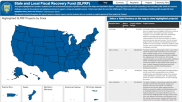
Treasury regularly releases the reporting data submitted by state, local, and territorial governments. This public data provides transparency and accountability for communities, local leaders, and the public about how SLFRF resources are being used by recipient governments.
|
|
|
The Closeout Corner aims to comprehensively prepare recipients for closeout, including providing recipients with educational resources available.
Now that the obligation deadline has passed, recipients should look towards the expenditure deadline, which is December 31, 2026, for all eligible uses except Surface Transportation projects and Title I projects. Recipients must expend SLFRF funds obligated for Surface Transportation projects and Title I projects by September 30, 2026.
Given this stage of the SLFRF program, some recipients may have met the necessary requirements for Treasury to initiate early closeout.
Recipients that have reported fully expending their SLFRF allocation may be invited to close out their SLFRF award before the end of the period of performance. Treasury has initiated this process on a rolling basis, notifying recipients with instructions as applicable.
Closeout will not be available again until Treasury completes the current reporting cycle. New closeout invitations will be issued, as applicable, after the reporting period ends.
Recipients that have fully expended their allocation and are ready for closeout should select “Yes” to the pop-up question “Are you ready to close out?” after certifying the April 2026 report.
Recipients are required to maintain an active SAM.gov registration until they receive notification that closeout has been completed.
If the point(s) of contact associated with your community have not received communication from Treasury with an invitation to close out, the option is not yet available for your community. In the meantime, please ensure your point(s) of contact are up to date in the portal and that you review the SLFRF Award Closeout Preparation Checklist.
Until Treasury notifies your community with an invitation to close out, please continue to submit Project and Expenditure (P&E) Reports as usual, even if all SLFRF funds have been fully expended.
Preparing for Closeout with an Active SAM.gov Registration:
To initiate close-out, recipients must have an active SAM.gov registration. This registration is administered by the General Services Administration (GSA), a federal agency. To determine the current status of your government’s SAM.gov registration, click here. If your registration is currently active, note the registration
expiration date, and ensure you complete the steps to renew the registration ahead of closing out your SLFRF award. Note: Only the SAM.gov Entity Administrator can renew the registration.
If your SAM.gov Entity Administrator is no longer with your government or there is not an Entity Administrator associated with the registration, create a user account and submit an Entity Administrator Appointment Letter to gain access to update the existing registration. If there is an existing Entity Administrator but you are now assuming that role, the current Administrator will need to assign that role directly to you. Recipients should not create a new UEI/SAM registration, but instead, should renew the existing registration
provided when funds were disbursed. Please find below a list of GSA-provided resources to assist with your SAM.gov registration renewal:
Non-entitlement units of local government (NEUs) that are registering their entity for the first time should e-mail their assigned UEI to Treasury at SLFRF@treasury.gov. Once the UEI is verified, we will update our records accordingly.
There is no cost to renew your SAM.gov registration, and assistance from the Federal Service Desk is free for public use. Additionally, SAM.gov does not use social media or contact individuals by phone to solicit, review, or make awards. In general, emails from the U.S. government come from a .gov or a .mil email domain. Look at both the sender’s display name and the sender’s email address. Be cautious of email addresses that try to look like U.S. government email addresses, e.g. sam-registration-gov@gsasam.com. If you are suspicious, do not respond or follow any links. To help identify potential phishing emails, view this article.
|
|
CONNECT WITH US
Please share SLFRF news by forwarding this newsletter to others!
Subscribe to the State and Local Fiscal Recovery Funds Newsletter by signing up here.
If you require additional assistance, please reach out to us by email:
For questions about the Treasury Portal or for technical support, please email covidreliefitsupport@treasury.gov.
For general questions about the Coronavirus State and Local Fiscal Recovery Funds, please email
SLFRF@treasury.gov.
|
|
|
|
|