|
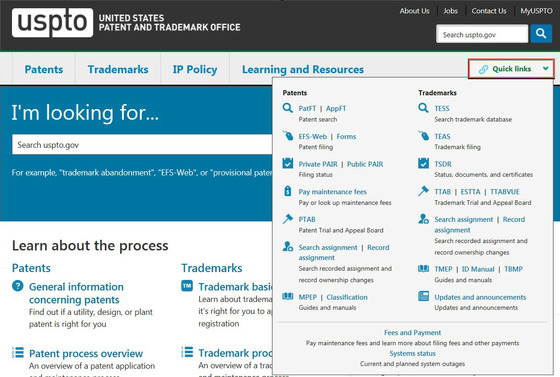
We often receive questions about how to most easily access frequently used pages and tools on the USPTO website. The best way is the "Quick links" button in the upper right-hand corner of every page.
For example, Trademark customers can use “Quick links” to directly access:
- TESS (Trademark Electronic Search System)
- TEAS (Trademark Electronic Application System)
- TSDR (Trademark Status and Document Retrieval)
- TTAB (Trademark Trial and Appeal Board) online
systems (ESTTA, TTABVUE)
- Search and record assignments
- TMEP (Trademark Manual of Examining Procedure)
- Trademark ID Manual
- TBMP (Trademark Trial and Appeal Board Manual of Procedure) *newly added*
- Updates and announcements
- Fees and payment
- System status
Here is a visual preview of where to find "Quick links" at USPTO.gov:
|