We are writing to inform Federal agencies of recent improvements made to Retirement Services Online (RSO) to enhance the annuitant experience and self-service functionality.
RSO Login Changes
In mid-February, Retirement Services updated the RSO login process to make it easier for more users to access their accounts.
Annuitants who have already logged in to RSO using their Login.gov account will continue to log in as normal—no change.
Annuitants who completed their retirement application in ORA and are logging in to RSO for the first time should be able to log directly in to RSO—no more passcodes. This only works if the annuitant uses the same Login.gov account that they used for their ORA application.
Annuitants whose Login.gov email matches the one OPM has on file will be emailed an activation code. After entering the activation code, they should be logged in. For future logins they will not have to enter an activation code.
Annuitants whose Login.gov email does not match the one OPM has on file will log in through Login.gov, receive the activation code to their Login.gov email, enter the activation code, then answer five questions to confirm their identity. For future logins they will not have to enter an activation code or answer the five questions.
Any RSO user who has not logged in for more than 13 months will receive an activation code by email as a security precaution.
New Online Request Tools
1099R
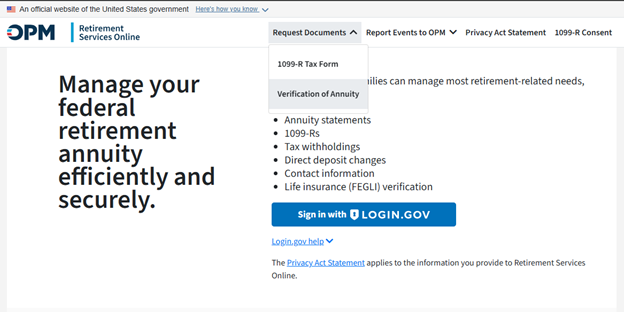
A new method for obtaining an electronic 1099R was established this year. Annuitants no longer are required to log into their RSO account to access their tax document. Annuitants with an active RSO account can use their claim number and U.S. zip code to request a secure email link to download a copy of their 1099R.
If annuitants would like to receive future 1099Rs via postal mail, they will need to review and update their communications preference in RSO after logging into their account.
Annuity Statement
Annuity Statements in RSO are now called Verification of Annuities (VOAs).
To obtain a VOA, annuitants may log into their RSO account or use the new tool to request a secure link to download their VOA.
Electronic Signature Forms
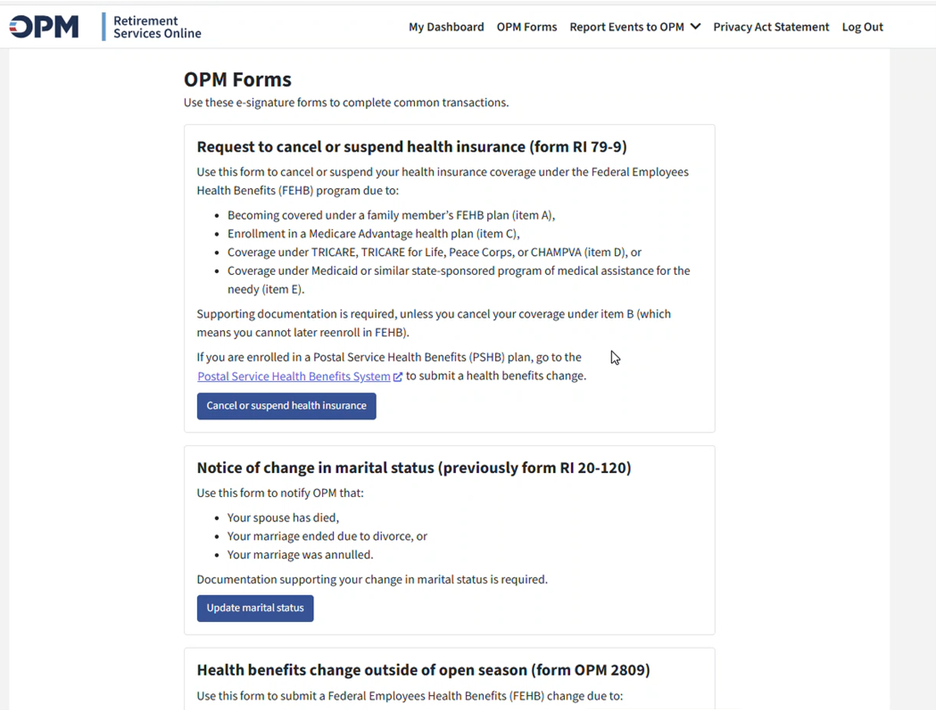
Several commonly used forms by annuitants are now available in RSO. Annuitants are now able to submit certain health insurance changes and marital status changes using OPM’s approved electronic form and digital signature process.
To use this new feature, annuitants will log in, navigate to the “OPM Forms” page, select the form they wish to complete, fill out the form, attach any required supporting documents, and digitally sign and submit the form. Annuitants should not download or save the document. The form completed in RSO will automatically go to OPM and a copy of the form will be emailed to the annuitant for their records.
Language stating "approved" on the annuitant's copy simply confirms that all signatures have been received and their action is in the queue for processing. We request that annuitants allow OPM time to process the action before submitting a duplicate request unless there's a change to the request.
The forms currently available in RSO include –
- Request to Cancel or Suspend Health Insurance (RI 79-9)
- Notice of Change in Marital Status (RI 20-120 aka Y Adjustment Form)
- Health Benefits Election Form (OPM 2809)
- Foster Child Certification
Additional forms will be added to RSO in the future to improve the self-service functionality available to annuitants.
Annuitant Surveys
Retirement Services recently added a FERS annuity supplement survey to RSO—annuitants receiving the FERS Annuity Supplement are able to complete the survey directly in RSO. The Disability Earnings Report continues to be hosted in RSO.
The annuitant surveys hosted through RSO allow annuitants to easily complete and submit their earnings information. For more information about annuitant surveys, please visit the Retirement Eligibility Surveys page.
If you have any questions, please contact the Benefits Officers Liaison and Development team at benefits@opm.gov or your assigned OPM Liaison.
|