NOAA Fisheries Offers New Online Marketplace to Buy and Sell Individual Fishing Quota Privileges
Key Message:
- NOAA Fisheries is announcing the release of a new feature within the Southeast Gulf Catch Shares online system. This new IFQ Marketplace message board serves as a platform to facilitate connections between IFQ participants who are interested in buying or selling shares or allocation for the Gulf Red Snapper and Grouper-Tilefish Catch Share programs.
- This feature was developed in response to requests from the industry to increase IFQ marketplace transparency and accessibility. For more about the development of the marketplace and its benefits to participants, read our web story Off To Market: Buying and Selling Individual Fishing Quota.
- For further information, IFQ participants can contact Catch Share Support at (866) 425-7627 between 8:00 a.m. and 4:30 p.m., Eastern Standard Time, Monday through Friday, excluding federal holidays.
Who Can Access the IFQ Marketplace?
Only participants with an active IFQ Shareholder account can view and post to the marketplace.
Where can I find the IFQ Marketplace?
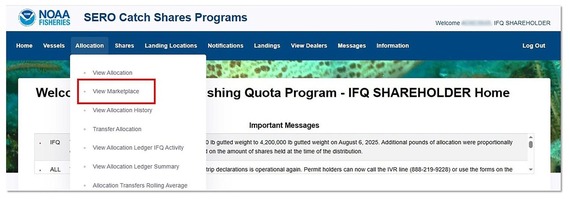
After logging in to the Catch Shares Online System, select “View Marketplace”, which is the second dropdown option under both the “Shares” and “Allocation” tabs.
 How Do I Create a Post?
On the IFQ Marketplace feature, click the blue button in the upper left corner labeled “Click to Post Transaction.”
The below dropdown menu will appear. Red asterisks indicate required fields.
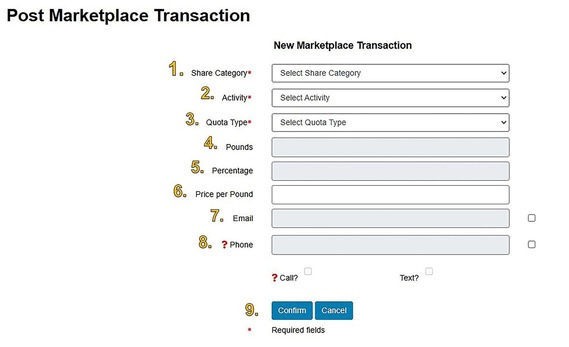 Step 1. Select the share category of interest from the dropdown menu. Only one share category can be selected at a time.
Step 2. Select the activity you wish to complete from the dropdown menu, either “Sell” or “Buy.”
Step 3. Select the quota type of interest from the dropdown menu, either “Allocation” or “Shares.”
Step 4. If you selected “Allocation” in Step 3, manually enter a whole number in the “Pounds” box. If you selected “Shares” in Step 3, this box will be grayed out but will populate with an automatically calculated equivalent pounds when you enter the share "Percentage” in Step 5.
Step 5. If you selected “Shares” in Step 3, enter a number in the “Percentage” box. The equivalent pounds will automatically be calculated and appear in the gray “Pounds” box above.
Step 6. Enter your desired price per pound. The “Total Price” is automatically calculated and will not appear until the post has been submitted to the marketplace.
Step 7. You must select at least one method of contact. If you would like to be contacted by a potential buyer/seller by email, click the checkbox to the right of the “Email” box and enter your email address.
Step 8. If you would like to be contacted by a potential buyer/seller by phone, click the checkbox to the right of the “Phone” box and enter your phone number. Below that box, you must check at least one contact method (“Call” and/or “Text”).
Step 9. Click “Confirm” to review the information you submitted in a pop-up window. If all the information entered is accurate, click “Confirm and Save” to finalize the post to the marketplace. To return to the previous page and edit the post, click “Cancel.”
Note: Once you have submitted a post to the marketplace, it cannot be edited. Previously submitted posts can only be deleted and a new post made with adjusted information.
How Do I Delete a Post I Created?
On the IFQ Marketplace page, please delete any outdated or accidental posts by clicking on the garbage can icon in the far right column of the corresponding row of the post. Participants can only delete posts that they have submitted.
Once you have completed a transaction (sale or purchase) you posted to the marketplace, you are responsible for promptly deleting the associated post.
 How Long Does My Post Remain on the Marketplace?
All marketplace posts older than 30 days will automatically be deleted. You may also manually delete your post at any time.
How Do I Search for Quota to Buy?
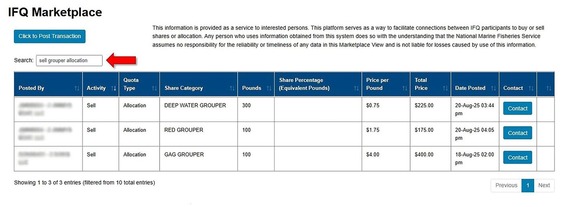
When you arrive at the IFQ Marketplace page, type “sell” into the search box. This will filter the table to only show transactions from participants looking to sell shares or allocation.
The search box can also be used to filter the table by other criteria in the column headers. Additionally, you can filter by multiple criteria (e.g., “sell grouper allocation”, “buy shares”, or “Shares snapper”).
 Can I Sort the Information displayed?
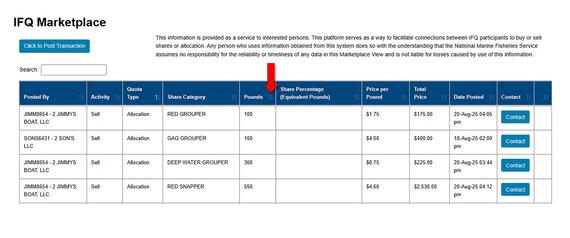
On the IFQ Marketplace page, click the arrows to the right of any column header to sort by that header. The first click sorts the information in descending order (i.e., largest to smallest); clicking again will sort the information in ascending order (i.e., smallest to largest).
 How Do I Contact Someone About an IFQ Marketplace Post?
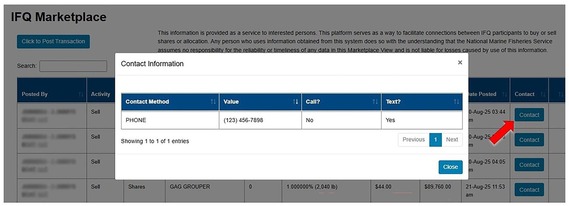
To reveal the contact information for an IFQ Marketplace post, click the blue “Contact” button on the right side of the post. A new pop-up window will display the preferred contact method and relevant contact information provided by the submitter.
 Can I Complete a Transfer In the Marketplace?
The marketplace is only for advertising purposes and cannot be used to initiate any transfers. If a seller reaches an agreement with a buyer, the seller still needs to initiate the transfer(s) through the normal process in the Catch Shares Online System.
For step by step guidance on how to complete an allocation or share transfer, see Issues 14 and 15 (respectively) of the IFQ Quarterly Newsletter: Catching Up on Catch Shares or the IFQ Troubleshooting Guide.
|