  Issue 2.1, November 2021
In October 2021, the Integrated Food Management System (IFMS) celebrated its first anniversary. This modern, innovative, and flexible system has been designed to replace a decades-old inventory system that has become increasingly challenging to maintain in order to meet evolving program needs.
The Transition Team is pleased to welcome the latest group of Indian Tribal Organizations (ITOs). As of November 2021, there are 74 ITOs using IFMS to conduct food distribution issuance for their communities and manage inventory and household records for the Food Distribution Program on Indian Reservations (FDPIR). To date, over 7 million food items have been issued to nearly 19,000 households through IFMS.
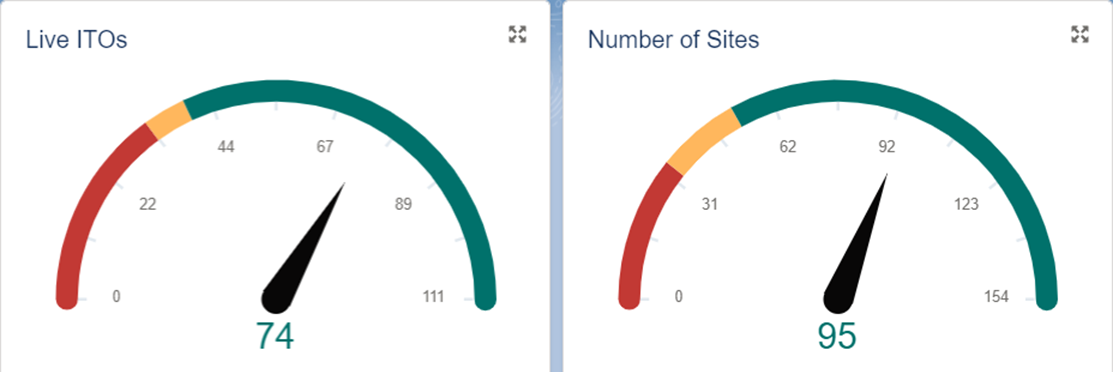 As of November 2021, IFMS is being used by 74 ITOs at 95 sites.
Each ITO’s experience transitioning from the familiar to IFMS is unique, and their stories and experiences may help others navigate the transition process and adapt to the new system. Take a look at some of the feedback received from ITOs who are now using IFMS:
- Cody Stump of the Chippewa-Cree Tribe (Rocky Boy) shared that the Availability Report and the Benefits Not Received Report work very well for them. He was very complimentary regarding the Household Certification app, which alerted them to an individual who had moved and joined another household.
- Frank Dunn, the Tribal Foods Representative for the Eastern Band of Cherokee Indians, was happy to share that his staff have nothing but good things to say about the IFMS since their transition last June. In particular, the front office person loves it.
- Director James White of the Seneca Nation noted that IFMS is "100% better than AIS" and his team is happy with the transition. He noted that the point-and-click navigation is more user-friendly.
The IFMS team also received positive feedback from the Crow Tribe of Indians and the Seminole Nation of Oklahoma.
The Transition Team would love to share more successes and IFMS tips from the user community. Please send comments to the Transition Manager.
IFMS Activity At-a-Glance
|
As of November 4, 2021, IFMS activity since launch includes:
-
74 ITOs deployed IFMS with 344 active users
-
35,911 individuals in 18,800 households received food
-
12,476,043 items issued through 30,781 order transactions
-
7,045,528 items updated through 91,780 inventory transactions
-
16,388 household certifications updated
-
2,559 new households created
|
|
 |
IFMS Release 1.6.0
Release 1.6.0 went live on October 8, 2021. The following enhancements were included:
- Issuance receipts will no longer appear with a smaller font when printing or re-printing from the Issuance application on all supported browsers.
- The signature line at the end of the issuance receipt is now the full-page width.
- The inventory exceeded error message will not appear on issuance adjustments for material quantities that had been previously issued
Additional information about these updates can be found in the published Release Notes in the IFMS Learning Academy (login required).
IFMS Learning Academy and Web Resources
A variety of self-service user resources are available to the IFMS community. User manuals and quick reference guides (QRG) provide helpful instructions for a variety of common business tasks and functions as well as tips for using additional system features when needed. Other resources include release notes and guide rate information.
These documents can be found in the IFMS Learning Academy (login required), which was recently reorganized to make it easier to find help by functional area. To view available resources, click on the Article Title (topic) on left. Refer to the Details tab for a description of available materials and links to external resources, as applicable. The Related tab provides all files available to view or download.
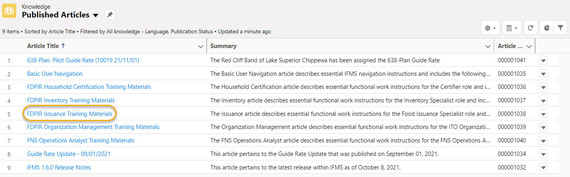 The IFMS Learning Academy contains user resources organized by topic. To view related files and links, click on the Article Title.
Video tutorials are also available for many IFMS transactions via the FNS YouTube channel.
All user materials are regularly updated to keep them aligned with the latest system changes and incorporate feedback from the IFMS user community.
Hot Tips
Household Order History
The order history for a household can be viewed from the Household Overview screen. Click on the Related tab at the top of the screen. This displays a list of all the issuance orders for the selected household. Click on the View All link to view the full list. Refer to the Issuance Manual (Section 9.1, pp. 46-48) for more information.
Inventory Transfer
When transferring inventory to another site or to a different ITO, these materials display as “In Transit” in inventory and are NOT available to issue to customers. To move transferred materials to available inventory stock, use the Transfer Receipt (not the Receipts transaction) to receive “In Transit” materials into available inventory and update the quantities for the FNS-152 report. Refer to the Inventory Manual (Section 5.6, pp. 39-43) for more information.
Transfer Out to Tailgate
To issue from a tailgate location, the ITO must first use the Transfer Out transaction to transfer materials from the main warehouse to the tailgate site. These materials will be removed from the warehouse inventory and automatically be made available for the tailgate site. No transfer receipt is needed. Refer to the Inventory Manual (Section 5.5, pp. 33-38) for more information.
Reverse Transaction
To reverse an Inventory Receipt, Nutrition Education, or Adjustment transaction that was previously completed, use the Reverse Transaction feature. First confirm the transaction type, materials, and quantities from the original transaction to correctly create the reverse transaction. Reverse transaction dates must be for the same month as the original transaction to ensure the FNS-152 report is correct. Refer to the Inventory Manual (Section 5.11, pp. 58-59) for more information.
For reversals of Transfer Out, Transfer Receipt, or Physical Count, users must contact the IFMS Help Desk for assistance.
Current Inventory
Users can view a list of all available inventory for the ITO by clicking on the Warehouse Inventory tab. This list shows the current inventory at all warehouse and tailgate sites. Refer to the Inventory Manual (Section 4.0, pp. 9-11) for more information.
Transition Support
The IFMS Transition Team is available to provide assistance to ITOs who are preparing for IFMS and to answer questions about the transition process. Contact the Transition Manager to learn more. The transition program is designed to support ITOs, considering their unique needs, from initial planning through the Go Live event at a pace that minimizes disruption to daily operations. This includes the following tools and resources:
- Support Specialists assigned to each ITO for the duration of the transition process
- Self-Paced e-Learning Introductory Course
- Flexible virtual training sessions
- Manuals, quick reference guides, and exercises for each functional area
- Access to the IFMS training environment to reinforce and build upon training sessions
- Discussion of ITO data needs and guidance on using IFMS reporting tools
- Post-transition support with timely response to questions or issues
- Feedback sessions for continuous improvement of transition program and system features
Training Opportunities
Virtual training sessions for specific roles (e.g. Household Certifier, Inventory Manager, and Issuance Specialist) are held several weeks in advance of the scheduled Go Live date. The Transition Team works with ITOs to provide flexibility in order to accommodate operating schedules and staff availability; this includes shorter sessions, repeat offerings of the same topic, and coordination with transitioning ITOs to choose the days and time(s) that best suits their needs. New users also receive copies of user manuals and other resources for self-paced learning.
All transitioning ITOs also have access to the training environment, where they can get hands-on practice and become familiar with IFMS before Go Live. After each training session, participating ITOs receive self-paced exercises for use in the IFMS training environment. The goal of these exercises is to provide real-world scenarios to reinforce the training that was conducted that day.
Anyone interested in IFMS can find demos and tutorials in the library of videos. No login is required to view.
|