|
On December 15, the School Year (SY) 2018-2019 USDA Foods Available List for Schools and Institutions was
published. Each year, USDA works diligently
to introduce new products and reformulate items based on feedback from States
and school districts. This year, we are
pleased to unveil ten new products for ordering in the upcoming school year,
including frozen mixed berry cups, frozen mixed vegetables, chicken drumsticks,
grilled chicken breast fillets, pre-sliced turkey ham and smoked turkey, egg
patty rounds, and white whole wheat flour. In addition to these new items, we added some smaller package size
options for products such as raisins, frozen mushrooms, and rolled oats. For more information on the new offerings, view the product preview sheets. At USDA we strive to publish a list of items
that is able to meet the unique needs of school districts across the country by
closely monitoring trends and adapting our list of offerings to meet the
changing needs of school districts. To
submit new product ideas or feedback on existing products, email us at USDAFoods@fns.usda.gov.
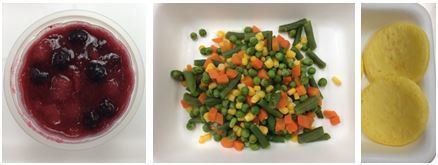 |
Frozen mixed berry cups, frozen mixed vegetables, and egg patty rounds are among the new options available to order for the upcoming school year.
USDA is currently
defining Business Management Improvement (BMI) pilots that will begin in Fiscal Year (FY) 2018 based on process areas
identified in the business case and implementation plan documents. USDA is defining pilot scope in terms of
duration, products, geographic region, automation or data requirements;
stakeholder involvement; and evaluation metrics.
Six process area pilots are being considered:
- Product
Lifecycle Management (PLM) / Stock Keeping Unit (SKU) rationalization
- Long term contracting
- Forecasting
(top-down predictive modeling)
- Transportation & FOB Origin purchases
- Supplier management
- Electronic
Data Interchange (EDI) for supplier data exchange
These pilots were targeted because they can be better defined
and more easily managed with existing resources. Some are pre-requisites
or supporting activities for additional process area pilots. Work will
continue, with the resources available, to include other process area pilots in
FY 2019.
Any questions or comments about the BMI may be directed to CP-BPRINFO@ams.usda.gov.

One of the new items introduced on the SY 2018-2019 USDA Foods Available List for Schools
and Institutions is the Grilled
Chicken Breast Fillet (material code 110921). USDA has been working
on this product in response to requests from States and school districts for a
chicken item that can be used in sandwiches, but this item was formulated so
that it can also be used as a center-of-the plate entrée with a sauce or glaze. The product is a made with whole muscle
chicken breast product with grill marks on the outside. It has a minimal seasoning profile so that it
can be adapted by the local school districts to a variety of menu applications. It credits as 2 meat/meat alternates.
For more information on the case size, number of cases per truck, and estimated price per case, view the product preview sheet.
|
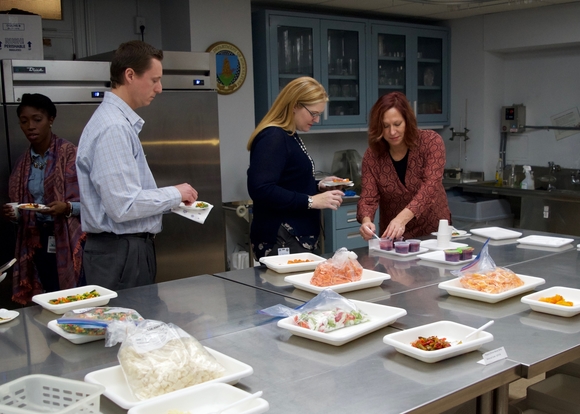 |
Attendees at the December 2017 training for new State Agency staff working with USDA Foods in schools had the opportunity to sample several items on the Foods Available List, including some of the new products for SY 2018-2019, at the USDA Test Kitchen in Washington, DC.
SDA SOPs Make Ordering as Easy as
1, 2, 3!
New Standard Operating Procedures
(SOPs) are available for State Distributing Agencies (SDA). The SOPs are a soup
to nuts guide for SDAs on managing USDA Foods for schools. This document covers
details of using the Web-Based Supply Chain Management (WBSCM) system and
highlights information on how to create a demand-driven ordering process.
The first several sections of the
SOPs focus on WBSCM and include information on new user registration,
available trainings, and reports. One section of the SOPs even details how to
tailor WBSCM reports to best suit your needs. In addition to information on WBSCM,
this document underscores the importance of creating a request-driven system
through forecasting and catalog maintenance. Other sections outline order
management, entitlement tracking, and complaint processes.
The SOPs are a one-stop-shop for managing USDA
Foods orders for Child Nutrition Programs, and this document is posted on
the USDA Foods National Processing Community
PartnerWeb site. Look for it under “SDA Resources” on the left navigation bar. SDA staff who are not yet registered for this new
PartnerWeb site can email NPA@fns.usda.gov
to request a registration form.

In October 2017, USDA released a new component for its Interactive Food Buying
Guide for Child Nutrition Programs (FBG), called the Recipe Analysis
Workbook (RAW). The interactive FBG provides food yield information for all
Child Nutrition Programs, which is critical when program operators are determining
the correct amount of food to order for their individual programs. Not only
does it help ensure that there is enough food for every participant; it also
helps program operators avoid ordering too much food, keeping costs down. The
RAW builds on this capability by allowing users to search for creditable
ingredients and determine each recipe’s expected meal pattern contributions. Combined,
these interactive tools can help save program operators significant amounts of
time as they plan meals for their children. For more information, visit
the FBG information
page.
Good inventory management practices can help State Distributing Agencies (SDAs) meet customer demands and minimize costs. Inventory management begins with carefully planning menus and correctly procuring products in quantities needed. Be sure to inspect the items ordered at the time of receipt, document and report any issues, and properly store product. Properly storing food is important to maintain product quality and food safety.
Accurate forecasting, determining the type and quantity of products needed, and considering how USDA Foods fit into the menu are equally important in managing product inventory. Forecasting should be based on menus, program participation, and historical order data. It should account for seasonality of products and shifts in student preferences. To ensure that USDA Foods are distributed in a timely, efficient manner and in optimal condition, proper ordering, inventory management, and storage practices for USDA Foods are necessary.
SDAs and Recipient Agencies (RAs) should consider their anticipated demand (i.e. student participation) and menu to ensure the amount of product they order is distributed to students in optimal condition and that inventory levels for the National School Lunch Program do not exceed amounts needed for a 6-month period. Holding products in inventory is costly. Product sitting in storage facilities requires space, equipment, utilities, and staff time. Depending on the distribution contracts within the state, the RA may
even incur fees for product that remains in the warehouse after a designated
time period.
SDAs should make sure that all School Food Authorities (SFAs) have the opportunity to provide input, at least annually, in determining the USDA Foods from the full Foods Available List made available to them for ordering. Ordering should be request-driven. An ideal request-driven ordering system would factor in SFA preferences regarding which USDA Foods they receive along with the desired quantities and delivery timeframes. This helps SDAs manage inventory levels, as RAs are more likely to utilize USDA Foods that they have requested.
Practices to help SDAs
maintain an efficient inventory management system include:
1. Provide
efficient, cost-effective distribution of USDA Foods
2. Protect
USDA Foods against theft, spoilage, damage, or other loss
3. Maintain
product at proper temperature and humidity
4. Meet
Federal, State, or local food safety and health requirements
5. Inspect
USDA Foods at the time of delivery and document any issues. Instruct warehouses to
“Inspect what they Expect”: inspect product at time of delivery and immediately
report any issues.
6. Maintain
a separate inventory record of USDA Foods
7. Distribute
inventory first-in-first-out (FIFO)
8. Assure
timely distribution to eligible RAs to ensure utilization of USDA Foods within 6
months of receipt
9. Ensure
insurance coverage to protect value of USDA Foods
10. Conduct
an annual physical review of USDA Foods inventories at all storage facilities
11. Reconcile
physical and book inventories
12. Monitor
RA usage and transfer USDA Foods to another SFA, if not being utilized
13. Maintain
record of all transfers
14. Report
any USDA Foods losses to Food and Nutrition Service (FNS) Regional Offices
15. FNS
monitors FNS 155 Inventory Management Register reports and may require transfer
of excessive USDA Foods inventories, in storage or at processors, to other RAs
to ensure timely utilization of USDA Foods
RAs should contact SDAs, and SDAs should contact their FNS Regional Offices with any questions or refer to the following resources for more information:
FD-709-5 (Rev 2): Shipment & Receipt of USDA Foods
FD-107: Donated Food Storage, Distribution, and Product Dating (Revised)
Inventory Management & Tracking Reference Guide
USDA Foods Complaint Procedures
The Complaint Team is available Monday-Friday, 6:00 a.m. – 5:00 p.m. Eastern Time. Email USDAFoodsComplaints@fns.usda.gov or call the USDA Foods Complaint Hotline at 800-446-6991.
New “My Profile” Available in FFAVORS
With the January 2018 release for the Fresh
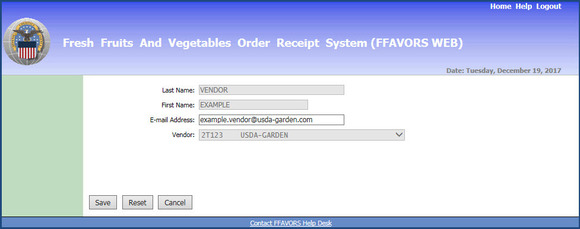
Fruits and Vegetables Order/Receipt System (FFAVORS), a new My Profile link has been added to the
main menu. This will allow all users to review and update their own contact
information to ensure they receive communications related to system updates,
orders, and any questions or requests for assistance submitted through the
FFAVORS application.
My Profile
is located at the bottom of the menu on the FFAVORS home page for both
Customers and Vendors:
Vendors can make updates to their email address.
Customers can edit their email address as well as phone
number, extension, and fax number.
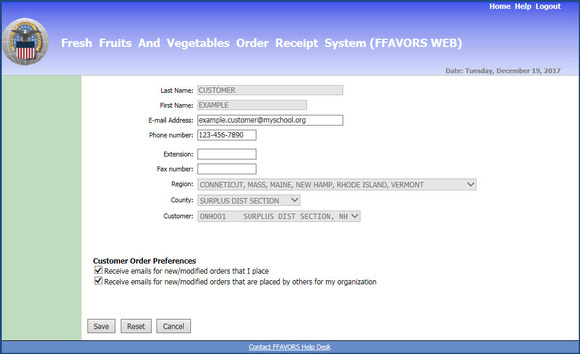
Additionally, Customers can opt-in to receive email
notification for new USDA
DOD Fresh orders or modifications to existing orders to be delivered to
their organization. The first option will notify the user when they create or
modify orders in FFAVORS. The second
option will notify the user when other users create or modify orders. For school users, this includes other users
from the same school, authorized district users on behalf of the school, or the
Defense Logistics Agency (DLA). For
district users, this includes other district users, users from any of the
schools that are part of the district, or DLA.
Please contact the FFAVORS
Help Desk with any questions.
Recent Improvements to the WBSCM User Experience
In addition to addressing performance issues, the most
recent Web-Based
Supply Chain Management (WBSCM) releases and the October software upgrade
implemented enhanced navigation features and resources to make WBSCM more
user-friendly. A summary of these
changes is available in the WBSCM document library at Help->Training->Job Aids->General Help->WBSCM Upgrade
Summary-October 2017.
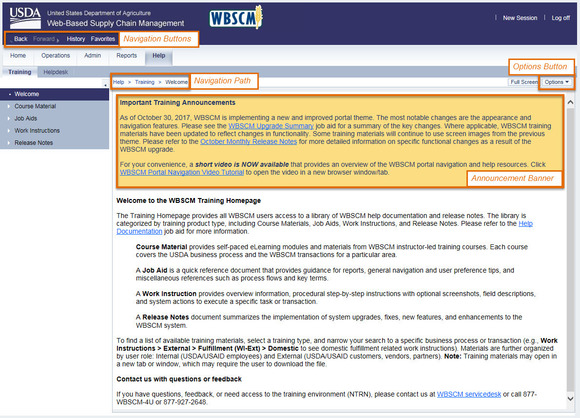
Some of the new or enhanced navigation features include:
- Navigation
path (“breadcrumbs”) for the current transaction
- Navigation
buttons on menu bar: Back, Forward, History, and Favorites.
History provides links to the 12 most recently accessed transactions. Favorites
allows users to create and organize shortcuts to the transactions they use most
frequently.
-
Options button (formerly a non-descript
icon) now labeled
Additionally, the following resources have been added to
improve the user experience with WBSCM:
- Important news
and reminders in on-screen announcement banner
- New video
tutorial available in WBSCM to
demonstrate system navigation and point out helpful tools and resources
- Descriptions
and guidance added to the Help tabs
WBSCM releases are implemented each month, and all
users are encouraged to review the latest Release Notes for system changes that
impact them. This information can be
found in the WBSCM document library at Help->Training->Release
Notes->Release Notes.
If you have questions about these changes, contact the WBSCM Service Desk or call
(877) 927-2648.
USDA staff will be participating in these upcoming meetings in 2018. We look forward to the opportunity to meet you and hope to see you there!
March 4-6: School Nutrition Association (SNA) Legislative Action Conference in Washington, DC.
April 29 - May 2: American Commodity Distribution Association (ACDA) Annual National Conference in Minneapolis, Minnesota.
 1. Click here. Or you can go to the Food Distribution website and click on the red envelope on the row of social media icons on the top right of the page.
2. Enter your email address and click "Submit."
3. Check the boxes to select your topic(s) of interest. For these e-letters, scroll down to the Food Distribution category and click the plus sign to the left of the check box to expand the list and view all the topics. Select any of these topics to receive the general e-letter plus the corresponding program-specific e-letter(s) of your choice:
*USDA Foods --> receive all "USDA Foods from Farm to Plate" e-letters
*Commodity Supplemental Food Program (CSFP) --> receive "Household Highlights"
*The Emergency Food Assistance Program (TEFAP) --> receive "Household Highlights"
*Food Distribution Program on Indian Reservations (FDPIR) --> receive "FDPIR Connection"
*Schools/Child Nutrition Commodity Programs --> receive "Spotlight on Schools"
4. Visit the subscriber preferences page any time you would like to review, add, or delete subscriptions. Questions? Contact USDAFoods@fns.usda.gov.
5. Share the e-letter and new subscriber link with interested colleagues and friends!
|
|