|
TECHNICAL-ADVISORY-2021-002
FORENSIC ANALYSIS OF SMARTCAMERA SYSTEMS
|
|
This technical advisory highlights the types of data that could be generated by smartcameras that can be exploited for forensic purposes. This data includes media saved by connected devices and smartphone applications, as well as logs that record the time and other details associated with activities recorded by these cameras. The resulting digital evidence can shed light on who did what, when, where, and how in the vicinity of the cameras. For instance, data derived from these devices can not only show video of an individual at a particular time and place; but also record logs of when a door was unlocked or a light was manually turned on. |
|
The data generated by smartcameras is not stored in a single location and could be distributed across a controller or hub device on the same network, the smartphone used to access the camera or an associated cloud account. As of this writing, forensic tools vary widely in their ability to recover data from these devices and should not be solely relied upon. Practitioners need to be aware of both the possible presence and significance of this data and how they should be forensically recovered. |
|
|
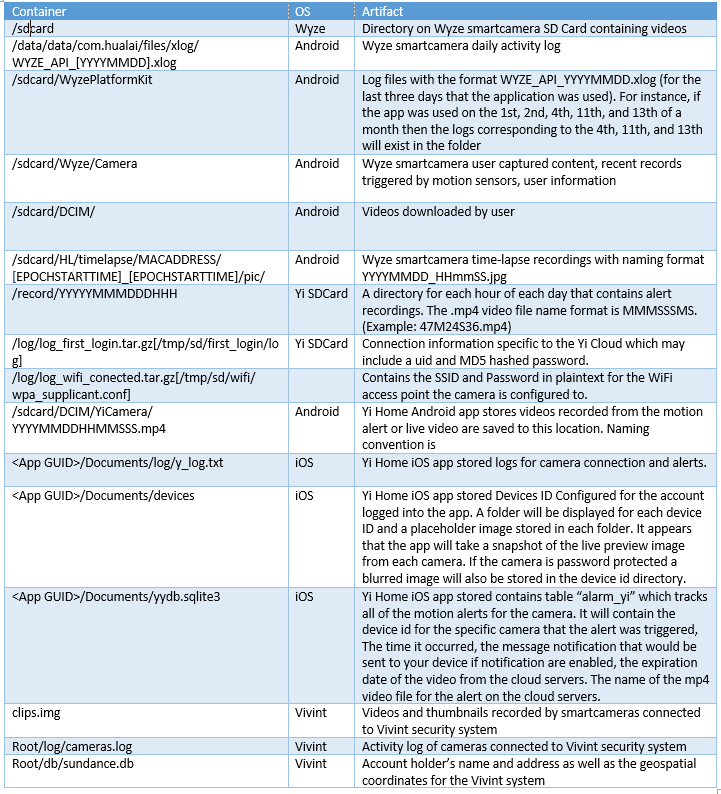
DC3 forensic practitioners analyzed a number of smartcameras and found that data can be stored on the device itself, on connected devices and smartphone apps, as well as the cloud. Standalone cameras can have a removable storage card (SDCard) that contains recorded videos and photographs. Smartcameras can also contain configuration details, including credentials for WiFi access points they connected with. Some smartcamera systems have multiple devices connected via a sync module or hub that stores the motion alert recordings on a removable USB mass storage device.
More sophisticated cameras connected to security systems such as Vivint send data to a central controller device which stores some data internally on a memory chip, and can save files onto a removable storage device. Logs associated with smartcameras capture the timing of activities such as motion or sound detection and interactions with the cloud. These activity logs are typically consolidated on a connected device or in the cloud, rather than on the camera itself. Smartphone apps connected to security cameras can store information in both the application folder and the SDCard of the smartphone. Media captured via a smartphone app can include time-lapsed recordings, videos triggered by motion or sound detection, videos downloaded by the user, and photographs taken by the user via smartphone app. In addition to timing of activities, logs can contain user account details, including email address and hashed password, camera nickname, MAC address, and IP address.
|
|
Data generated by smartcameras might only persist for a limited number of days and should be preserved immediately. Multimedia, activity logs and configuration files generated by security cameras can be stored on the camera itself, on connected devices (e.g., smartphone app, sync module or hub, security system control panel) and in the cloud. This digital evidence can provide insights into the use of the cameras, activities in and around the building, as well as passwords to connected networks and cloud accounts. When it is possible to recover passwords configured in a camera or activity logs, this can be potentially useful to investigators for accessing other data sources protected using the same password. |
|
Contributors Acknowledgements
Technical Advisories are a five-minute read to raise awareness among investigators, forensic practitioners, attorneys, and judges about an emerging trend in Digital/Multimedia Forensics.
- Daniel Rosenberry, Justin Grannis (MITRE Engineers), Kevin Westerman (DC3/CFL Forensic Examiner)
- DC3 Editorial Board (Curation, Review, & Publication)
For additional information and smartcamera forensic capabilities please reach out to DC3 at hub@dc3.mil.
|
|
Relevant Forensic Artifacts
DC3 is building a crowdsourced catalog of forensic artifacts, created by practitioners for practitioners, to curate expertise across the digital forensic community, making it available as a user friendly, online knowledge management platform. In this context, a digital artifact is defined as a singular unit of interpretable data that can be extracted from a given data source.
|
|
|
|