|
TECHNICAL-ADVISORY-2021-004
ELECTRON CROSS-PLATFORM ARTIFACTS
|
|
Electron is a software framework that enables cross platform desktop applications to run in the Chromium browser on Windows, macOS, and Linux systems. Popular Electron apps include Discord, WhatsApp, Slack, Mattermost, Microsoft Teams, and Skype. Electron apps have gained popularity in recent years because developers can make a web application and then port it to a desktop application and maintain the same high-quality user experience while re-using much of the client-side codebase. This advisory describes artifacts that Electron apps can contain and how to examine them. |
|
Electron applications generate data in different formats that are unreadable using current commercial forensic tools. As a consequence, these valuable data sources may be overlooked unless the digital forensic practitioner is aware of the possible presence of these sources of digital evidence and how to forensically recover them. |
|
|
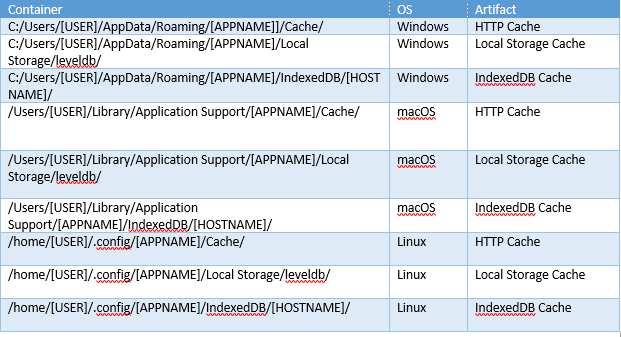
Chromium stores user information, preferences, Local Storage and IndexedDB cache, and pre-computed HTML elements in what is called ‘LevelDB’ (LDB) file format. Local Storage contains information in key-value format as an alternative to cookies, and IndexedDB data is used to manage larger amounts of structured data. For example, Microsoft Teams uses IndexedDB to cache chat messages under the key renderContent, and Discord uses Local Storage to store the user's id and email address under the keys user_id_cache and email_cache. The ldbdump utility can be used to extract information from LDB files, including deleted data.
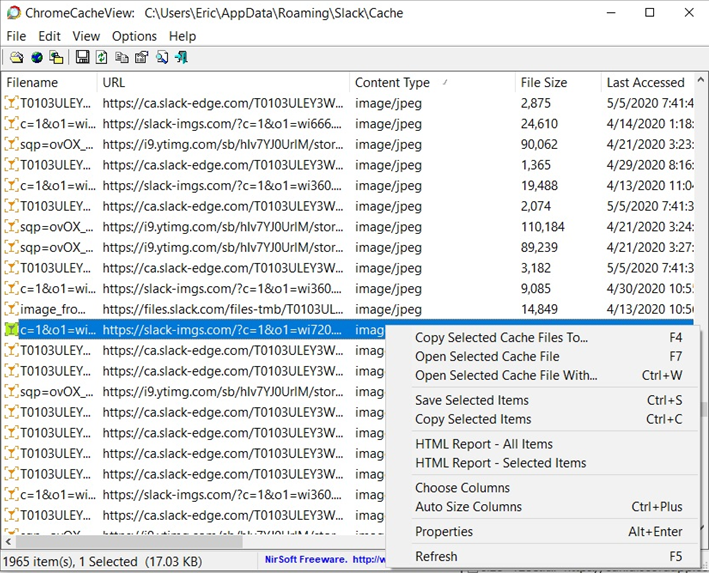
Electron apps also store data in cached Chromium HTTP payloads, including multimedia files the user has downloaded from within the app or chat messages retrieved from the server. On Windows these cache files typically consist of an index file, four or more data files, and many dedicated files starting with the file names f_XXXXX where X is a base-16 value. The data files and f_XXXXXX files store HTTP response headers and HTTP response payloads. On MacOS and Linux the cache files are in a simplified format, with an index file and many files with the naming convention of sixteen base-16 characters in a row followed by an underscore and either a “0” or an “s”. This simplified format stores each cached HTTP response with its URL, response headers, and payload together in its own separate file. The freeware ChromeCacheView can be used to select the Cache folder of an Electron app and convert them into human-readable form (see Figure below).
|
|
|
A growing number of applications are being developed using Electron, which can contain useful digital evidence in LevelDB and Chromium HTTP Disk Cache formats. Although commercial tools do not currently support all Electron apps, the stored data can be examined using freely available tools:
ChromeCacheView: https://www.nirsoft.net/utils/chrome_cache_view.html
Ldbdump: https://github.com/golang/leveldb/tree/master/cmd/ldbdump
|
|
Contributors Acknowledgements
Technical Advisories are a five-minute read to raise awareness among investigators, forensic practitioners, attorneys, and judges about an emerging trend in Digital/Multimedia Forensics.
- Eric Robertson (DC3/TSD Developer)
- DC3 Editorial Board (Curation, Review, & Publication)
For additional information and forensic analysis capabilities please reach out to DC3 at hub@dc3.mil.
|
|
Relevant Forensic Artifacts
DC3 is building a crowdsourced catalog of forensic artifacts, created by practitioners for practitioners, to curate expertise across the digital forensic community, making it available as a user friendly, online knowledge management platform. In this context, a digital artifact is defined as a singular unit of interpretable data that can be extracted from a given data source.
|
|
|
|