| |
 |
HSIN Supports Preparedness Operations
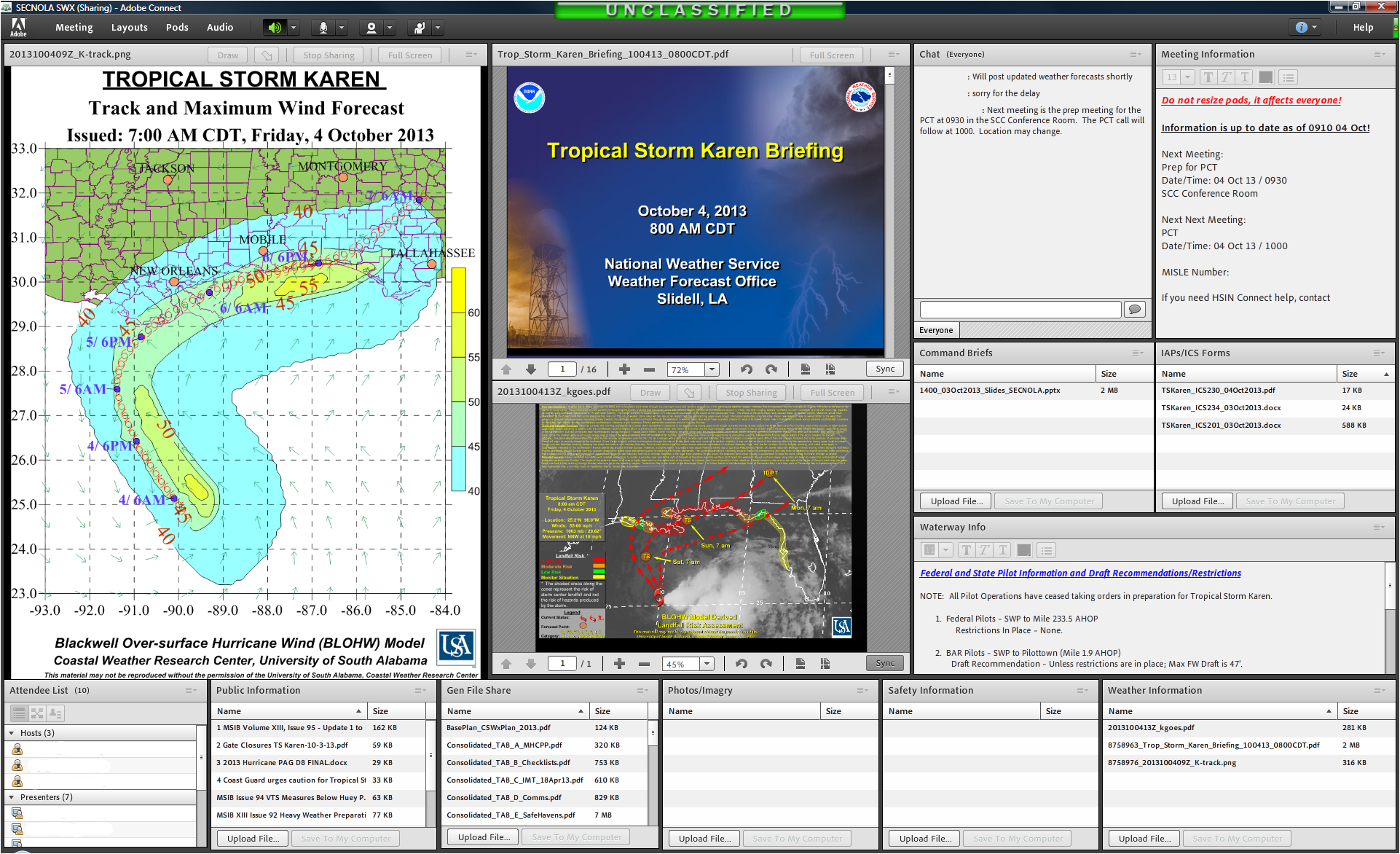 A successful response operation relies on extensive preparation prior to any event. During hurricane season, this means Gulf States have to be organized and share information at all levels and between agencies. As Tropical Storm Karen built up and looked like it was going to become Hurricane Karen, the Coast Guard’s Sector New Orleans, along with emergency preparedness officials in other Gulf States, put in place their well-tested plan for collaboration and information sharing for Federal, State and Local response agencies using HSIN Connect. The online command center enabled officials to share weather updates, prepare for potential storm surges and initiate response operations in the event they became necessary. A successful response operation relies on extensive preparation prior to any event. During hurricane season, this means Gulf States have to be organized and share information at all levels and between agencies. As Tropical Storm Karen built up and looked like it was going to become Hurricane Karen, the Coast Guard’s Sector New Orleans, along with emergency preparedness officials in other Gulf States, put in place their well-tested plan for collaboration and information sharing for Federal, State and Local response agencies using HSIN Connect. The online command center enabled officials to share weather updates, prepare for potential storm surges and initiate response operations in the event they became necessary.
For more information about how HSIN Connect was used during this preparedness operation, please contact HSIN Mission Advocate Tracy Carlton.
|
 |
NOC uses HSIN to Share Updates during Attempted Perimeter Breach at White House
 During last week’s attempted perimeter breach at the White House and subsequent car chase in the Capitol region, the National Operations Center (NOC) used HSIN R3 as part of its standard response operations. Watch officers with the NOC posted initial, vetted Phase 1 reports to the FedOps COI on HSIN with new information posted as the incident developed. During last week’s attempted perimeter breach at the White House and subsequent car chase in the Capitol region, the National Operations Center (NOC) used HSIN R3 as part of its standard response operations. Watch officers with the NOC posted initial, vetted Phase 1 reports to the FedOps COI on HSIN with new information posted as the incident developed.
The NOC uses the FedOps COI to track and disseminate the latest reports on every incident or event of significance to the Law Enforcement, DHS and Emergency Management/Services operations. This information is made available as a key information product on the FedOps site. During the October 3 incident, the FedOps site had a significant increase in unique visitors as users turned to the site for the most up-to-date information.
For more information on how HSIN was used during this event, please contact HSIN Mission Advocate Maimi Niina.
|
|
HSIN Intel Introduces "Partner Products" for Fusion Center Collaboration
In order to make HSIN Intel more robust and user-friendly, a new section was created on HSIN Intel called “Partner Products.” The purpose of this section is to ensure previously unavailable products and resources are readily available and easy to find for HSIN Intel users.
Within the “Partner Products” section, landing pages have been developed for several partner organizations that collaborate with the Fusion Centers in support of public safety initiatives. Each page includes products and resources for HSIN Intel community members. Updates to content and product postings in this section will be ongoing.
Feedback on the Partner Pages section of HSIN Intel may be sent to FusionCenterSupport@hq.dhs.gov.
|
|
Tip: Close Your Connect Session to Ensure Information Back Up
HSIN Connect can be a powerful tool for real time collaboration and information sharing during emergency management and incident response operations. However, to maintain optimal system operation during a multi-hour or multi-day response effort, the Connect session must be properly closed and reopened every 12 hours. This procedure ensures that all session information is adequately backed up and helps prevent the system from crashing.
How to properly close a Connect session:
- All but one "Host" must log off the session so that the remaining “Host” can properly end the meeting.
- From the "Meeting" option on the main menu, the remaining Host should select "End Meeting."
- An "End Meeting" dialogue is presented in which the Host can provide informational text about the meeting closing; for example, "The meeting is being closed as part of a routine application requirement and will re-open momentarily. All participants will be required to log back in to the meeting room."
- A "Save Message" button is provided for the Host to optionally save that content.
- To close the meeting, click the "OK" button in the bottom right of the dialogue box.
- If the Connect session was properly closed, all the saved content will be listed in the closure message.
How to restart a Connect session:
- To restart the Connect session, click the "Start Meeting" button at the bottom left of the display.
|
|
HSIN in the News
DHS Launches Latest Upgrade of Information Network
October 1, 2013 | Defense Daily - Full article available to subscribers only
DHS Launches Latest Upgrade of Information Network
October 2, 2013 | C4I - Full article available to subscribers only
Strengthening Intelligence Education with Information-Processing and Knowledge Organization Competencies
October 4, 2013 | Journal of Strategic Security
|
|
HSIN Community: Appearing at a Location Near You!
-
Oct 16: Armed Forces Communications and Electronics Association (AFCEA) Bethesda Monthly Breakfast Series, Bethesda, MD - Donna Roy, HSIN Program Director
-
Oct 22: International Association of Chiefs of Police (IACP) Annual Conference, Philadelphia, PA - Tracy Hollis, HSIN Solutions Engineering Lead
-
Nov 5-7: National Fusion Center Association (NFCA) Annual Training Event, Alexandria, VA
Have an event you’ll be going to and want to share news about HSIN? Let us know and we’ll get the word out and/or share how it went! Please email us at HSIN.Outreach@hq.dhs.gov.
|
|
Upcoming Planned Outages
Planned outages are a necessary part of maintaining and improving an IT system. Be advised of the following, currently planned outages. Please note that planned HSIN R3 system outages are always subject to change. Final notice of an outage will always be provided by the HSIN Service Operations Team:
- No outages currently scheduled
|
| |
| |
 |
You have received this email because you have expressed interest in receiving updates from HSIN. Thank you for your subscription. Please contact the HSIN Outreach Team at HSIN.Outreach@hq.dhs.gov with comments and/or questions.
If you have any questions or concerns about HSIN, your access, or this communication, please contact the 24/7 HSIN Help Desk at 1-866-430-0162 or 1-703-674-3003 or via e-mail at: HSIN.HelpDesk@hq.dhs.gov.
#.
© 2013 Department of Homeland Security | Homeland Security Information Network (HSIN).
|
|
|
