 USDA Releases a New Version of SSURGO Portal Beta
The U.S. Department of Agriculture's Natural Resources Conservation Service is excited to release a new version of Soil Survey Geographic Database (SSURGO) Portal Beta! This release includes the first iteration of the Soil Data Viewer (SDV) feature, a rasterized version of vector soil polygons, the ability to import STATSGO2, and user interface improvements.
What is SSURGO Portal?
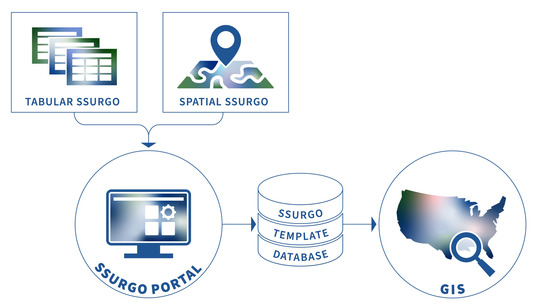
SSURGO Portal is a license-free application that imports spatial and tabular SSURGO data into geospatial SQLite SSURGO Template databases, generates raster versions of soil map units, and contains the new SDV tool. The SDV tool creates tables of soil properties and interpretations that can be used to create thematic maps in GIS.
Start Using the New Version of SSURGO Portal Today!
Visit the SSURGO Portal web page to access the new version of SSURGO Portal Beta and the user feedback survey. Refer to the Quick Start Guide to begin using SSURGO Portal.
New Features and Enhancements
-
Soil Data Viewer: SSURGO Portal has a new feature called Soil Data Viewer (SDV). SDV has the same ratings as Web Soil Survey and the old ArcMap SDV tool.
- For this release, SDV creates a table of the rating results and places it in your SQLite SSURGO database. This table can then be joined to the mupolygon or muraster layer on mukey field in GIS.
- This is the first iteration of SDV and we’re planning more enhancements. In a future version, you’ll be able to make a thematic map directly in SSURGO Portal.
-
Rasterized Version of Map Unit Polygons: SSURGO Portal now creates a 10 m or 30 m GeoTif raster of the vector SSURGO map unit soil polygons during data import. Cell size is dependent on how much SSURGO data is selected for import. It’s created by default, but you can choose to not create it using the advanced options.
- You can now import STATSGO2 data.
- There are general user interface improvements, including a feature that makes it easier to select your SSURGO data folder.
Removed Features
SDV replaced the temporary SSURGO On Demand (SOD) tool. All references to SOD were removed from the SSURGO Portal webpage and the tool was taken down.
|