|
Dear Grant Recipients,
The National Service Criminal History Check (NSCHC) Exemption Period will end on June 30. Below please find some reminders, issues for your awareness, and resources.
**As you make corrections to information associated with checks conducted via Truescreen, including corrections to grant numbers or changes to organization name, please note that these modifications may result in a reset of adjudication for the associated checks. Review your checks after corrections or changes are made.**
Exemption Period (September 24, 2018 -- June 30, 2019)
CNCS will not take disallowance enforcement action against grant recipients for past noncompliant NSCHCs for eligible individuals if the grant recipient has done the following:
-
Established accounts with Truescreen with the CNCS specific agreement code and Fieldprint; and
- Conducted a recheck no later than June 30, 2019 through said accounts on individuals who are serving or working in covered positions on or after November 15, 2018; and
- Adjudicated these checks on or before June 30, 2019.
Information about the Exemption Period can be found on the Knowledge Network. We continue to update the Exemption Period FAQs (updated 6/21/19) as we get questions.
Common Issues
Before the end of the Exemption Period, CNCS recommends that grant recipients review their criminal history records from the CNCS-contracted vendors, Truescreen and Fieldprint, to ensure that rechecks are compliant. Checks must be complete and correct by the end of the Exemption Period. Please see below for common issues:
Truescreen Common Issues
- Grant recipient does not adjudicate check
- Truescreen will provide an adjudication recommendation, but it is a grant recipient’s responsibility to conduct the final adjudication decision. When a grant recipient conducts that adjudication in Truescreen, the system will record that adjudication with a time stamp.
- Grant recipient does not indicate verification of government-issued ID
- Grant recipients indicate in Truescreen that they have verified the individual’s identity using a government-issued photo ID. This step is also recorded with a timestamp.
- First and last name on ID do not match
- It is the grant recipient's responsibility to conduct state and/or NSOPW checks on the first and last name as it appears on the government-issued photo ID. Middle name is an optional field for Truescreen searches.
- Incorrect state/states ordered
- Checks should include the NSOPW and state of work/service and state of residence (as applicable). Please be aware of states covered under the Truescreen Pre-Approved Alternative Search Procedure (ASP) and National Fingerprint File (NFF) Pre-Approved ASP.
- Grant number or other grant recipient information is not accurate
- Please review the information associated with your checks in Truescreen to confirm that grant number and other information entered by the grant recipient is accurate. Grant numbers must be valid.
- For corrections, email CNCSHelp@truescreen.com the case number for the criminal history record attached to the incorrect information, along with the correction to be made.
- **As you make corrections to information associated with checks conducted via Truescreen, including corrections to grant numbers or changes to organization name, please note that these modifications may result in a reset of adjudication for the associated checks. Review your checks after corrections or changes are made.**
Fieldprint Common Issues
- Grant recipient does not adjudicate check
- Grant recipients must document that the FBI check results were reviewed and considered and the candidate was cleared to serve or work (e.g., sign and date document, create cleared memo, etc.), as applicable.
- Grant recipient does not document resolution of a Not Cleared Adjudication Recommendation from Fieldprint
- The grant recipient must ensure that the individual is eligible to work or serve in a covered position. Information about resolving Not Cleared results can be found here in the NSCHC Using Fieldprint and Truescreen Manual.
Training: Check Your Check: Ensuring Compliance with Truescreen and Fieldprint: Slides and recording can be found here.
Pre-Approved Alternative Search Procedures can be found here.
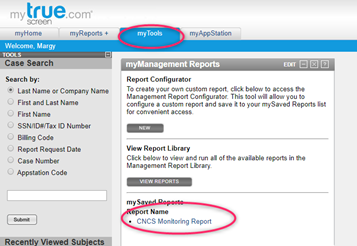
Truescreen CNCS Monitoring Report:
- The majority of grant recipients should now have access to their Monitoring Report in Truescreen. This report can be found under the MyReports tab and will show you, in Excel format, a summary of checks run and relevant compliance information. If you do not have access to this report, please reach out to chc@cns.gov. State Commissions who have established monitoring access with Truescreen should have access to this report for their subrecipients. Please see the screenshot below.
Please reach out to chc@cns.gov with any questions.
|