|
We noticed that the Web-based Entity National Producer Number (NPN) listed on your Marketplace Learning Management System (MLMS) profile is still incorrect. If you are the authorized representative for this Web-based Entity, please update your MLMS profile with the correct Web-based Entity NPN by following the steps below.
If you are not the authorized representative for this Web-based Entity, please remove the Web-based Entity NPN from your Marketplace learning MLMS profile as outlined in step 4.
-
Log in to your account on the CMS Enterprise Portal. On the Agent Broker Registration Status page, click Complete Agent Broker Training, and then select the Access Training link next to the MLMS listing.
- On the MLMS Profile page, make sure that one of the following four Agent Broker options is selected: Only an Individual Marketplace Agent Broker, Only a SHOP Marketplace Agent Broker, Both an Individual and SHOP Marketplace Agent Broker, or Not an Agent Broker.
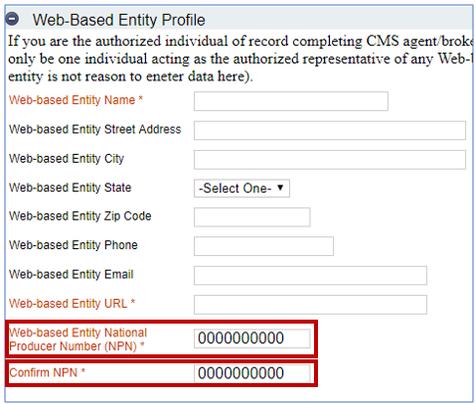
- On the MLMS Profile page, scroll down to the Web-based Entity
Profile section and click on the icon next to the section heading to expand the Web-based Entity Profile fields.
- Update the NPN within the Web-based Entity National Producer Number (NPN) and Confirm NPN fields, shown in the screenshot below. To remove the NPN, delete the NPN from the Web-based Entity National Producer Number (NPN) and Confirm NPN fields.
- Click on the Save/Update button at the bottom of the page to ensure that your profile information is updated.
|