|
You asked, we listened! Based on your feedback, Help On Demand just rolled out a new enhancement that allows you to customize your referral states and quickly connect with consumers requesting help in your area.
Originally, Help On Demand was configured to send referrals from all states where an agent or broker is licensed. Now, you are able to limit your preferences to select only the states in which you would like to receive referrals! You will not be able to add states where you do not have a valid license.
To customize your preferences, follow these steps:
- Log in to Help On Demand and navigate to your profile using the left-hand navigation toolbar.
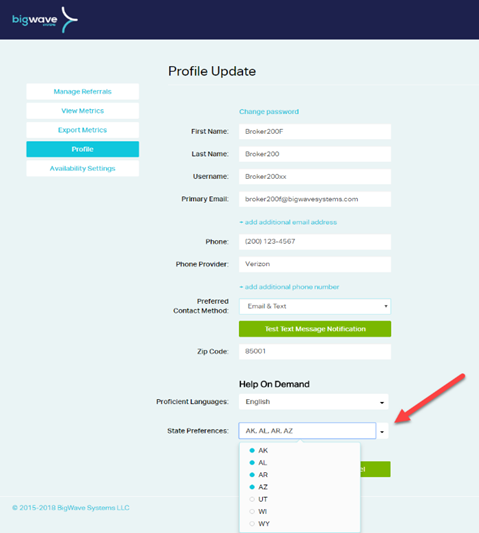
- Towards the bottom of your profile, you will see a new State Preferences field. This field auto-populates to include all states where you have a valid license and health Line of Authority. Use the dropdown menu to select and/or deselect states using the bubble indicator for each state. A blue bubble indicates that the state is selected and you will receive referrals from that state. A white bubble indicates that the state is deselected and you will not receive referrals from that state.
- Save your changes.
Once you have updated your State Preferences, you will only receive referrals from the states you selected. In the example below, the agent or broker is licensed in seven states, but only wants to receive referrals from Alaska, Alabama, Arkansas, and Arizona:
This new feature is available now, so update your State Preferences today!
|