We've made updates to data.census.gov aimed at making it easier for you to access and work with the data you need. These improvements are based on user feedback and focus on simplifying the download process and enhancing how table customizations are saved.
Here's a quick look at what's new:
Intuitive improvements to the table download process.
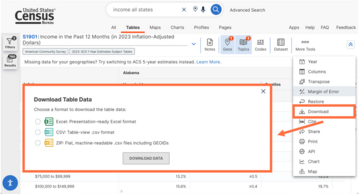
With this update, all table download options are grouped together in a new “Download” button.
After selecting the button, the site provides a prompt to select one of the download options and explains the differences between each format to help you more easily identify the option you need.
New ability for the URL to capture column customizations.
This allows more customizations to be maintained when you revisit the URL or make other display adjustments. Specifically, the URL includes new details that reflect edits to show, hide, reorder, or filter columns.
New parts of the URL, denoted by &tableFilters= and &cols=, capture these customizations made to the columns of the table. See our FAQ: How do I save my results or search? for a detailed explanation of data.census.gov URLs.
Note: This update only applies to tables that are in a flat format with a single header. Examples of programs on data.census.gov that provide tables in flat format include the Economic Census, International Database, and economic surveys.
Enhancements to the Microdata Access Tool, including:
Improved display of tables and table controls in mobile view, allowing you to use all parts of the tool on mobile devices.
Improved process to name geography groups. The full name is displayed and persists after adding or removing geographies from the group.
Stay tuned for more upgrades to improve speed and performance!
When you download a table on data.census.gov in the ZIP file format, you receive the download in a machine-readable output that is useful if you want to sort, map, or manipulate the data.
If you want output that looks similar to the table display, we suggest downloading in Excel. You can download the table in Excel by following these steps:
Click the Download button at the top of the table.
In the pop-up window, select the Excel radio button and click the Download Data button.
Open the Excel file. When you use the preferred browser (Chrome), the file appears in the download folder in the upper right.
The file contains two worksheets:
“Information” Worksheet: Provides the fully qualified table name, universe statement, source details, and table notes. It also features the Census Bureau logo and a shareable data.census.gov link for your selected table and geographies.
“Data” Worksheet: Provides the table data and labels in a format that is optimized for easy viewing and printing.
For more guidance on data availability and using data.census.gov, the Census API, and Microdata Access, visit our Resources page.
Stay Connected with Us!
Follow us on our social media channels so you never miss an update.
Join us as we dig deeper into complex geographies in data.census.gov. In this webinar, we will delve into Census Bureau geographies like state legislative districts and tribal areas.
Data.census.gov is the primary platform to access data and digital content from the U.S. Census Bureau. We continuously update data.census.gov with new data from our most popular survey and programs, as well as system enhancements to improve your experience on the platform.