
Environmental Justice and Corporate Compliance Screener improvements in ECHO
U.S. EPA Office of Enforcement & Compliance Assurance (OECA) sent this bulletin at 04/25/2024 12:31 PM EDTECHO has released new features for finding facilities with possible environmental justice concerns, and screening for corporate compliance.
Environmental Justice Search and Reporting Improvements
ECHO has updated the way you can search and report on facilities with environmental justice (EJ) concerns.
-
Facility searches have a new selector for “Potential Environmental Justice Concerns”:
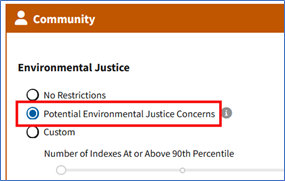
This selector chooses facilities that have one or more of EJScreen’s supplemental indexes at or above the 90th percentile, or are on tribal land, or in a US territory. EPA’s Office of Enforcement and Compliance Assurance uses these criteria to identify facilities that may need additional consideration for EJ concerns.
-
You can also customize the search criteria, for example by looking for facilities in areas where more than one of EJScreen’s indexes is elevated:
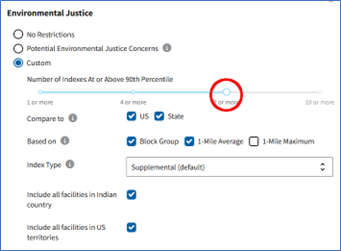
-
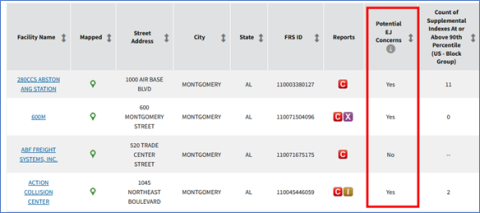
Facility search results now include a “Potential EJ concerns” column:
-
Facility reports now clearly identify facilities with potential EJ concerns:
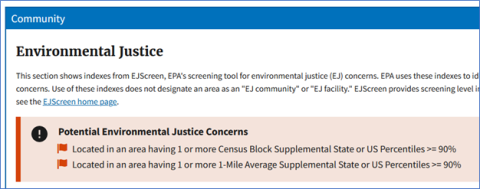
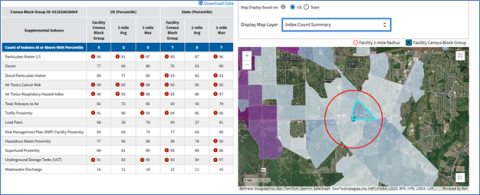
and provide maps and tables of EJScreen indexes around the facility:
Corporate Compliance Screener Allows Public Users to Save Search Criteria
Users that authenticate via Login.Gov can now save custom search criteria in the ECHO Corporate Compliance Screener. The ECHO Corporate Compliance Screener summarizes compliance and enforcement data across multiple facilities owned or managed by a company or jurisdiction. The tool selects facility and enforcement case records based on user-entered company names and compiles a list of summary statistics, detailed current noncompliance, and recent formal enforcement activity. The user can review the data and remove false positives or “sound-alike” companies that are not desired in the dataset. This interface allows users to quickly analyze a large number of facilities, review those that may have past compliance and enforcement issues and download a formatted report of the dataset. Once users establish a list of facilities within a company, it is easy to save and re-run a report for facilities on a periodic basis.

Update your subscriptions, modify your password or e-mail address, or stop subscriptions at any time on your Subscriber Preferences Page. You will need to use your email address to log in. If you have questions or problems with the subscription service, please visit subscriberhelp.govdelivery.com.