Friday 2 September 2022 - Reminder that Hive launches on Thursday next week (8 Sept)!
Thank you - We are now less than a week away from Go Live. A massive thank you to all staff who have completed their relevant Hive training already in advance of Go Live next Thursday. Your support is much appreciated.
Several important messages todayin the run up to Go Live are below – mainly for those LCO users who will be using the Hyperspace (full) version of the Hive EPR regarding their training and login testing.
LCO Hive Go Live booklet - We will also be sending out some key information that you need to know in a useful booklet next week. This will cover things like escalating issues at Go Live, how to access the EpicCare Link read only version of Hive and other useful information. As the majority of LCO staff are continuing to use EMIS as our primary patient record we hope Go Live will be smooth as possible in the community, but do look out for the booklet to guide you through how to resolve any issues you might have.
Quick messages
1. Just In Time Training - for Hyperspace users who’ve not completed workshop training
Note - You do not need to complete JIT training if you have already completed your workshop-based training or if you are only going to be using the read only EpicCare Link version of Hive.
Just In Time (JIT) training is specifically for LCO staff who require access to the Hyperspace (full) version of the new MFT Hive electronic patient record and have not yet attended any/all of the workshop-based training for this level of access.
In order to be able to access the Hyperspace version of Hive from Go Live next week, it is essential that these staff complete a JIT training module. It’s a shortened, virtual version of the full training and covers only the essentials for Go Live. This needs to be completed by Tuesday 6 September at the very latest as it takes around 48 hours after completion of the training to be given access to the Hive EPR. After Go Live you will still need to complete further training. Further details about this will follow after Go Live.
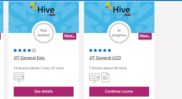
It should look something like the image on the right.
There are several LCO specific JIT options and you need to choose the correct one related to you depending on if you have inpatient, outpatient or specialist access to Hive. These are called:
LCO Inpatient General Users - complete the ‘JIT IP Consultants & Junior Doctors’ module (the name is a bit misleading and this is relevant even if you are not medical staff as it gives the overview you need)
LCO Outpatient General Users - complete the ‘JIT OP Consultants & Junior Doctors’ module and ‘JIT General LCO’ module
For teams with specialist Hive training needs you will also see you may have been allocated the relevant specialist JIT training – you can also use the JIT brochure (PDF) to check what you need
The modules also include an End User Proficiency Assessment (EUPA) that needs to be completed as well.
Handy hint – JIT sessions are on everyone’s learning profile and are a handy refresher of workshop content if you need a reminder on any aspects of the workshop training you had. You can access them at any time.
2. Check you are ready for Go Live with Log in Labs for Hive Hyperspace users
Note - Only relevant for Hyperspace users in the LCO. Not required for EpicCare Link users
All staff accessing the Hyperspace version of the Hive EPR must complete a log in lab unit prior to Go Live to to check your MFT credentials allow you to log on to the system and see the correct view of information.
Log in labs must be carried out in the Epic SUP (Support) environment. You will not be able to check this information in the live Epic PRD (Production) environment or the PLY (Playground) environment.
3. EpicCare Link training – make sure you complete your e-learning
All LCO colleagues in scope for Hyperspace or for EpicCare Link read only access to the Hive EPR need to complete the EpicCare Link e-learning module before Go Live. This can be accessed through the MFT Learning Management System (LMS) at
If you have forgotten your login, follow the instructions on screen.
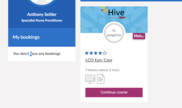
On the LMS you will find the training in your assigned profile - it should look like this image to the right.
Click on the course to open it up and complete it. You don't necessarily have to do it in one sitting.
Reminder - There are two sections in the e-learning that are not relevant to LCO staff and can be skipped. These are:
21 mins and 53 seconds - Placing Orders. Safeguarding referrals for LCO staff will remain within the Ulysses system at go-live of Hive and ordering tests will be completed through ICE for Community/Primary Care requests or Hyperspace for Acute requests. That means that you will not need to use the Placing Orders function in EpicCare Link for safeguarding or for ordering tests. There is a message telling you in the video that you can skip this section. You need to resume from 24 mins 52 seconds - Monitoring Patient Events.
From 38 mins 54 seconds - Site Admin Workflows. This final section to the end of the video is not relevant for LCO staff so you can skip to the end of the video after this section.