|
Dear Grantees,
As part of PEI’s transition to HHSC on 9/1, we wanted to kindly remind and ask you to take a screenshot of your current ABCS active list since we will no longer be completing background checks through ABCs. This will help ensure that you have an accurate record of staff clearances as of today.
Please save this screenshot securely, as it will serve as a reference point for your next staff clearance check, which is scheduled at the 2-year mark.
Action required:
- Log into ABCS account.
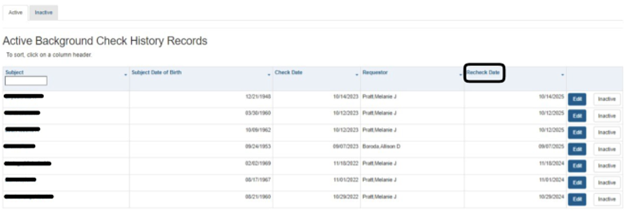
- From the home page, they will see an image like the one below that shows all Active Background Check History Records.
- They can take screen shots of each page.
- If using Microsoft Edge, they will right click and select screenshot from the menu, then highlight the area they want to capture. They will then copy and paste into their document (I use word).
- Or they can highlight all rows/columns, copy, and paste into an excel spreadsheet.
- If they copy and paste into excel, they can add a filter on the column that says, “Recheck Date,” sort by oldest to newest and that will allow them to see who has renewals needed soonest.
 Thank you for your prompt attention to this matter. If you have any questions or need assistance, please don’t hesitate to reach out to your contract specialist or via peicontracting@hhs.texas.gov
|