|
 A young Douglas fir growing on a mountainside.
|
|
What’s going on
30-second summary
|
|

Salary limit and member redirect for 2026
Every January, the annual salary limit and monthly member-redirect income threshold numbers are adjusted. This ensures they keep pace with inflation and cost of living in our region, as reported in the West Region Consumer Price Index.
New limits, based on West Region Consumer Price Index 2025 year-end numbers
|
|
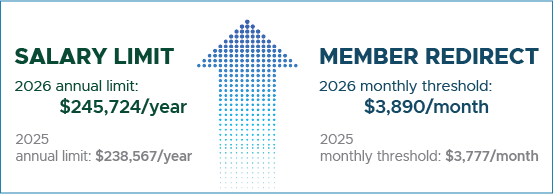
2026 SALARY LIMIT
annual limit
$245,724/year
What does this mean? Once a PERS member earns this amount of gross subject salary in 2026 (or prorated as a partial year), any more subject salary they earn must be reported as non-subject salary for that calendar year. Salary limit applies to Tier One, Tier Two, Oregon Public Service Retirement Plan (OPSRP), and working retirees (even though they do not earn benefits).
Salary limit caps the subject salary that PERS can include in a retiring member’s final average salary. The limit includes regular pay, overtime pay, and lump-sum payouts.
Learn more about salary limit on the Salary Limit: Information for Employer Reporters webpage.
Learn how to report salary in Correct Usage of Subject and Non-Subject Salary Fields, section “Reporting Salary That Is Above the Annual Salary Limit.”
|
2026 MEMBER REDIRECT
monthly threshold
$3,890/month
What does this mean? Earning equal to or more than this amount in a 2026 calendar month triggers the member redirect; that is, the redirect of a percentage of the member’s 6% Individual Account Program (IAP) contribution from their IAP to their Employee Pension Stability Account (EPSA). The money in their EPSA will be used to help fund their pension at retirement.
Member redirect offsets a small percentage of an employer’s PERS costs. You can see the credits in the Executive Summary section of your organization’s actuarial valuation
Learn more about member redirect, EPSA, and voluntary contributions on the employers’ Member Redirect webpage.
Learn how to manage voluntary contributions on the How to Manage an Employee’s Voluntary Contribution webpage.
|
|
About the programs
The Legislature initiated the Member Redirect and Salary Limit programs to benefit employers. Member redirect takes some of the financial burden off employers by involving members in contributing to their own future pension benefit. Salary limit protects employers from funding overly generous benefits based on very high salaries.
|
|
 
PERS-Treasury employer webinar
January 20 at noon Pacific; registration required
Join PERS and Oregon State Treasury for a virtual webinar about the Oregon Public Employees Retirement Fund, how it is invested, and how that investment strategy is working.
Speakers
- Oregon State Treasurer Elizabeth Steiner.
- PERS Director Kevin Olineck.
- Oregon Treasury Chief Investment Officer Rex Kim.
Topics
- The plan to continue improving PERS unfunded actuarial liability and funded status.
- Structure and strategy of Oregon PERS Fund portfolio.
- Link between investment returns and employer contribution rates.
- Risk management.
Questions
- During registration, submit a question that you would like to have answered live during the question-and-answer session.
Space is limited — register now to reserve your spot.
(Click the button above or copy and paste https://events.gcc.teams.microsoft.com/event/7b31e809-b100-43dc-a47b-4615b970c66a@9123ae20-585d-446a-abd6-50dad4c7c1d5 into your browser address bar.)
PERS member session
|
On January 22, from noon to 1 p.m. Pacific, PERS and Treasury will hold a second webinar for members, retirees, and anyone else interested in the investment of the PERS Fund. More information is forthcoming by News Bite email. Employees can register for January 22 member session here.
|
|
|

EDX tips: Calculations for hiring and terminating
On both ends of a PERS member’s career, employer reporters are required to submit numbers to PERS that require mathematical calculations. These are not the only numbers reported to PERS, but these two require tricky calculations. To help you, ESC provides step-by-step instructions, which are overviewed below.
|
|
When reporting a
new hire
Number to calculate: Average overtime hours for OPSRP
Description: The Average OT Hours field on a Detail 1 new-hire record establishes the annual overtime for that individual’s employee class, group, or position type. The employer needs to calculate the average based on actual past hours or future expected hours.
Whom it affects: Retiring OPSRP members.
Purpose: The number sets a limit on the number of overtime hours that PERS can include in an OPSRP member’s final average salary.
It prevents employees from working inordinate amounts of overtime before retirement to artificially increase their pension — a practice that financially strains the employer and the system.
Is the field required? Yes. For Tier One, Tier Two, and working retirees, choose 0.
Instructions:
|
When reporting a termination
Number to calculate: Unused sick leave hours for Tier One/Tier Two
Description: Tier One and Tier Two employees (whose employers participate) can have their unused sick-leave hours applied to their pension, up to a certain amount. When reporting a retirement, withdrawal, or termination of a Tier One/Tier Two employee for any other reason, employers must calculate the net amount of unused sick leave hours before entering it on the Detail 1 termination record.
Whom it affects: Retiring Tier One and Tier Two employees who work for an employer that participates in the Unused Sick Leave program.
Purpose: The program provides a pension boost for Tier One/Tier Two employees. The amount is capped to keep amounts comparable among different employers.
Is the field required? Yes. For OPSRP members and working retirees, enter 0.
Instructions:
|
|

OPSRP loss-of-membership status applied this month
On January 16, 2026, PERS will run an annual report that searches for all Oregon Public Service Retirement Plan (OPSRP) members who qualified for loss-of-membership (LOM) status as of December 31, 2025.
OPSRP members who are not vested* and who have worked fewer than 600 hours/year for the last five years go into OPSRP LOM status. When this happens, they lose their PERS membership and forfeit the retirement credit (aka service credit) that they have earned.
They retain their Individual Account Program (IAP) account, however. LOM in the OPSRP Pension Program does not impact OPSRP IAP membership.
If this applies to your employee
If a wage record for a LOM employee submitted after January 16 suspends, contact ESC to ensure your representative is aware that the employee is still working for you.
For more information on LOM, read employer reporting guide 1, Overview of PERS, section “PERS Membership,” subsection “Maintaining Membership.”
*When a member is vested in their pension, they are guaranteed to receive a pension at retirement unless they withdraw their membership. For information on how to vest, read Overview of PERS section “PERS Pension,” subsection “Vesting in the Pension Program.”

2025 PERS annual reports published
PERS has published three 2025 annual reports, which you can access at the links below and on the employer’s Annual Reports webpage.

PERS by the Numbers is an annual snapshot of key data and demographics of PERS. It presents facts and figures about the system’s administration, including membership and demographic information, benefit payment amounts, funded status, revenue, and a list of all PERS-participating employers.
2025 PERS Annual Comprehensive Financial Report (ACFR) [open PDF]
This report provides details and analyses of the system's 2025 financial performance.
2025 Popular Annual Financial Report [open PDF]
This report is a shorter, simplified version of the ACFR for those who are not financial professionals.
|
|

It’s a new year and a new chance to shoot for the star — the Superhero Gold Star Award, that is.
Every year, the PERS Employer Service Center acknowledges and recognizes the hard work and effort that goes into timely reporting. Employers who submit all their Regular reports on time* for the whole year will receive a Superhero Gold Star Award.
2026 Regular report due dates for monthly, semi-monthly, weekly, and bi-weekly reporting schedules
*PERS allows a grace period of three business days after each Regular report due date to still be considered on time.
|
|

Helping school employees earn a full year of service credit
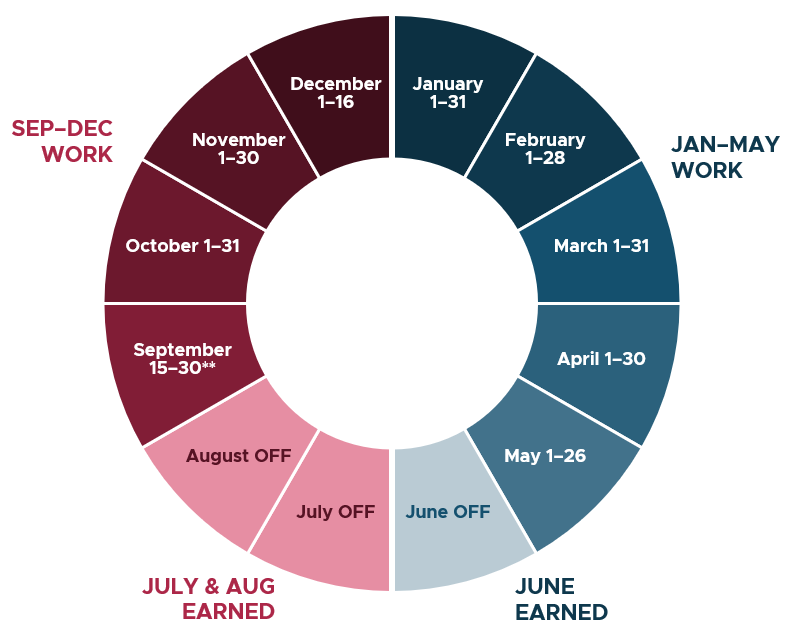
School employees have special rules for earning service credit* to account for unpaid summer and winter breaks. As we begin a new year, it is important to understand these rules to ensure school employees work the required amount of time to earn service credit for summer.
Work January 7 through May 26 — earn credit for June.
Work September 15** through December 16 — earn credit for July, August, and winter break.
*Service credit definition — Also called creditable service, service credit is the total years and months for which a PERS member earned service time during their PERS-covered career. This credit helps determine when a member can retire and how much their pension payment will be.
**September 26 start date for higher education.
Learn more
Understand service credit and leave without pay — Service credit is explained in detail in employer guide 1, Overview of PERS, section “How Members Earn Retirement Benefits,” “Service Credit” (revised 12/2025).
Rules for school employees — Employer guide 1, appendix A, “School Employee Job Class,” “Ensuring School Employees Earn a Full School Year of Service Credit” (revised 12/2025).
Information for employees — Direct school employees to the members’ School Employees webpage.
Check your service-credit total — PERS members can check their service credit on their member annual statement every spring and in their Online Member Services account. (How to Create and Use Your OMS Account (PDF))
|
|
Need help?
Contact the Employer Service Center to ask questions and get one-on-one reporting help.
|
|
|
|
|