|
 Snowshoe hares (lepus americanus), which turn white in the winter for camouflage, are named for their big feet.
|
|
|
Save the date for Oregon PERS and Oregon Treasury webinar in January
You are invited to the Invested For You webinar
Tuesday, January 20, 2026, at 12:00 p.m. Pacific
Join PERS and Oregon State Treasury for a new, interactive webinar series designed for PERS-participating employers, organization heads, leaders, and finance officers.
Hear about updates to the Public Employees Retirement System, factors that impact contributions, and the latest investment performance from:
- Elizabeth Steiner, Oregon State Treasurer.
- Kevin Olineck, PERS Director.
- Rex Kim, Oregon State Treasury Chief Investment Officer.
Each one-hour session includes a live question-and-answer session when your questions will be presented directly to the panel.
Space is limited — register now to reserve your spot!
(Click the button above or copy and paste https://events.gcc.teams.microsoft.com/event/7b31e809-b100-43dc-a47b-4615b970c66a@9123ae20-585d-446a-abd6-50dad4c7c1d5 into your browser address bar.)
Next session: On January 22, a second, general webinar session will be held for members, retirees, and anyone else interested in the investment of the PERS Fund.
|
|
|

How to find out if an employee’s PERS status has changed
At the end of each year, you need to find out how many hours your employees have worked. If an employee has worked too few or too many hours to maintain their current qualification status, you must ask the Employer Service Center (ESC) to change it.
How to check employee hours

Option 1
Run an Eligibility Report to see a list of all employees whose eligibility may have changed. Instructions are in employer guide 24, Running Reports.
Option 2
Run a Year-to-Date Wage and Contribution Summary Report to see total hours to date for an individual employee. See employer guide 24, Running Reports.
Option 3
Get notified by EDX error message when you report hours for a non-qualifying employee that puts them at or over 600 hours for the year.
Option 3 only occurs for a non-qualifying employee. You do not receive an error message for a qualifying employee not reaching 600 hours. You have to do option one or two to discover these employees.
|
|
Error message
|
S – Employee has 600 or more hours of service reported in the plan year; wage code ‘02 – Regular/Non-Qualifying’ may not be used.
|
|
How to change a position from qualifying to non-qualifying
or vice versa
Qualifying to non-qualifying service
The method for making the change depends on if it is a retroactive change or a future change.
Go to employer reporting guide 9, Reporting Wages for a Qualifying Employee, section “Qualification Status Changes.” Read the applicable subsection:
● “When Qualifying Employee Does Not Reach 600 Hours/Year.”
● “When Qualifying Position Changes to Non-Qualifying Going Forward.”
Non-qualifying to active service
The method for making the change depends on two factors: (1) if it is a retroactive change or a future change and (2) how many employers the employee has.
Go to employer reporting guide 10, Reporting Wages for a Non-Qualifying Employee, section “Changing From Non-Qualifying to Qualifying Status.” Read the applicable subsection:
● “When an Employee Reaches 600 Hours Working for One Employer.”
● “When an Employee Reaches 600 Hours Working for Multiple Employers.”
● “When a Non-Qualifying Position Changes to Qualifying Going Forward.”
Note about retroactive changes to position type: The Employer Service Center may require documentation to make employment changes to a past, closed year. Learn more in employer announcement #106, Requesting Retroactive Changes to Employment Data.
|
|
|

December reporting: How to ensure service credit for summer months
Employees need to work through December 16
Because school employees take winter and summer breaks, they have special rules for earning service credit. These rules ensure they can earn a full year of service credit even if their school closes for the summer.
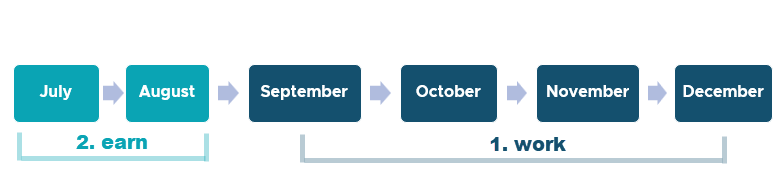
Earning service credit for July through December
To receive service credit for July through December, school employees must work (or be paid by you) from September 15** through December 16. If they terminate, retire, or take leave without pay (LWOP)* between September 15** and December 16,*** they will not receive service credit for July or August (nor the month in which they worked equal to or less than half the month).
What is service credit?
Service credit — aka creditable service or retirement credit — is one of the factors used to calculate a PERS member’s pension amount at retirement. A retirement applicant’s service credit is the total years and months for which they earned service credit during their time working for a PERS-participating employer. Learn more about service credit in next month’s Employer News.
| |
*A school employee must work more than half of each month of September, October, November, and December to earn service credit for July and August. Employer-paid leave counts as working.
**September 26 for higher education employees.
***If your school’s winter break begins before December 16, notify your ESC representative by phone or email. Your employee may still be eligible to earn service credit for December.
|
|
|
|
|
Contribution start dates (CSD) for employees hired in December
Employees who are hired into a qualifying position between December 2 and 31, 2025 — and successfully complete their six-month wait time — will all have the same contribution start date (CSD) of July 1, 2026.
TIP — While an employee is serving wait time, report wages as wage code 01 Regular Wages, Subject Salary, but do not include IAP contributions. For instructions on reporting wages during the transition from wait time to membership, read employer reporting guide 9, Reporting Wages for a Qualifying Employee, section “Reporting Wages During and After Wait Time.”
|
If hire date is
|
Contribution start date is
|
|
|
|
On December 1, 2025
|
On June 1, 2026
|
|
|
|
Between December 2 and 31, 2025
|
On July 1, 2026
|
|
Definitions
Wait time: Before becoming a PERS member, a new employee in a qualifying position must work for six months for the same employer with no break in service that is longer than 30 consecutive working days. Learn more in employer reporting guide 7, Reporting a New Employee, section “Qualifying for PERS Membership,” subsection “New, Non-PERS Member.”
Contribution start date: The day after an employee's six-month wait time is over is called their contribution start date (CSD). This marks their first day of membership; it is an important part of their PERS work history.
|
|
|

New 2026 salary limit and member redirect rates coming in January
On January 1 of each year, the PERS Board updates the salary limit and member redirect threshold amounts to reflect any percentage changes in the Consumer Price Index for All Urban Consumers, West Region (All Items).*
When we have the new numbers, we will inform you through a News Bite email and the January Employer News.
*Published by the Bureau of Labor Statistics of the United States Department of Labor.
|
|

How to report an employee death
When an employee dies before retirement, two things need to happen:
1. Their friend, family member, or personal representative informs PERS Member Services by calling 888-320-7377 (toll free) or
503-603-7766 (TTY).
2. Their employer follows the steps in employer reporting guide 15, Reporting a Termination or Death.
Doing these steps right away ensures that beneficiary benefits, if applicable, are not delayed.
|
|
Need reporting help?
The Employer Service Center is available for questions and one-on-one reporting help.
|
|
|
|
|