|
 Berries on a red elderberry shrub (sambucus racemosa).
|
|
What’s going on
30-second summary
|
|
Thank you to the first responders who fought fires across Oregon this summer. If your department got behind on reporting, the Employer Service Center (ESC) encourages you to reach out. ❖ For those in budgeting, you know the PERS system has an unfunded actuarial liability (UAL). But what does that mean, exactly? In the updated Guide to Understanding UAL, PERS offers a simplified explanation of UAL and what it is, what it is not, and how it affects employer rates. ❖ For reporters, here are two types of reports you should run every fall as part of year-end account clean-up. ❖ For those in the Salem, Oregon, area, the PERS Salem office has moved to a new building, which also houses the Oregon Savings Growth Plan (OSGP) office. ❖ Lastly, here are two tips to help you avoid delays when logging into EDX.
|
|
|
|

Thank you, first responders
In May 2025, the National Interagency Fire Center saw a significant wildland fire season ahead for the Northwest. Unfortunately, that forecast was realized.
The Employer Service Center wants to acknowledge the hard work of our nearly 500 Oregon police and fire employers this year. The bravery, determination, and diligence of your workers saved expansive areas of forestland, numerous people’s homes, and countless lives.
2025 fire season by the numbers
From January 1 through September 29:
Firefighters in Oregon fought
2,944 wildfires
that burned
340,091 Oregon acres.
Local and agency government employees, landowners, forestland operators, and community members also stepped up and contributed to fire containment.
In addition, Oregon police departments, fire departments, and medical providers worked tirelessly over a busy summer providing fire prevention, structure firefighting, medical care, citizen safety, traffic safety, and so much more.
Thank you for all you do.
PERS Employer Service Center Team
Source: ODF Wildfire News, Oregon Department of Forestry website.
|
To keep up with police and fire news:
Fire news
Oregon Wildfire Response & Recovery website
Oregon Public Radio Wildfires and Air Quality Information Hub webpage
Police news
Oregon State Police (OSP) webpage
For news, go to OSP’s News Releases webpage
To find your local police department website, search your browser for “(city or county name) police.”
|
|
|

Understanding PERS unfunded actuarial liability (UAL)
The PERS system’s unfunded actuarial liability (UAL) is an ongoing hot topic in the news. Your organization’s board has probably discussed it and asked questions like, What is it? Where does it come from? When will it go away?
UAL is an important aspect of your rate, and it is a complex one. The PERS Actuarial Activities Section has just revised and updated the Guide to Understanding UAL to help everyone understand what it is, how it happens, and why employers are responsible for paying it down.
Here is an overview of what UAL is and what it is not, summarized from the updated guide.
What is UAL?
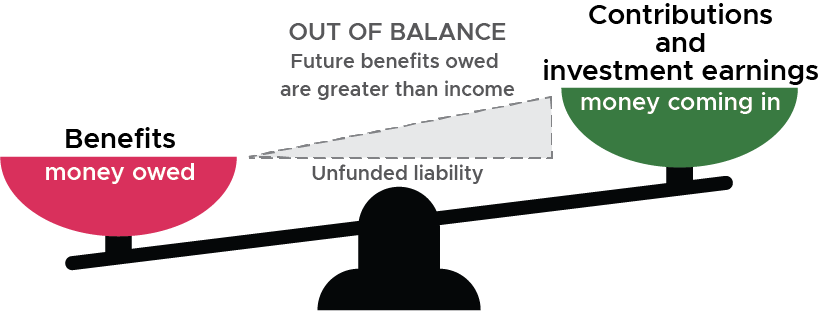
An unfunded actuarial liability (UAL) is created when the amount of money a retirement system currently has (its assets) becomes less than the assumed cost of the current and future benefits (its liabilities) that it owes to all its retirees and members.
The percentage of the current members’ and retirees’ benefits that the system can fund at this moment is how much the system is funded (aka its funded status). The percentage the system is short is considered to be unfunded (aka its unfunded actuarial liability).
PERS actuaries* do not measure the funded status so that PERS can pay all its members and retirees at once. That’s not a realistic scenario. Measuring funded status is a standard actuarial method of ensuring the health of a system over the long term.
*Actuary and other terms are defined in the Guide to Understanding UAL.
|
|
Common misconceptions about PERS UAL
PERS is in debt.
|
UAL is not the same as debt because it is not measuring funds needed now. It is an imbalance between current funds and retirement benefits that will be paid down the road.
|
The PERS Fund has lost money.
|
UAL is the difference between the money currently in the fund and coming into the fund vs the assumed cost of future benefits. UAL is not the cause of, nor necessarily the result of, poor earnings.
|
PERS is making formerly low- to average-paid workers into millionaire retirees.
|
Here are some real numbers:
-
From 1990 to 2023, the average retirement benefit for 30-year retirees was $3,778 per month.
-
The average annual retirement benefit for 2023 retirees is 45% of their final average salary (FAS). Their average service time was 27 years.
- Just 0.7% of 2023 retirees are receiving annual benefits of more than 100% of their FAS. These retirees worked an average of 38 years.
Learn more in the 2024 PERS by the Numbers report.
|
PERS retirees might not get their pensions.
|
The system is designed to be able to pay benefits without being 100% funded. Once a member is vested, they are guaranteed to receive their pension unless they withdraw membership. No one’s pension is at risk because of UAL. Any UAL that forms is immediately addressed in the next rate-setting valuation.
|
|
|

Important year-end reports
Every fall, the ESC leads employer reporters through year-end account clean-up — aka account reconciliation — to ensure you get all your records posted by year end. The two reports overviewed below are a key part of this process. Both are explained in employer reporting guide 24, Running Reports.
|
|
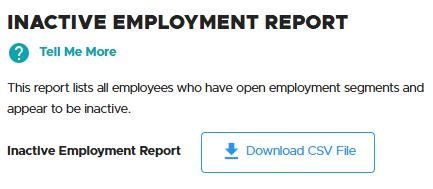
Inactive Employment report
Inactive employees are those who are no longer working and being paid but are still active in your EDX account. (This does not apply to employees on leave of absence, who should not be terminated unless they are leaving your employment.)
To find inactive employees, run an Inactive Employment Report, as explained in employer reporting guide 24, Running Reports, “Inactive Employment Report” section.
Note about working retirees
The report does not include working PERS retirees among those who have not worked for 90 days. For a list of these employees, contact your ESC representative to request a comprehensive active employees report that lists inactive retiree employees.
|
Employee Eligibility Exception report
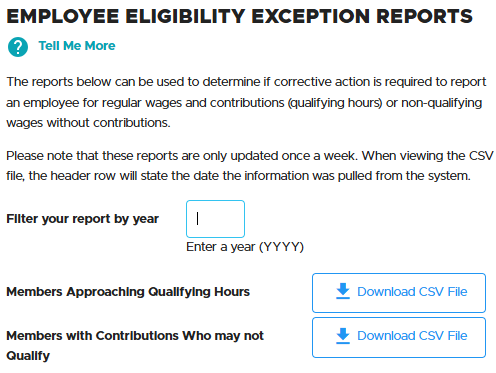
An Eligibility Exception report lists employees whose eligibility for PERS benefits may have changed because they worked more or fewer hours than expected this year. If you find an employee whose eligibility needs to change, submit a Demographic Correction Request (DCR).
The Employer Service Center held a webinar on this topic on September 24. Read the presentation slides by clicking this link Eligibility Exception Reports Webinar (PDF) or go to the Training webpage, Webinars section, to access the slides and a video of the presentation. DCR instructions are in employer guide 20, Creating a Demographic Correction Request (DCR).
|
|

PERS Salem office has moved
The PERS office in Salem has moved to the Department of State Lands building. The new address is 775 Summer Street NE, Suite 200, Salem, Oregon 97301-1280.
The Oregon Savings Growth Plan (OSGP) office is also in this building. The Salem office is only accepting OSGP walk-ins, PERS forms drop-off, and scheduled Retirement Application Assistance Sessions (RAAS). (Learn about RAAS.)
For these and other retirement needs, including pension and Individual Account Program (IAP) questions, members can also visit PERS headquarters in Tigard, call Member Services at 888-320-7377 (toll free) or 503-603-7766 (TTY), or email Member Services.
|
|

Dodge EDX login delays
Pass on the password vault for EDX
Problem
|
When you allow a password vault to automatically fill in your EDX login password, EDX may reject your password. You must then reset your password and log in all over again.
|
|
Solution
|
Do not allow your password vault to automatically enter your EDX password. Instead, enter your password manually to log into EDX.
|
|
Contact ESC for a password reset
If you do not change your EDX password before it expires, the next time you try to log in, EDX will prompt you to enter a new password.
If EDX will not allow you to change your password, contact the Employer Service Center to request a password reset.
EDX offers a feature originally designed to allow web administrators to reset employer reporter passwords. However, this function is not always successful, so ask ESC to reset your password instead.
When you request a password reset
- You will receive an email with a temporary password that is good for 30 minutes.
- Log into EDX with your user ID and temporary password.
- Once you are logged in, change the temporary password to your own unique password. Go to the Update My Profile function in the main menu and enter a new password. Click the “Password Requirements” link to view the type and number of characters required.
|
Tips for login success
- Use the Microsoft Edge browser.
- When entering the temporary password, copy and paste just the password from the email. Be careful not to include the space before nor the period after.
- Make a note of your password in a secure place or note the new password in your password vault. Remember not to allow the vault to enter your password automatically when logging in, however.
|
|
|
Need help?
Contact the Employer Service Center to ask questions and get one-on-one reporting help.
|
|
|
|
|