|
 Roosevelt elk, named for Theodore Roosevelt, live in the Blue and Wallowa mountains and in the Northern Oregon Coast Range.
|
|
What’s going on
30-second summary
|
|

Your 2024 actuarial valuation reports
|
NOTE
|
This article is an updated version of the original sent on September 8, 2025.
|
Year-end 2024 valuation reports available this December
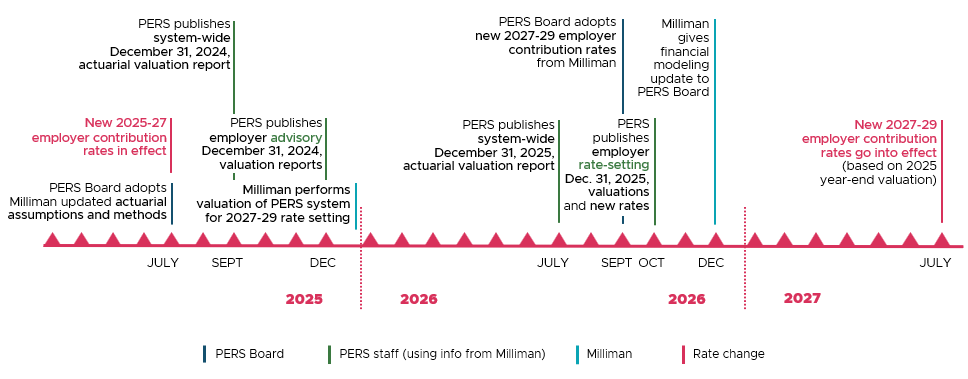
This year’s reports will be advisory. This means that they do not reflect an actual rate change. Instead, advisory valuations show what your 2027-29 rates would be if they were based on 2024 experience (i.e., actual data, not assumptions) and if all actuarial assumptions were realized in 2025. This indicates how your rates might change in 2027 — giving you time to prepare.
Rate setting is an 18-month process
Your valuation report shows data the actuary uses to build your contribution rate. New contribution rates go into effect 18 months after your rate-setting valuation is completed. As shown in the image below, advisory valuations published this December show where rates might be trending. Rate-setting valuations take place at the end of December 2025, new rates are published in October 2026, and those rates go into effect in July 2027.
To open a larger version of the image, go to the 18-Month Employer Contribution-Rate-Setting Process (PDF) chart or click the image below.
Another look into your future rates: the 2024 PERS
Experience Study
The 2024 PERS Experience Study (PDF), published by PERS actuary Milliman in late July 2025, is recommended reading for financial officers who are keeping track of future rates. The report offers insight into where rates are trending in the next biennium and up to 2042.
In the report, you can read the latest data and demographics of the PERS system, which Milliman uses to formulate the next two valuations: the advisory and the rate-setting. If the data show that Milliman’s current methods and demographic assumptions still support actual facts, the actuary will leave them unchanged. If necessary, Milliman will adjust them to reflect reality. If facts have changed but Milliman recommends staying the course, the report explains why.
Report summary
 According to the report, most of the assumptions used in the previous two valuations will continue to be used. The report reflects these four changes:
- The use of updated mortality assumptions.
- The updated assumptions use the most current mortality table as well as actual PERS mortality experience, which makes them more accurate.
- The reduction of school district contribution rates in the 2025-27 biennium caused by Senate Bill (SB) 849 (2025).
- Based on information provided by the PERS actuary, the PERS Board is planning to use the pre–SB 849 2025-27 school district rates as a base for setting school district rates for 2027-29. This means that the rate collar used for 2027-29 advisory rates will reflect the 13.95% UAL rate published before the implementation of SB 249 rather than the UAL rate of 12.27% actually charged in 2025-27 as a result of SB 849. The decision allows PERS to stay on pace to meet its funding goals.
- An increase in the assumed system-wide pension administrative expenses to cover extra work required for PERS modernization efforts.
- This increase will not affect employer rates because these efforts are not financed by the PERS Fund.
- For the 181 employers who have a side account expiring on December 31, 2027, a rate offset for those side accounts will not be included in your 2027-29 rates.
- PERS Actuarial Activities Section will work with employers to use your remaining account balance after July 1, 2027, and help you establish a new side account, if you want. Email them at actuarial.services@pers.oregon.gov
You can find another explanation of the experience study in Milliman’s Preliminary Discussion for the Upcoming Experience Study presentation (PDF) from March 2025.
State and Local Government Rate Pool (SLGRP) members
|
The pre-SLGRP offsets and charges that were calculated when the pool was formed are expiring at the end of the 2027-29 biennium. Transition liabilities and surpluses that were calculated after that (i.e., at the time the employer joined the pool) vary. Email PERS Actuarial for information about your particular situation.
|
|
|
|
Owners of expiring side accounts
|
If your organization has a side account that is expiring in December 2027 and you have questions about how this may affect your accounting, email actuarial.services@pers.oregon.gov. Also, you can learn more on the Side Accounts webpage, section “Expiration of Side Accounts in 2027.”
|
|
|
|
.

EDX online status check
versus
Employer Service Center live status check
Which one should you do?
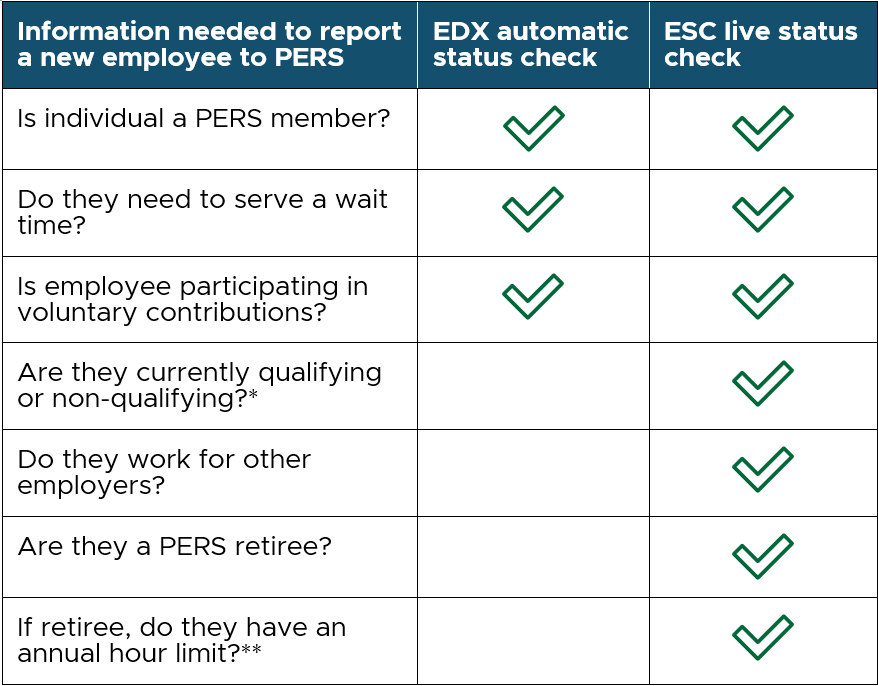
Before reporting a new employee to PERS, you need to do a status check. This check provides important information that ensures you set up your new employee correctly in EDX.
You have two options for doing a status check: an automated status check in EDX and a live status check with an ESC representative. Let’s compare the information each status check can provide.
Note: This chart is a graphic image. If you are unable to read it, view it in employer guide 24, Running Reports, section “Status Check Report.”
|
|
*Qualifying means they are a PERS member who qualifies to earn PERS benefits by working at least 600 hours a year for a PERS-participating employer. If you are hiring a qualifying employee, they have either just left a qualifying position or they work more than one job. Non-qualifying means they work fewer than 600 hours a year. |
**PERS retirees who return to work for a PERS-participating employer are allowed to work only up to a limited number of hours/year if they retired early and did not take a six-month break from working for any PERS employers. PERS disability retirees who reach their normal retirement age are allowed to work but are also limited. Those who retired at their normal retirement age and early retirees who took a six-month break have no limit. Learn more in employer guide 8, Hiring a Retiree. |
|
|
.

Leave-without-pay quick reference
In webinars and trainings, employer reporters ask great questions about leave without pay (LWOP). And for good reason — it can be complex. Keep the table below as a quick reference next time you have questions. For detailed information, refer to employer guides 11 through 13, and do not hesitate to contact the ESC for help.
|
|
What is a leave without pay?
|
A bona fide LWOP is approved by the employer. The employee must be both:
- Taking an unpaid leave for at least half the working days in a calendar month.
- Not using any paid time off (PTO, such as sick leave, vacation, or compensatory time) or receiving any pay from the employer on those days. Pay from a third party does not count.
|
What is not a leave without pay?
|
The following are not bona fide leaves without pay:
- A period when an employee has no work to do or is furloughed.
- A school employee’s winter or summer break.
- A period during which your employee is receiving any employer pay or paid time off.
- A period that is shorter than half the working days in a calendar month (i.e., 10 or fewer days).
|
Reporting leave without pay
|
Follow the steps in employer reporting guide 11, Reporting a Leave, section “How and When to Report a Leave Without Pay.”
|
Reporting pay received during LWOP
|
To report pay, such as holiday pay or a bonus, usually you stop the employee’s leave, report the pay, then restart the leave. Read employer guide 13, Family and Medical Leave, section “Reporting Pay During Family or Medical Leave,” subsection “Reporting Other Types of Pay.”
|
Reporting PTO used during LWOP
|
If employee uses any PTO on a day while they are out — as little as a half-hour — that day is not included in their LWOP. Report the pay as regular time.
|
Using donated sick leave
|
Report the use of donated sick leave just like regular time — same as if the employee were using their own sick leave. Learn more in employer guide 11, Reporting a Leave, section “Using Donated Sick Leave Hours.”
|
Taking Paid Leave Oregon leave
|
For instructions, refer to employer guide 13, section “Paid Leave Oregon,” subsection “Report a Paid Leave Oregon Leave.”
|
Receiving workers’ compensation during a leave
|
Do not report workers’ compensation payments to PERS because they come from a third party. Do submit a demographic correction request (DCR) to inform PERS that the employee is receiving workers’ comp. Learn more in guide 13, section “Reporting Pay During Family or Medical Leave,” subsection “Workers’ Compensation.”
|
If employee does not return from leave
|
Submit a termination record (or death, if applicable). The status date is their last day of employment (or date of death). The last day of service is the last day they were on the job or on paid leave, whichever is later.
|
|
|

You may want to bookmark the EDX Troubleshooting webpage. This page offers instructions for all of these account issues:
- Unlocking your account.
- Changing an expired or soon-to-expire password.
- Adding an employer number to your account.
- Changing your password.
- Changing your email address.
- Finding your Regular report due dates and changing your wage-reporting schedule, if needed.
|

The PERS Expo is only three weeks away, so please keep encouraging people to register. Remember that you do not attend all day — only the sessions you want.
Employees at any point in their career should attend to:
- Learn their PERS benefits.
- Find out how to retire.
- Get advice on maximizing their retirement savings.
- Understand facets of membership like vesting, purchasing service time, and how to qualify for retirement.
|
|
Need help?
Contact the Employer Service Center to ask questions and get one-on-one reporting help.
|
|
|
|
|