May 2026

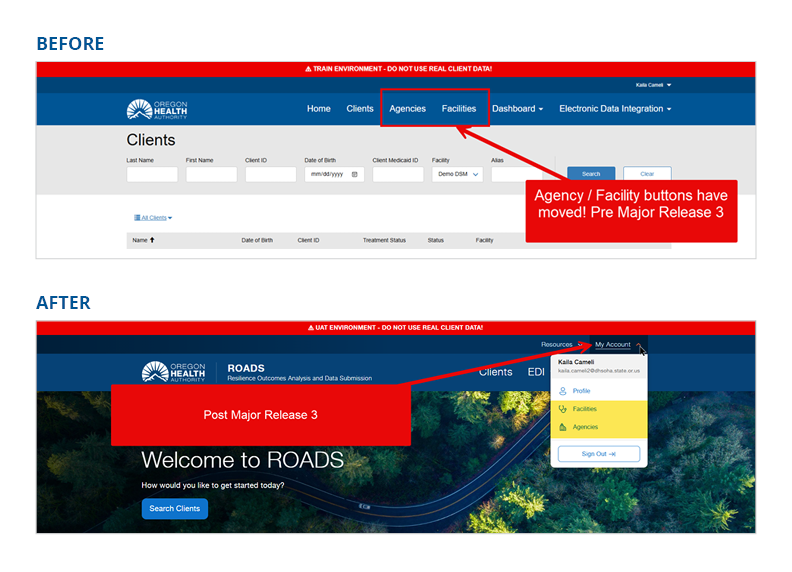
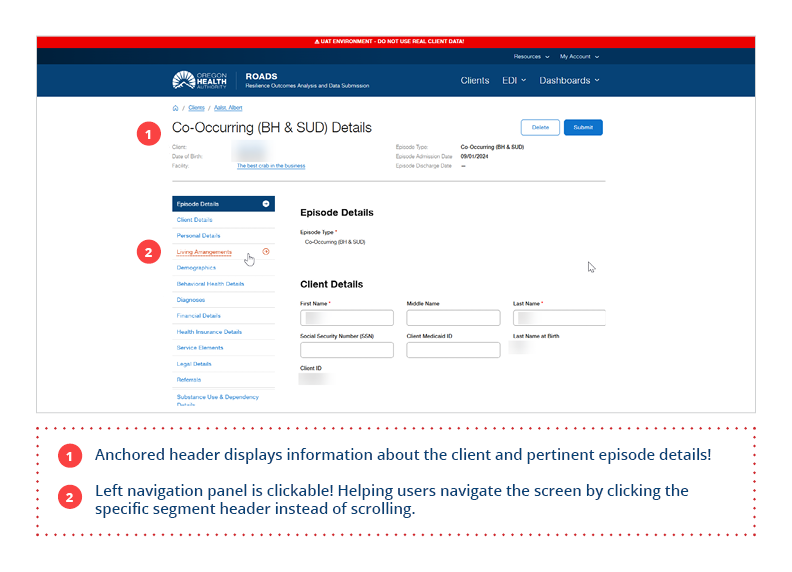
Spring is in full bloom and so is ROADS! Major Release 3 launched last month and we hope you are settling in and getting comfortable with the refreshed experience. Some items have moved to new locations, so we are including screenshots below for reference. As always, if you have any questions or run into anything unexpected, don't hesitate to reach out.
The ROADS Team
If you were directed to ROADS through the BHRN program, please note that reporting via the portal is optional until July 1, 2026.
EDI providers have until November 1, 2026 to complete EHR configuration. Once your system is ready, you are welcome to begin reporting. There is no need to wait until November.
If you will be using the portal to submit data, we'd love to have you join one of our BHRN ROADS Portal Trainings. Register for a session using the links below:
- Tuesday, June 2 | 10:00 – 12:00 PM |
- Thursday, June 11 | 1:30 – 3:30 |
- Wednesday, June17 | 10:00 – 12:00 PM |
- Thursday, June 25 | 1:30-3:30 |
- Tuesday, June 30 | 10:00 – 12:00 PM |

Updates for Our Providers Using Electronic Data Interchange (EDI)

The service elements listed below are required to be available as selectable options in V2 submissions:
- 17 – Aid & Assist
-
19 – ACTM Assertive Community Treatment Services (ACT) Medicaid
-
60 – ACTN Assertive Community Treatment Services (ACT) Non-Medicaid
- 23 – Jail Diversion
- 56 – MHBG3
- 57 – MHBG307
- 58 – MHBG308
- 59 – SUPTRS520
- 55 – BHRN
- 99 – N/A
All remaining service elements are currently under internal OHA review. Further guidance will be shared as that process continues.
As of the April 27 Major Release, the system now enforces real-time validation of a Client Medicaid ID against the Medicaid system. Default or placeholder Client Medicaid IDs will no longer be permitted.
Because this change applies systemwide, V1 and V2 users alike may see an increase in validation errors if incorrect or unverified IDs are entered.
User Request Form
The User Request Form is your go-to resource for both onboarding new staff and offboarding those who have left your agency. Promptly disabling users who are no longer with your agency is essential. It protects clients' protected health information (PHI) and ensures we maintain accurate, up-to-date records for your agency.
Facility Request Form
If you are adding a new user who has been assigned at the facility level, please be aware that we cannot process that request if the facility does not exist in ROADS. If your facility is not yet on record, please complete the Facility Request Form before submitting a User Request. You do not need to submit a new access agreement as long as your current one is on file. The Facility Request Form alone is all that is needed to ensure we have complete and accurate information for your agency and to keep PHI protected.
 Want to learn more about ROADS? Whether you're just getting started, need a refresher, or have questions about using the portal or EDI, we’ve got a webinar for you! Our learning opportunities are designed to help you feel confident and supported every step of the way.
The ROADS Monthly Checkpoint: Portal keeps Portal users informed with the latest updates, key changes, and important timelines. Have questions? Please reach out! |
|
 |
Wednesday, June 3rd | 9:00 - 10:00 AM
 |
|
Are you new to ROADS or looking for a refresher? Join our monthly Introduction to ROADS webinar for an overview of ROADS 101. This session is designed to provide essential information, best practices, and insights, and answers to your questions. |
Wednesday, June 10th | 10:00 - 11:00 AM
|
Join us for a live training session on the ROADS Portal! This session will walk you through essential functions, best practices, and common questions to ensure a smooth transition.
Important: Before attending, make sure your Multi-Factor Authentication (MFA) is set up and that you have your password ready to log in.
👉 Interested in BHRN-specific portal training? Please see the schedule at the beginning of this newsletter.
|
|
 |
Wednesday, June 24th | 10:00 AM - 12:00 PM
Please note: Our monthly Portal Trainings cover the same content, so you only need to attend one session. However, you're welcome to join any of our webinars if you'd like a refresher or have questions!
We’re excited to offer ROADS Office Hours, a dedicated time for providers to connect directly with our team. This open forum is a space to ask questions, get real-time answers, troubleshoot login or MFA access issues, and learn tips for making the most of the ROADS Portal.
Thursday, June 4th | 10:00-10:30 AM
Thursday, June 18th | 10:00-10:30 AM
We understand that your time is valuable and that waiting on hold can be inconvenient. If you need to call the Service Desk, we’ve been advised that these times typically have shorter hold times:
- Wednesday, Thursday, and Friday mornings
- Tuesday, Wednesday, Thursday, and Friday afternoons
We appreciate your patience and hope these recommended windows help you reach support more quickly.
📞OIS Service Desk: 503-945-5623
Oregon state policy requires all users to update their passwords every 60 days. You'll receive a prompt when it's time, but we recommend setting a calendar reminder, so you're never caught off guard. If you have Multi-Factor Authentication (MFA) set up, you can reset your password anytime via the:
Self Service Password Reset
Questions?
Reach out to us at ROADS@odhsoha.oregon.gov.
ROADS Quick Links
|