February 2026

February was a busy month across ROADS, and with so much in motion, our Navigator is arriving as we step into March. This edition includes a quick look back at February’s updates along with new March opportunities, including upcoming webinars and resources you can register for now.
Thank you for your continued engagement in the ROADS community. Your collaboration helps us strengthen our tools and support your work more effectively. We look forward to building on this momentum in the months ahead.
- The ROADS Team
If you have been directed to ROADS from the BHRN program, please note that reporting is optional until July 2026.
We are preparing BHRN‑specific training, guidance, and tools that will be rolled out in May and June. Please keep an eye out for these upcoming trainings and resources!

Thank you for the thoughtful work you put into learning and navigating the ROADS Portal. We have noticed some fake client names and test data appearing in the live ROADS Portal. This can cause issues when reports are generated. To help keep our data accurate, please remember:
- The live ROADS Portal is for real client information only.
- The training site is the right place for practice or test entries. You’ll see a red banner that confirms you’re in the test environment.
- Keeping each site for its proper purpose helps maintain clean and reliable data.

We understand that your time is valuable and that waiting on hold can be inconvenient. If you need to call the Service Desk, we’ve been advised that these times typically have shorter hold times:
- Wednesday, Thursday, and Friday mornings
- Tuesday, Wednesday, Thursday, and Friday afternoons
We appreciate your patience and hope these recommended windows help you reach support more quickly.
📞OIS Service Desk: 503-945-5623
 Want to learn more about ROADS? Whether you're just getting started, need a refresher, or have questions about using the portal or EDI, we’ve got a webinar for you! Our learning opportunities are designed to help you feel confident and supported every step of the way.
Wednesday, March 4th | 9:00 - 10:00 AM
|
The ROADS Monthly Checkpoint: EDI keeps EDI users informed with the latest updates, key changes, and important timelines.
Have questions? Send them in advance or ask during the webinar!
|
|
 |
Wednesday, March 11th | 10:00 - 11:00 AM
 |
|
Are you new to ROADS or looking for a refresher? Join our monthly Introduction to ROADS webinar for an overview of ROADS 101. This session is designed to provide essential information, best practices, and insights, and answers to your questions.
Have questions? Send them in advance or ask during the webinar!
|
Wednesday, March 25th | 10:00 AM - 12:00 PM
|
Join us for a live training session on the ROADS Portal! This session will walk you through essential functions, best practices, and common questions to ensure a smooth transition.
Important: Before attending, make sure your Multi-Factor Authentication (MFA) is set up and that you have your password ready to log in.
|
|
 |
Please note: Our monthly Portal Trainings cover the same content, so you only need to attend one session. However, you're welcome to join any of our webinars if you'd like a refresher or have questions!
We’re excited to offer ROADS Office Hours, a dedicated time for providers to connect directly with our team. This open forum is a space to ask questions, get real-time answers, troubleshoot login or MFA access issues, and learn tips for making the most of the ROADS Portal.
Join us on Thursday, March 12th | 10:05 – 11:00 AM.
Join us on Thursday, March 26th | 10:05-11:00 AM
New to ROADS and wondering how to get started? This quick visual guide walks you through the steps to access all things ROADS!
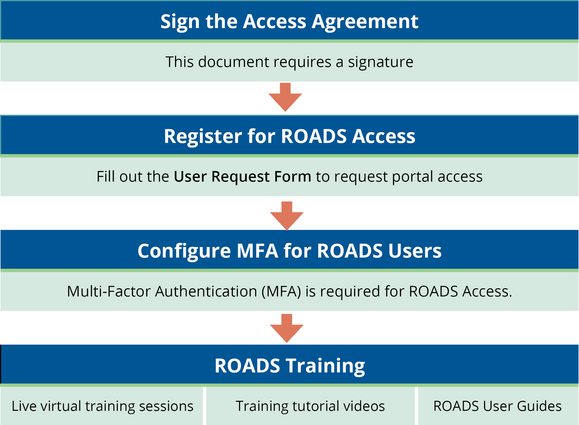
Do you or a new employee need to access to ROADS? Need to remove access to ROADS for a former employee? Click on the User Request Form below.
If you have filled out an Access Request form, here is what to expect:
Access requests typically take 8–10 business days to process. Because of increased volume from new providers entering data into the ROADS Portal, processing times may be slightly longer than usual. We will complete your request as soon as we can.
You will receive two emails once your access is ready: one from the ROADS Team with MFA instructions and another from the OIS Service Desk with your login credentials.
We truly appreciate your understanding as we work through these requests as efficiently and thoroughly as possible.
To strengthen cybersecurity across state systems, a new statewide policy now requires all user passwords to be updated every 60 days. This change is part of Oregon’s updated statewide information and cyber security standards, which aim to better protect sensitive data and reduce the risk of unauthorized access.
What This Means for You:
-
Every 60 days, you’ll be prompted to change your password.
- To avoid any disruptions, we recommend setting a recurring reminder on your calendar.
- If you’ve already set up Multi-Factor Authentication (MFA), you can easily reset your password at any time here: Self Service Password Reset
- If you haven’t completed your MFA setup yet, see below for more details.
Questions?
Reach out to us at ROADS@odhsoha.oregon.gov.
ROADS Quick Links
|