
By Vanessa Baker, Project Manager
Can you believe it? It’s been just over a year since we launched AASHTOWare Project. Now we have 18 projects in various stages of activity! We’re continuing to make progress and truly appreciate the ongoing feedback from users.
If you run into issues or have questions, don’t hesitate to reach out either through our live chat or by emailing us at awpadmin@odot.oregon.gov. If we don’t know there’s a problem, we can’t work on a solution!
What’s coming up?
By the end of this year, 18 more projects will be bid as AWP projects. That means lots of training opportunities are on the way starting in January and continuing through the end of 2026.
We’re still finalizing the date when all new projects will be AWP, but we expect that to happen sometime in 2026.
In the meantime, we’re offering multiple sessions for payroll and materials training, and we’re also working on recording additional classes. These recordings will complement our computer-based training (CBT) modules and help staff stay up to speed between live training sessions. More to come on training options for new staff.
|

Promises Come True
Inspectors, REs, AREs, CASes rejoice! If you're new to AWP and have an active contract, you'll want to join us.
We've scheduled our first specialized training for Daily Work Reports just for you.
Join us online for our DWR training event on Wednesday, Dec. 17 from 9:00 a.m. to 12 Noon. We’ll walk through the DWR process, step by step. You’ll also have time to ask specific questions about working with DWRs.
Interested? There are limited spaces available for this first training! Let us know you're coming to get on the list.
|

Technician Training
Register in Workday. (External Non-ODOT Users need a Workday account to register.) We’ll meet at the ODOT Materials Lab (800 Airport Rd., Salem) from 8:00 a.m.- 3:00 p.m. (PDT). Upcoming class dates: Jan. 20 & Feb. 17. See course details in Workday.
If your company work on or supply material to an AWP ODOT contract, plan to attend! Topics include Sample Records, Test Management, Materials Sources, Daily Source Reports, and External Labs. (For ODOT Certifications: CAgT, CAT-I, CDT, CEBT, CSTT, QCT.)
|

Certified Payroll for Primes & Subs
Our next scheduled trainings are: Jan. 15 & Feb. 12 from 9:00 a.m.-12 Noon (PDT). These trainings are online. Send us an email and let us know which class you plan to attend. Find the Teams link for this training on the AWP Website.
Have you taken the initial CPR training? Would you like to review the Payroll process again now that you are working in your AWP contract? Join us at an online payroll training anytime for review.
|
Payroll Reminders
- When entering payroll, please be sure to complete the Standard Deductions fields under the Wages section.
We’re seeing several payrolls rejected because these fields are left blank. While they aren’t currently marked as required, they do need to be filled out. We're actively working on a solution to make this clearer in the system, but in the meantime, please make sure those fields are completed to avoid delays. Thanks for helping keep things running smoothly!
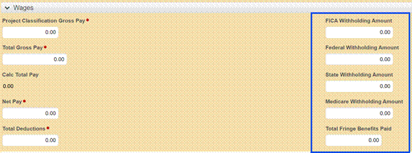
- Tool Tips in Payroll have been updated to more plain language and to better describe what to enter in the field.
- The Payroll QRG has been updated with more descriptions and an improved format.
Daily Work Reports
Sometimes you may need to add a DWR after approval to adjust costs or quantities. It is possible to create a Zero-Quantity Payment DWR! These can be created to track submittals from the Contractor when the Inspector was not a part of the original review.
The rule of thumb is that if you didn’t create a DWR, you cannot alter a DWR. But the CAS can copy a DWR! Then, remove the quantities in that posting by cross reference in comments. This is how the RE Office can create a supplemental report or a correction to a daily work report. You can also create a zero-quantity payment as a reference for tracking purposes using the item postings/comment box.
We are updating the quick reference guide (QRG) for the DWR with this information. We'll also include how to make corrective DWRs when the DWR creator is out of the office and for Document Review Reports (DRRs).
For more details, send us an email. Check our quick links on the right.
Misc. Tips
Happy Trails! We all know that people change jobs, companies and responsibilities. When that happens, you are required to let us know. If anyone on your staff no longer needs access to AWP, tell us as soon as possible!
These are the latest updated QRGs from August to October. You can find them on the AWP Training page under specific roles
NEW QRGs
Updated QRGs
 First Subcontract Update Completed!
We’ve officially worked through the steps of a subcontractor change order. Now, we’re updating the Subcontractor QRG to include the steps for this process. In the meantime, if you encounter a similar situation, please don’t hesitate to reach out to the AWP System Admins for support. We’re here to help!
Change Order Ext Report
We heard you that the Change Order Ext report was hard to read. We've addressed those issues! The changes have been made. The report now sorts by Project Line number and the columns for Quantity and Payment Unit align under each heading.
Materials Updates
- Having the Organization field added to help technicians filter only samples from their company or organization.
- Last Updated Date added to the Sample Record Overview.
- QCCS and Prime Roles can review and transition sample tests from the Sample Record Test Summary page.
- QCCS and Prime can now add remarks to the Sample Record.
- Materials with set specifications limits and sieves auto-populate those fields in the appropriate tests (Reference Specs).
- Refresh checkbox has been added to the Agency Views Tests. This allows the technician to click save and recalculate the page to bring in data that wasn't previously complete.
|