It’s Time for You to Take a Journey
in AASHTOWare Project!
Most of you have been exploring the AP Dev site with your subcommittees. If you haven’t tried it yet, the AP Dev site can be accessed here:
https://oregondot-pr-dev.infotechinc.com/Account/LogOn?ReturnURL=%2F#Dashboard
Enter your network login in the User Name field. For many, that is our hwy, ODOT, or ISB number. The password you created for the Dev site goes in the next field. Your password will expire every 90 days and needs to be updated. Has your password expired? Click the link for Update Password on the logon screen to request a password reset. Choose ODOT from the last dropdown field.
You’re in! Now it’s time to roll up your sleeves and explore the Dev site. Here are a couple of places to start your adventure.

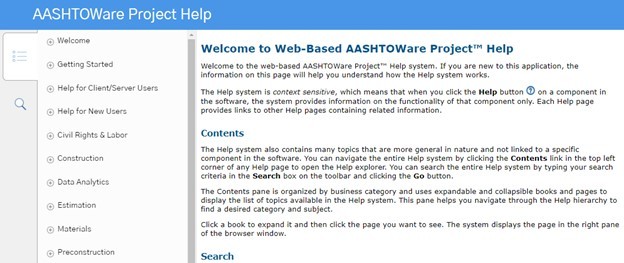
Here are a couple of places to start your adventure. First, open the web-based AASHTOWare Project™ Help system by clicking on the circled Help button in the upper right corner of your screen.
|
Once Help opens in a new window, click on the bulleted icon on the far left to see what is available for you in AP Help. Start with Welcome from the list. Try different things. In the Global Help you can review all the parts of AP, even areas you may not work with in your regular role.
Next, go back to the dashboard, choose Home and select your role. If you have more than one choice for your role, change between them to see how your screen choices change based on your role.
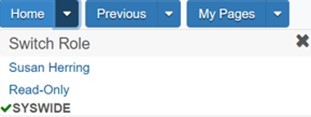
You’ll notice that the components identify areas in your role where you have access. This is similar to the Favorites button in Doc Express, eliminating the extra areas you don’t need to see to do your job. The role you chose limits what you see on the dashboard below. If you have more than one role listed under Home, try another and see how your component list changes.
There is a Help button here at the component level. When you click on the Component Help, a new window will open with specific information from that component.

Want to see the Global Help again? Use the link in the top right corner: Click here to see this page in full context. This view allows you to drill down on specific topics that relate to this component. Choose the bullet from the right side bar to find links to all of AP’s subject areas.

Discover different parts. This is the Dev site and you can search any part that’s available. If you break something, that’s great! This is the best time for us to determine where we need to make fixes. Please let us know at odoteconstruction@odot.state.or.us.
This gets you started!
Watch for future bulletins with more things to discover in AP.
Questions? Comments?
Interested in becoming an APOST team member?
Contact us and let us know.
|