|
|
The Release Notes, posted after the build, details the issues that were resolved and any change requests and additional enhancements that went into this system update.
Interim Business Processes (IBP) will retire with this build
-
Interim Business Processes (IBP) will retire with this build:
-
IBP 24-004: When VEC support staff use their Homepage to select ‘Retrieve Next Task’, they will pull the scheduling tasks in error will retire with this build. ONE will update so that upon selection of ‘Assign Next Task’ or ‘Retrieve Next Task’, the scheduling tasks will only assign to support staff associated to the same office as the case associated to the task.
-
IBP 24-009: The Liquid Resources screen is changing a known financial institution and selecting the “Financial Institution Not Available through ONE” field will retire with this build. The AVS batch will be updated to only mark the “Financial Institution Not Available through ONE” when the batch determines the bank is inactive.
-
IBP 24-011: The Long-Term Care - Notice of Disqualification (MED-061) is unable to be locally printed when there is a Trust record for the disqualification will retire with this build. ONE will be updated to correctly list all disqualifying resources, including trusts, on the MED-061 when locally printed. This known issue did not impact notices printed by the night batch.

|
|
Priority enhancements from the ECIC and staff
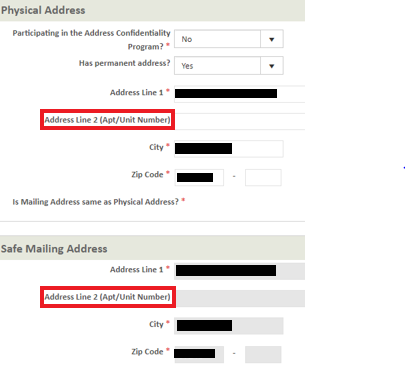
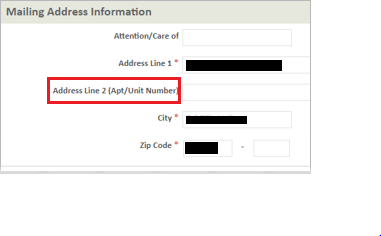
Update to ‘Address Line 2’ Field
- The ‘Address Line 2’ Fields in both Worker Portal and Applicant Portal will now display as ‘Address Line 2 (Apt/Unit Number)’ to specify that the field is intended to include any Apartment or Unit numbers
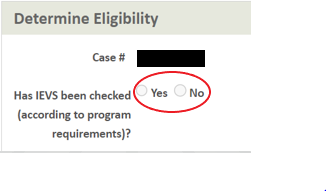
Update IEVS Display
- The IEVS question on the ‘Determine Eligibility’ screen will now display as disabled when eligibility has been run at least once on the case. Once the case is authorized and if there is another intake, renewal or added individual scenario it will be re-enabled again until eligiblity is run.
- This will reduce the number of times staff have to answer the question if there is a need to continue to update ONE and run eligibility additional times prior to authorization.
- This enhancement does not change program rules for when IEVS checks are completed, see When to Check IEVS and IEVS screens EG for additional details.
Update to SFO Work Allocation
- The Store Front Office (SFO) work allocation will allow workers to be manually moved up or down in the SFO Work Allocation screen as needed. This functionality will no longer be disabled once work allocation has been completed for the day.
- This will allow SFO eligibility staff who were previously marked as unavailable and are now available for work to be manually moved up or down in the allocation.
Clarifying Changes to SECA Questions
- The SECA questions on the Self - Employment Income Source Screen and on the Specific Income Source screens will be updated to add “self-employment’ to the text.
- Income Source Screen previously read as “Does the individual pay SECA or have clear and convincing evidence?” Will now show as:

- The FICA/SECA question on The Specific Income Source screen previously read as “Does the individual pay FICA/SECA (see Schedule SE) or have clear and convincing evidence?” Will now show as:

|
|
Additional enhancements and fixes
Change to SNAP RFI Due Date for SAVE
- Currently for SNAP the RFI due date for SAVE results of ‘Secondary Verification’ is 30 days during intake and renewal and 10 days during a Report a Change. ONE is being updated to have this RFI due date as 6 months for all case modes.
Income Allowance and Shelter Standard updates for Medical
- New income allowance standards have been updated in ONE effective 7/1/2024
- Minimum Community Spouse Income Allowance Standard: $2555.00
- Community Spouse shelter Standard for a month: $766.50
- Family Member Income Allowance for a month: $2555.00
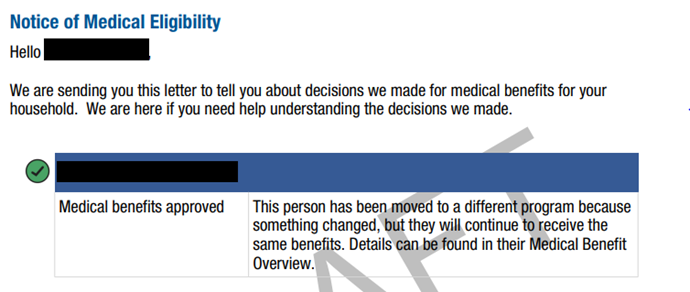
Update to Medical Notice of Eligibility (Med-005) and Medical Renewal Notice (Med-001)
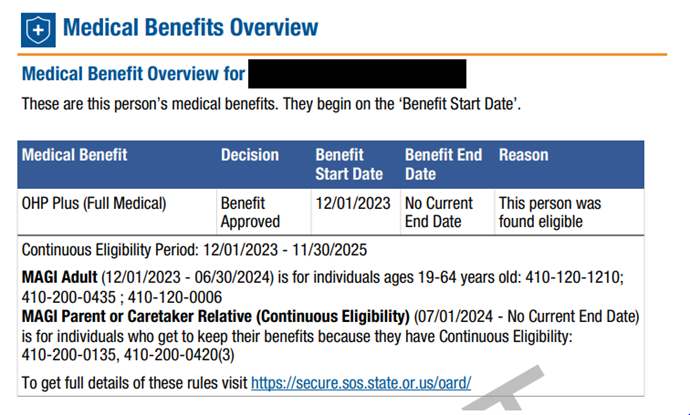
- The Medical Notice of Eligibility and the Medical Renewal Notice will no longer display the Over Income and Over Resource paragraphs in the Medical Benefit Overview section of the notice when an individual’s benefits transition from one Type of Assistance to another Type of Assistance within the same benefit. The notice will now display as:
  SNAP RFI to be Generated for Unverified Income
- Currently, when an individual is newly added to a SNAP case with an unverified income, an RFI is not being generated if the original filing group’s income was and stays over 130% FPL.
- This change will allow ONE to generate an RFI for newly added individuals with an unverified income, even if the original filing group’s income was over 130% FPL and stays over with the newly added individual’s income.
Update to Signature For Medical
- Rules in ONE are being updated for when a Signature RFI will be generated for Medical programs:
- Intake will generate a Missing Signature RFI:
- If the signature is not present
- If the signature present is prior to the program request date
- Note: A Signature RFI will not be generated if the signature date is equal to the Program Request date
- Reapply with a new Date of Request will generate a Missing Signature RFI:
- If a signature is not present.
- If the signature present is prior to the program request date of the new application.
- Note: A Signature RFI will not be generated if the signature date is equal to the Program Request date of the new application.
- Restore:
- Restore with the same date of request will generate a Signature RFI if a signature is not present on the Case.
- Application is denied. Signature is not present prior to the application getting denied.
- If the signature date is prior to the program request date.
- Note: A Signature RFI will not be generated if the signature date is equal to the Program Request date.
Update to QR Code for Mobile Application
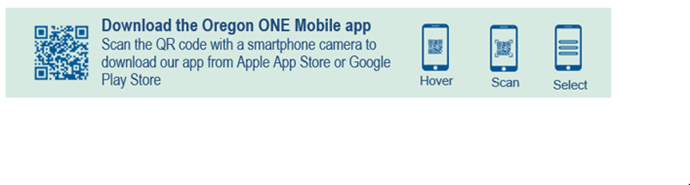
- Currently the QR Code on notices is directing users to http://benefits.oregon.gov instead of directing them to the Apple App or Google Play stores as is stated in the banner on the notices. The QR Code is being corrected to direct users to the stores instead of the benefits site.
 Updates to Worker Portal Chatbot
- The link for OPEN in Chatbot for Worker Portal is not currently working. A fix will be made so that when a user engages the Chatbot for quick accesses in OPEN and click on the link, they will be taken to the SharePoint link to OPEN
- Other Updates:
- Updates will be made to support the use of software/programs that accommodate those with visual impairment, such as JAWS
- The usages of “click here" will now direct the user to the actual location or document the link is taking the user to. For example: “For more information, click here” will now change to “For more information, click to visit benefits.gov”.
- Contact information for SHIBA Medical Choice Counseling will be added to Worker Portal Chatbot
- Additional search terms have been added to assist workers in pulling results for CSU and billing, CCO results and AVS Review

|
|
|
|