Introducing the Birth and Death Eligibility Tool
“What do I need to prove I am eligible?”
You have probably heard versions of this question many times from people requesting vital records certificates and may have even reached out to the state vital records office for answers.
The Center for Health Statistics is happy to announce the Birth and Death Eligibility Tool, a five-page quick-reference document designed to help make eligibility questions easier to answer. Officially titled Oregon Vital Records Required Proof of Eligibility: Birth and Death Certificates, the tool is organized in a simple table format by the applicant’s relationship to the person named on the record and the type of certificate being ordered.
Below is page 1 of the five-page tool.
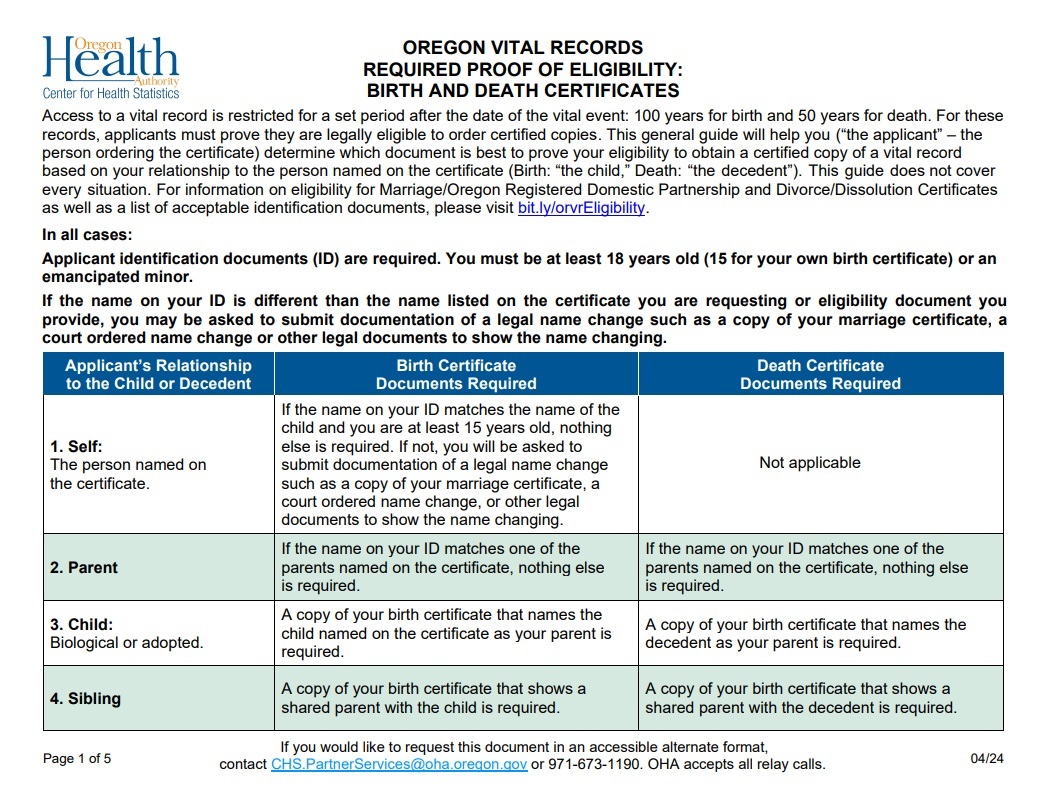 While the tool is not designed to address every possible eligibility situation, it should answer the most common questions and provide a good starting point in the ordering process. It can be printed and displayed in public areas of vital records offices, distributed as a handout, and used as a teaching and resource tool for vital records employees. To assist vital records staff with more complicated eligibility questions, a more detailed set of guidelines is being developed. We will share this with you as soon as it is available.
Click here for the Birth and Death Eligibility Tool. It can also be downloaded from our updated Eligibility web page. If you have any questions about the Birth and Death Eligibility Tool, please contact us at CHS.PartnerServices@oha.oregon.gov.
Updated OVERS Enrollment Form
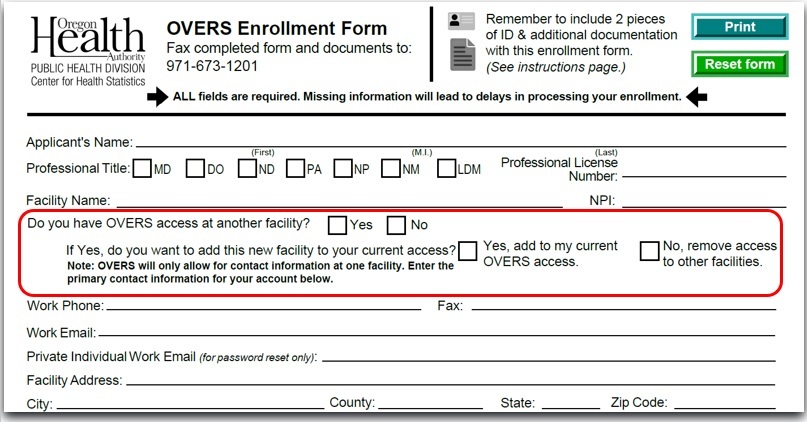
Some OVERS users work for multiple facilities and would like all of these to be linked to their existing OVERS access. The Center for Health Statistics made some updates to the OVERS Enrollment Form to accommodate those users. We also added a reminder that missing information will lead to delays in processing the form.
New questions were added asking if the user already has OVERS access at another facility. If the answer is “Yes,” then they are asked whether or not they want to add the new facility to their existing OVERS account or remove access at other facilities.
OVERS will only allow user contact information for one facility. Contact information includes phone number, work email and private work email (used to reset a password). This means that when the user completes the enrollment form, they should only include their primary contact information. The primary contact information is what will be entered into OVERS. Please be aware that the work email listed is where notifications will be sent for all facilities.
Please recycle any older versions of the form you have and start using the new form dated 02/24 which can be found on our website.
Please contact CHS.PartnerServices@oha.oregon.gov if you have any questions about the enrollment form.
Physician Assistant Title Changing to Physician Associate
House Bill 4010 was passed during the 2024 regular legislative session. Part of HB 4010 changes the term “physician assistant” to “physician associate.” This bill takes effect on June 7, 2024.
CHS is actively working to update OVERS with the new title. This may take some time to fully implement the transition from physician assistant to physician associate, however. After June 7, if you see “physician assistant” in a drop down menu in OVERS, continue to make that selection until it has been switched out for the updated title of “physician associate.”
We will provide you with any updates regarding this title change in the system as they become available.
Please contact CHS.PartnerServices@oha.oregon.gov if you have any questions about the new title of “physician associate.”
|
The State Needs Your Help to Meet Federal Requirements for Paternity Establishment
Several programs that benefit children and their parents receive federal funding based on whether Oregon meets the 90 percent goal for paternity establishment. This goal is set by the federal government. We need your help to make sure we meet this goal.
To reach this important target, facility Acknowledgments of Paternity (AOP) must be above 80 percent for births to unmarried mothers.
Birth Information Specialists and Midwives are crucial to ensuring that Oregon fulfills the paternity establishment percentage as the facility forms provide the majority of the counted records.
Responsibilities of Birth Information Specialists and Midwives in a Facility:
- Ensure parents have heard the Rights and Responsibilities located on the back of the form before completing the AOP. Parents can either read it to each other or a watch the YouTube video. (See handout that provides QR codes that link to English and Spanish videos.)
- Make sure parents have checked the form for accuracy and completeness before submitting it to the state, especially if you notice errors or missed fields.
- Make sure parents have signed and dated the form within 5 days of the child being born.
- Check the form is witnessed and dated by hospital staff for each parent signature.
- Be sure the dates the parents sign the form match the witness dates.
- Mail the forms to us immediately. Do not hold in batches. Delays in sending the forms can negatively impact the paternity percentages as well as create unnecessary steps for parents to establish paternity.
- Provide the Voluntary Acknowledgment of Paternity (45-31) facility form to parents as soon as you can (available in English and Spanish). This form must be completed before the mother leaves the facility. If the form cannot be signed at the hospital, you can provide the notary required Voluntary Acknowledgment of Paternity Affidavit (45-21) or direct the parents to the Vital Records website to download the form (available in English and Spanish). There is no fee required to process this form if it is postmarked within 14 days of birth. If the form is postmarked after that date, parents must be sure to include a $35 amendment fee.
- To make it easier for parents to submit the notary required form to CHS, our office can supply you with prepaid business return envelopes for families to mail in the Acknowledgment of Paternity Affidavit (45-21). These envelopes are the same ones that facilities use to return the facility form to CHS.
- The envelopes and the 45-21 or 45-31 forms can be ordered using the Request for Vital Records Forms and Tags.
- The facility AOP form (45-31) is also available to print from the OVERS record when the child is less than 5 days old and will print prepopulated with the child’s and mother’s information. The father will be required to write in their information if printed from the record.
Checking that the parents have reviewed the AOP form for accuracy and completeness and sending in forms promptly ensures that paternity establishment is a smooth process for facilities and parents. Please pass this information along to any labor and delivery staff that work with parents to complete the AOP.
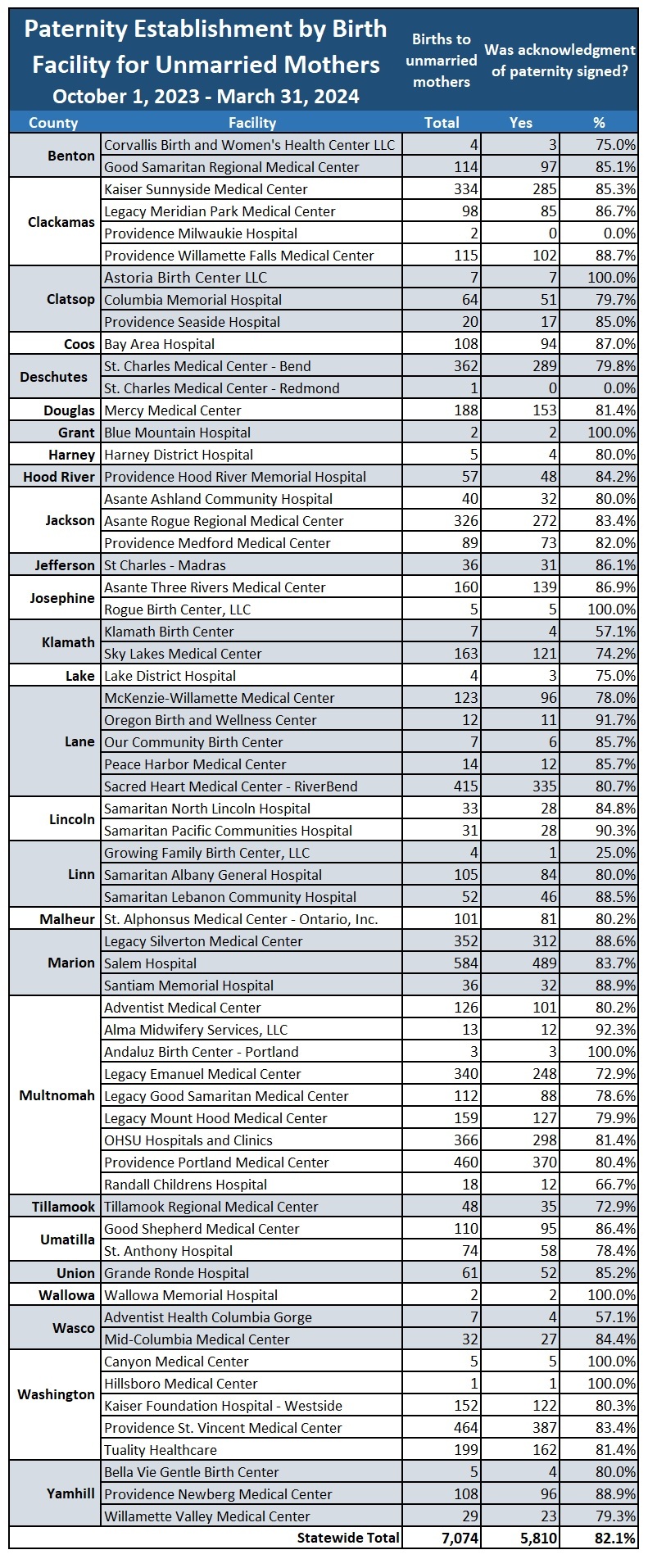
Below you will find the hospital paternity establishments for October 1, 2023, through March 31, 2024. Hospitals at 80 percent or higher - keep up the good work! Hospitals below 80 percent - every form makes a difference.
 For questions about the AOP form, contact CHS.Amendments@oha.oregon.gov.
If you would like training on AOP’s, have questions about criteria, or want tips on how to increase the number of paternities at your facility contact CHS.PartnerServices@oha.oregon.gov.
New Soft Edit Overrides for Pregnancy Questions
Having accurate pregnancy status data on the death record is important because it can help to identify causes of maternal mortality, underlying health issues and trends, as well as disparities in access to health care among different populations. To support the gathering of this crucial information, the Center for Health Statistics will be adding three new soft edit rules to the death record in OVERS.
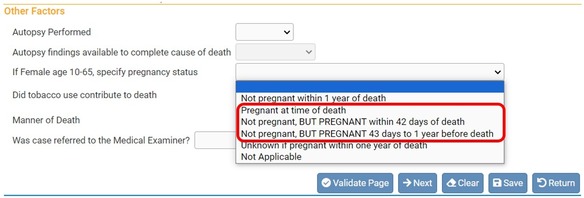
Starting May 20, 2024, medical certifiers and medical examiners will begin seeing soft edits for the pregnancy status question on the Other Factors page of the death record. Soft edits are items that are highlighted in yellow and must be overridden if the information listed is correct.
The edits will only appear for the following answers to the question If Female age 10-65, specify pregnancy status:
- Pregnant at time of death
- Not pregnant, BUT PREGNANT within 42 days of death
- Not pregnant, BUT PREGNANT 43 days to 1 year of death
After clicking Validate Page, the Other Factors page will have a yellow dot next to it and the answer to the pregnancy status question will be highlighted in yellow.
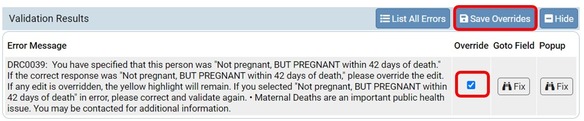
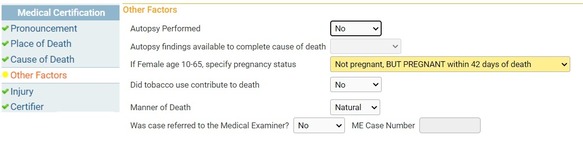 If Pregnant at time of death, Not pregnant, but pregnant within 42 days of death, or Not pregnant, but pregnant 43 days to 1 year of death is selected, you will receive an error message in the Validation Results section of the page. Confirm that the selection you made was correct. If the selection made was not correct, then choose the correct option from the dropdown menu and validate the record again. If the selection was entered correctly then you must override the error message.
To override the error place a checkmark in the Override box and then click Save Overrides.
|
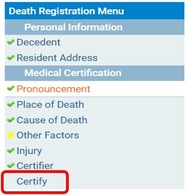
The yellow dot next to the Other Factors page will remain after overriding a soft edit. Once the error message has been overridden and any issues with the record have been addressed, click the Certify link from the Death Registration Menu and proceed with certifying the record.
|
|
 |
For questions about overriding error messages related to pregnancy status, contact CHS.Registration@oha.oregon.gov.
Overview of the Vital Records System
The Center for Health Statistics counts on every one of our many partners throughout Oregon to maintain the state vital records system. This system is large, complex, and most of us only interact with certain parts of it, so our understanding can be limited. We hope this broad, visual overview gives you a new perspective on how all these parts come together.
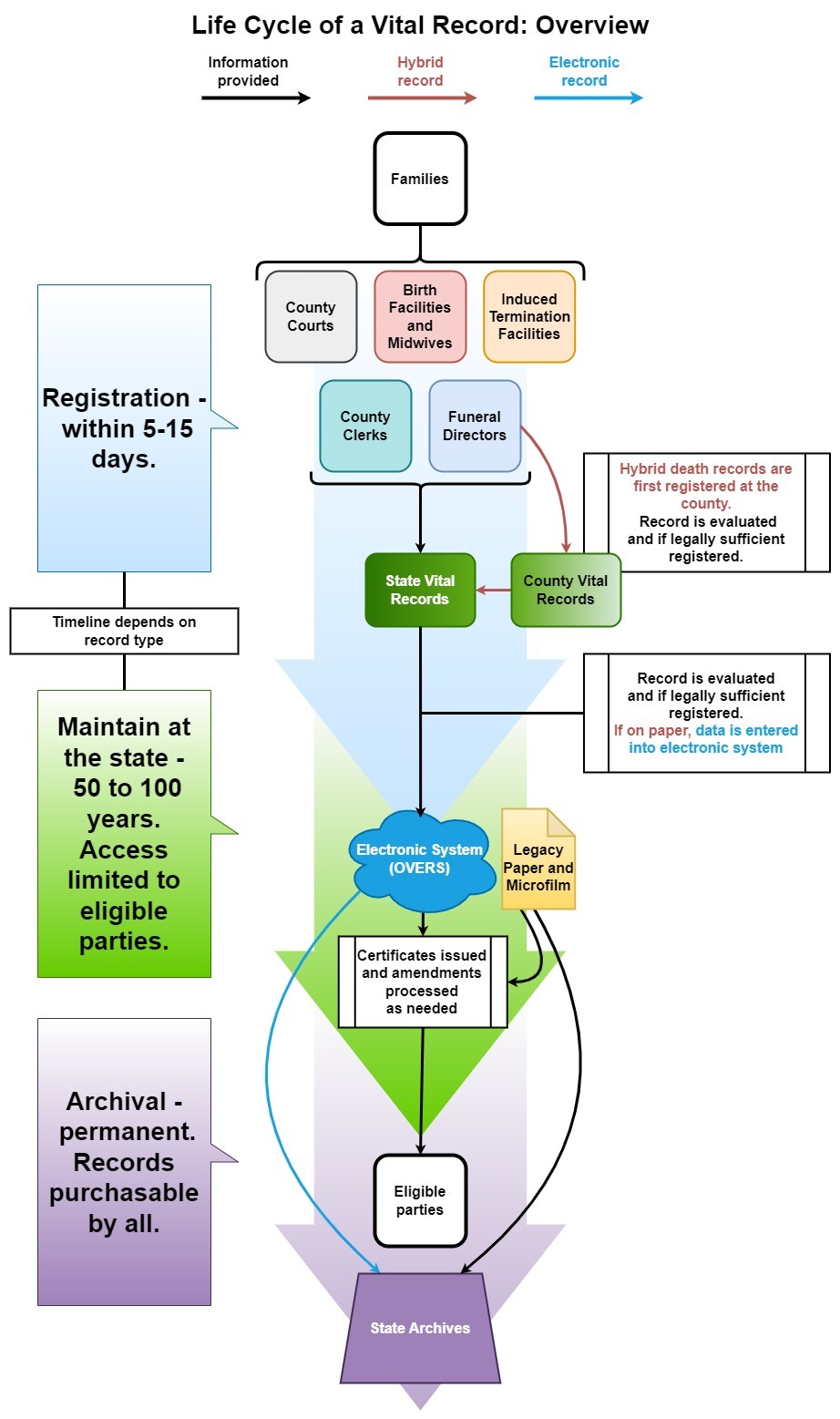
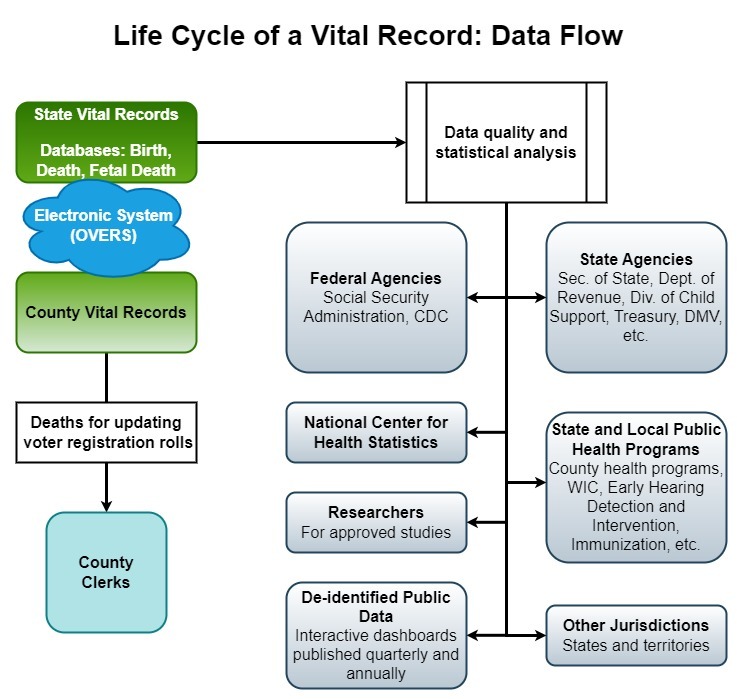
The first flow diagram shows the life cycle of a vital record, beginning as most records do with families reporting vital information to county courts, birth facilities, midwives, induced termination of pregnancy facilities, county clerks, and funeral directors. We rely on these partners to record the information and begin the registration process.
The timeline for registration of records is set by law. It is five days for birth and death events, and up to 10 to 15 days for marriage and divorce. Once registered with the state, these records remain confidential for 50 years in the case of death, marriage, and divorce and 100 years for birth. After that time period, they are moved to the state archives and become public.
 The second flow diagram shows how data moves between county vital records offices, the Center for Health Statistics, and the various partners and agencies who use the information we gather.
All of this data, also called vital statistics, are critical to assessing the health of the population. Our understanding of life expectancy, leading causes of death, the spread of epidemics of all types, and many other critical models for public health begin with this data. The state and federal agencies and programs shown in the diagram are only a sample of the many who rely on this data for their work.
Much of this information is analyzed and refined by the Center for Health Statistics and made available to the public in our interactive online dashboards.
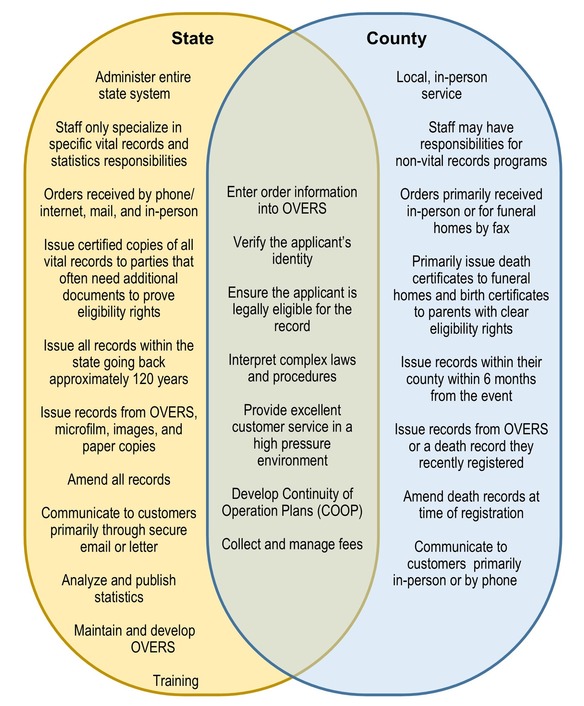
 The final chart shows the roles and responsibilities of the state and county vital records offices, illustrating how they differ and the many ways they overlap.
One critical challenge for the entire vital records system is modernization. There are still records at CHS that are on paper and microfilm, and these physical records take extra effort and time to issue when they are requested. At the county, hybrid records require much more time to certify, deliver, process, and amend. Efforts to fully digitize all our records as well as reach 100% electronic death registration are an ongoing priority.
 Despite the challenges, Oregon continues to make steady progress in the quality of our data, the timeliness of registration, and the equitability of access to records.
Again, we hope this helps you put your role in the statewide vital records system into perspective. Thank you for your invaluable assistance.
For questions about this overview of the vital records system, please contact CHS.PartnerServices@oha.oregon.gov.
The County Work Group
The County Work Group is an optional meeting for county vital records staff to learn about current vital records topics, ask questions and share ideas with each other.
County Work Group
June 25, 2:00 - 3:00 p.m. Pacific Time
Register here!
|
|
 |
|