Guidelines for Using Working Copies
A Working Copy is an uncertified draft of a vital record that is used for reviewing data entered into OVERS. It includes a watermark to indicate it is not a legal certificate and is printed on regular paper. It is NOT permitted for customers to keep a working copy.
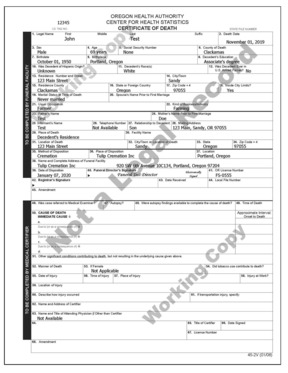
What can you do with a Working Copy of a vital record?
Do:
- Use your Working Copy to check if the information is correct prior to registration.
Do Not:
- Treat a Working Copy as a legal certificate.
- Photocopy a Working Copy.
- Allow a customer to keep a Working Copy.
Copying or releasing Working Copies creates a risk of customer misuse and fraud. Do not take that chance!
If you have any questions, email Partner Services at CHS.PartnerServices@oha.oregon.gov.
OVERS Password Reset Guide
The password reset functionality allows OVERS users to reset a password electronically after getting locked out or if they forgot their password.
Summary: Click on the Forgot your password? link under the Username field. The next screen will require your username and a Captcha security code. Continue through the prompts to receive an email with a temporary password. Once you have received the email, you can log back into OVERS and reset the password.
Instructions:
Select the Forgot your password? link under the Username field.
|
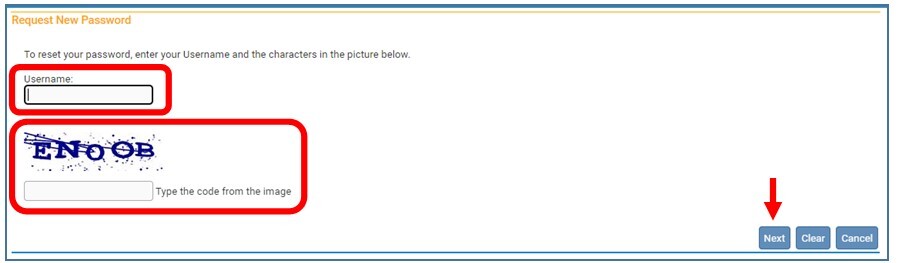
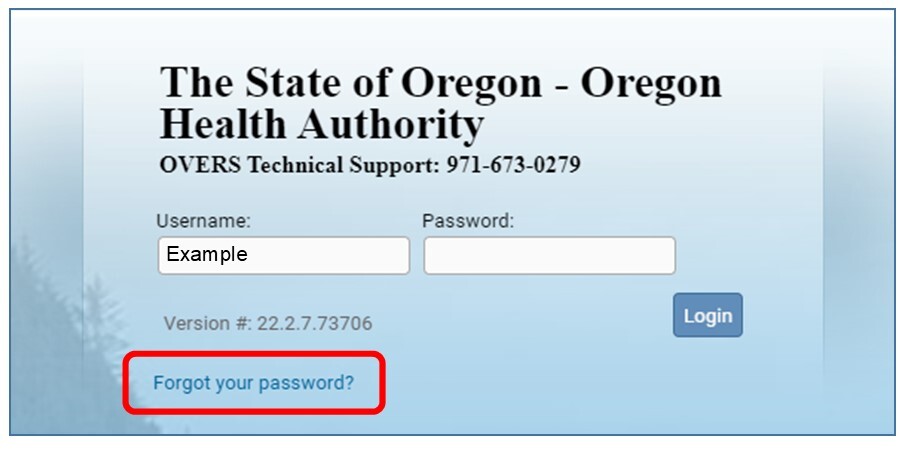 Enter your username and the Captcha security code from the image and click Next.
 Answer the security question and click Next.
If you do not know the answer to your security question, please call the OVERS Help Desk at 971-673-0279 to complete the process.
 Click Continue to receive a temporary password email.
 You will receive an email from ORVR.OHD@STATE.OR.US with your temporary password. Check your spam folder if you do not receive the email within a few minutes. You may copy the password to use when logging into OVERS.
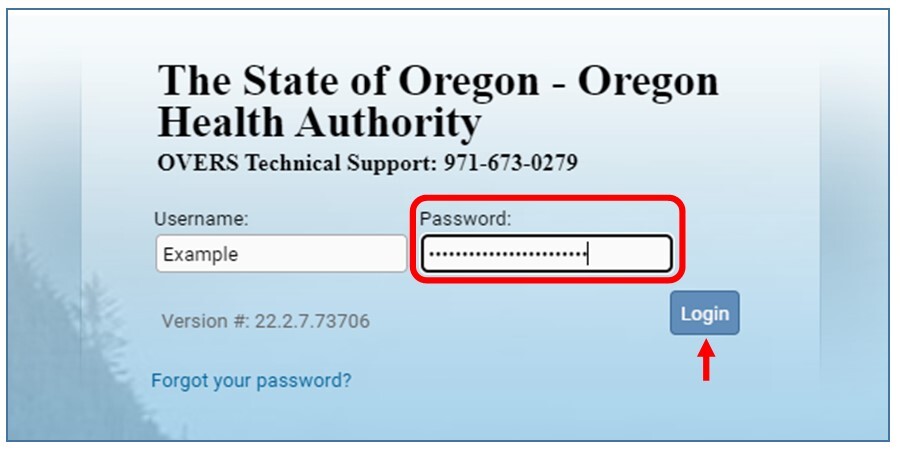
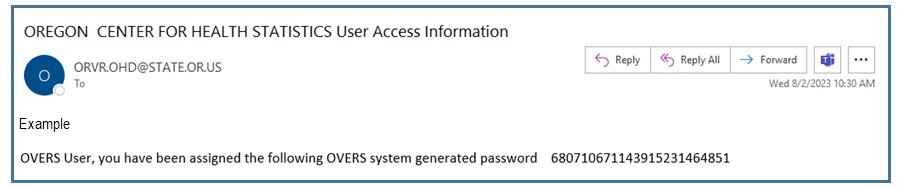 Log into OVERS with your temporary password from the email. You may paste the copied password for convenience.
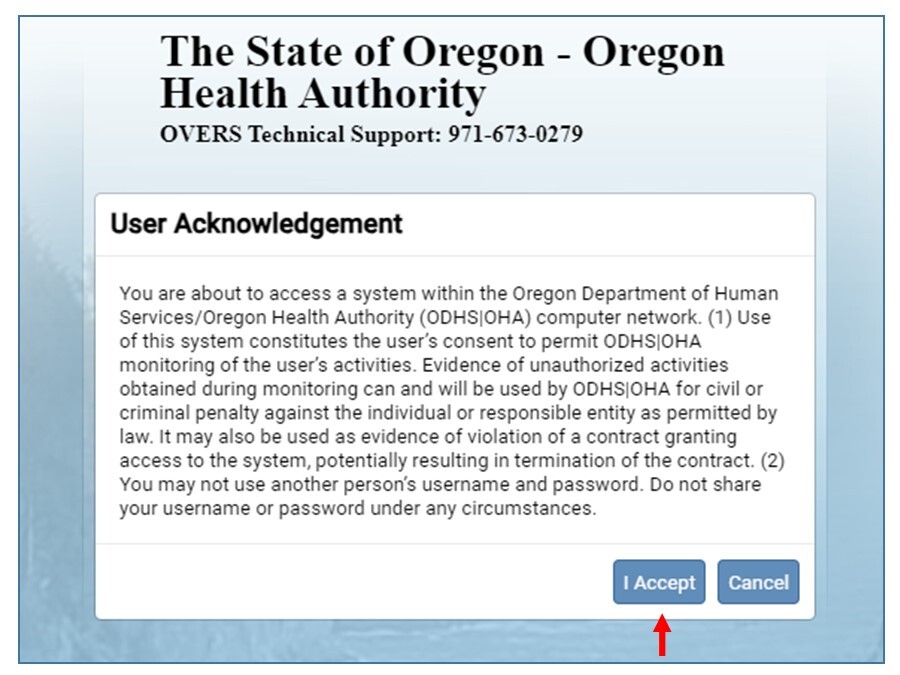
 You will be taken to the User Acknowledgement screen. Select I Accept to acknowledge that you have read and understand the acknowledgement.
This will take you into OVERS.
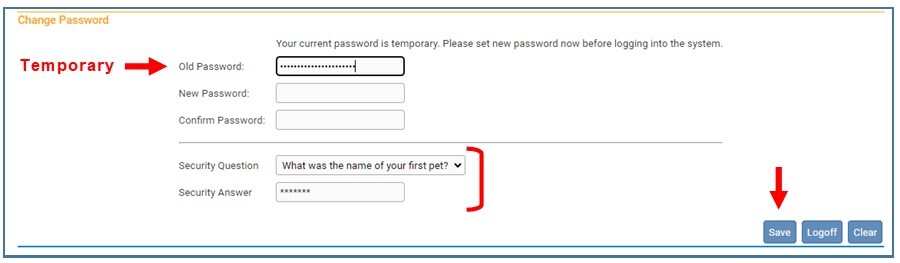
 You will be prompted to create a new password on the Change Password screen. Your “old password” will be the temporary password that was emailed to you. You can also change your security question at this time. You have a choice of four questions. Click Save.
 This resource guide is also available on our website.
If you are still unable to log in to OVERS, please contact the OVERS Help Desk at 971-673-0279.
Entering Birth Records When an Adoption or Surrogacy is Involved
Occasionally people request to be listed on the birth record at the hospital when a surrogate mother is delivering their baby or they are adopting. These requests may be urgent and are often supported by court orders. One or both people seeking to be listed as a parent may be a biological parent of the child.
Many parents feel a court order gives them the right to be put on the birth record at the hospital. This is not the case. A court order does not allow changes to the birth record by hospital staff. The fastest way to help the family is to follow the correct, lawful procedure.
What should be done in these situations?
- The person who actually gives birth must be listed as the mother on the birth certificate; it is the law. Oregon Revised Statutes 432.088 (8).
- Do not add a parent by court order to the birth record at the hospital.
- Explain to the parent or attorney that the court order should be submitted to Oregon State Vital Records to amend the birth certificate to reflect the information for the biological or legal parents.
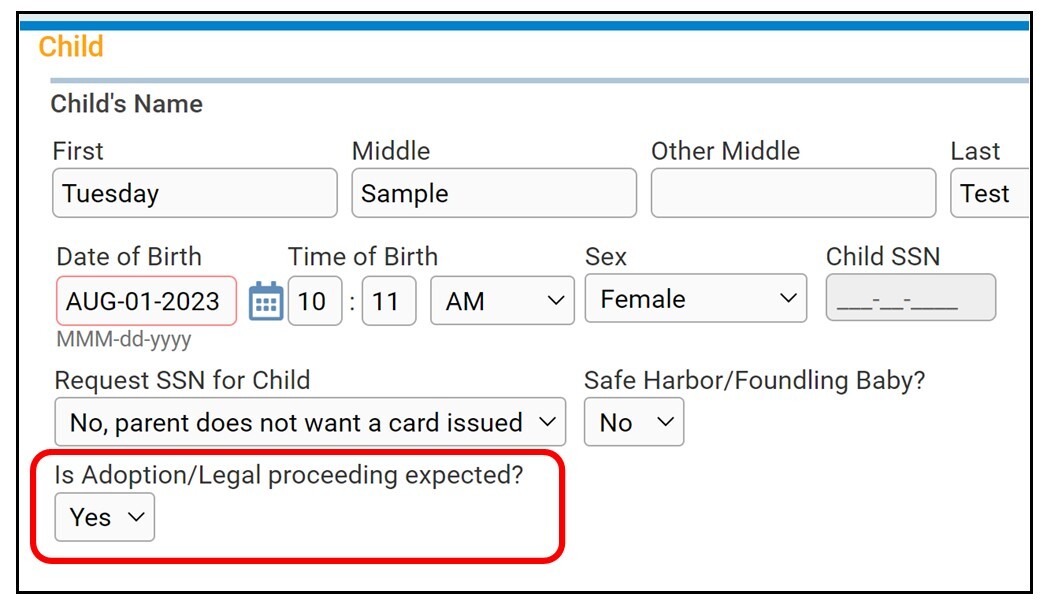
- Select “Yes” for the Is Adoption/Legal proceeding expected field on the Child page in OVERS. Only choose “Yes” if there is a court order indicating there is a surrogacy or adoption in progress. [image below]
- Direct parent questions or concerns about these procedures to our Amendments Unit at CHS.Amendments@oha.oregon.gov.
If you need additional information about how to enter a birth record when an adoption or surrogacy is involved, contact CHS.Amendments@oha.oregon.gov.
Introducing the Facility Administrator Work Group
The Center for Health Statistics is excited to announce a work group for OVERS Facility Administrators. This group will meet at 1:00 p.m. on the first Wednesday of every quarter (January, April, July and October).
We will be discussing helpful tips, training opportunities, overcoming common barriers, workflows and other topics that will help you with death records at your facility.
New Email for Ordering Death Certificates from the State
 |
|
Funeral home staff, a new email address has been created for you to use for correspondence related to your death certificate orders when ordering from the state vital records office:
CHS.FuneralHomeOrders@oha.oregon.gov
|
Use this new email for:
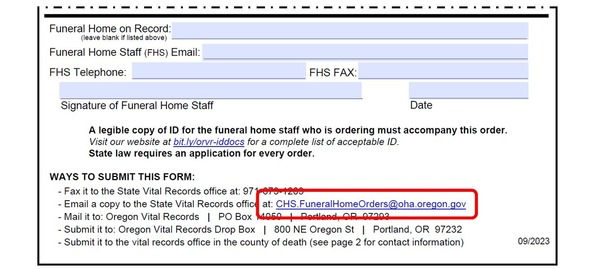
- Submitting the Funeral Home Order Form for Death Certificates via email. The form has been updated to include the new email. [see image below]
- Following up on previously submitted orders, regardless of whether the orders were submitted by fax, email, or mail.
The email is live and ready for immediate use.
If you have questions about this new email, feel free to share them with us at the new address: CHS.FuneralHomeOrders@oha.oregon.gov.
Legal Relationships
One important function of a vital record is to document legal relationships.
On a death record, the decedent’s spouse, parents, and relationship to the informant are examples of relationships that are recorded. Each has legal rights and responsibilities.
On a vital record, only legal relationships should be recorded rather than biological, emotional or familial ties. This is an important distinction for those who have been adopted. When someone is adopted, their adoptive parents become their new legal parents and their biological parents no longer have a legal relationship with them. On their death certificate, their adoptive parents should be listed as mother and father rather than their biological parents. The biological parents would not automatically be eligible to receive copies of the death certificate because, legally, they are not the decedent’s parents.
Please help families by advising them to identify legal relationships as they provide information for the death record.
If you have any questions, contact CHS.PartnerServices@oha.oregon.gov.
Cashier Close – No Longer Needed
Since 2012, county users of the Oregon Vital Events Registration System (OVERS) have been asked to regularly complete a financial reconciliation process called “Cashier Close.” In the past, completing this process in OVERS allowed financial reports to be generated and was necessary to prevent a buildup of unresolved transactions from slowing down the system.
This process is no longer required. If your county is using Cashier Close as a tool for cash drawer reconciliation or you use financial reports in OVERS, you may wish to continue to use the function. Otherwise, if you are completing this process solely to comply with our request you may stop completing this task.
Contact CHS.PartnerServices@oha.oregon.gov for questions about Cashier Close.
The County Work Group
The County Work Group is an optional meeting for county vital records staff to learn about current vital records topics, ask questions and share ideas with each other.
County Work Group
October 31, 2:00 - 3:00 p.m.
Register here!
|
|
 |
|